docker及k8s使用nvidia显卡

前置条件

https://docs.nvidia.com/datacenter/cloud-native/container-toolkit/latest/install-guide.html

需要安装 cuda toolkit,具体可以参考官网

1
apt-get install -y nvidia-container-toolkit

配置 runtime

使用 nvidia-ctk 配置, 官方推荐命令配置:

1
2
3
4
5
# docker
nvidia-ctk runtime configure --runtime=docker --config=/etc/docker/daemon.json

# containerd
nvidia-ctk runtime configure --runtime=containerd

修改的 是 /etc/docker/daemon.json 和 /etc/containerd/config.toml 文件

1
2
3
4
5
6
7
"default-runtime": "nvidia",
"runtimes": {
"nvidia": {
"args": [],
"path": "nvidia-container-runtime"
}
},

以及

1
2
3
4
5
6
7
8
9
10
11
12
13
14
15
16
17
18

[plugins."io.containerd.grpc.v1.cri".containerd.runtimes.nvidia]
privileged_without_host_devices = false
runtime_engine = ""
runtime_root = ""
runtime_type = "io.containerd.runc.v2"
[plugins."io.containerd.grpc.v1.cri".containerd.runtimes.nvidia.options]
BinaryName = "/usr/bin/nvidia-container-runtime"
CriuImagePath = ""
CriuPath = ""
CriuWorkPath = ""
IoGid = 0
IoUid = 0
NoNewKeyring = false
NoPivotRoot = false
Root = ""
ShimCgroup = ""
SystemdCgroup = true

测试 containerd 的默认 runtime_name 还是 runc, 修改为 nvidia;

1
2
[plugins."io.containerd.grpc.v1.cri".containerd]
default_runtime_name = "nvidia"

docker

未安装 nvidia-container-toolkit 时

1
2
root@debian:~# docker run --rm --gpus all nvidia/cuda:12.4.0-base-ubuntu22.04 nvidia-smi
docker: Error response from daemon: could not select device driver "" with capabilities: [[gpu]].

安装后

1
2
3
4
5
6
7
8
9
10
11
12
13
14
15
16
17
18
19
20
21

root@debian:~# docker run --rm --gpus all nvidia/cuda:12.4.0-base-ubuntu22.04 nvidia-smi
Fri Jun 14 06:38:57 2024
+-----------------------------------------------------------------------------+
| NVIDIA-SMI 525.147.05 Driver Version: 525.147.05 CUDA Version: 12.4 |
|-------------------------------+----------------------+----------------------+
| GPU Name Persistence-M| Bus-Id Disp.A | Volatile Uncorr. ECC |
| Fan Temp Perf Pwr:Usage/Cap| Memory-Usage | GPU-Util Compute M. |
| | | MIG M. |
|===============================+======================+======================|
| 0 NVIDIA GeForce ... On | 00000000:01:00.0 Off | N/A |
| N/A 45C P8 N/A / N/A | 5MiB / 4096MiB | 0% Default |
| | | N/A |
+-------------------------------+----------------------+----------------------+

+-----------------------------------------------------------------------------+
| Processes: |
| GPU GI CI PID Type Process name GPU Memory |
| ID ID Usage |
|=============================================================================|
+-----------------------------------------------------------------------------+

k8s

需要先安装 nvidia 插件

https://raw.githubusercontent.com/NVIDIA/k8s-device-plugin/v0.15.0/deployments/static/nvidia-device-plugin.yml

或者使用 https://github.com/NVIDIA/gpu-operator (可以自动安装驱动)

1
2
3
4
5
6
7
8
9
10
11
12
13
14
15
16
17
18
19
20
21
22
23
24
25
26
27
28
29
30
31
32
33
34
35
36
37
38
39
40
41
42
apiVersion: apps/v1
kind: DaemonSet
metadata:
name: nvidia-device-plugin-daemonset
namespace: kube-system
spec:
selector:
matchLabels:
name: nvidia-device-plugin-ds
updateStrategy:
type: RollingUpdate
template:
metadata:
labels:
name: nvidia-device-plugin-ds
spec:
tolerations:
- key: nvidia.com/gpu
operator: Exists
effect: NoSchedule
# Mark this pod as a critical add-on; when enabled, the critical add-on
# scheduler reserves resources for critical add-on pods so that they can
# be rescheduled after a failure.
# See https://kubernetes.io/docs/tasks/administer-cluster/guaranteed-scheduling-critical-addon-pods/
priorityClassName: "system-node-critical"
containers:
- image: nvcr.io/nvidia/k8s-device-plugin:v0.15.0
name: nvidia-device-plugin-ctr
env:
- name: FAIL_ON_INIT_ERROR
value: "false"
securityContext:
allowPrivilegeEscalation: false
capabilities:
drop: ["ALL"]
volumeMounts:
- name: device-plugin
mountPath: /var/lib/kubelet/device-plugins
volumes:
- name: device-plugin
hostPath:
path: /var/lib/kubelet/device-plugins

部署完,看日志有报错

1
2
3
4
5
6
7
8
9
10
11
12
13
14
15
16
17
18
19
20
21
22
23
24
25
26
27
28
29
30
31
32
33
34
35
36
37
38
39
40
41
42
43
44
45
46
47
#  kubectl logs -f -n kube-system nvidia-device-plugin-daemonset-fb7lc 
I0618 07:00:59.142415 1 main.go:178] Starting FS watcher.
I0618 07:00:59.142533 1 main.go:185] Starting OS watcher.
I0618 07:00:59.143158 1 main.go:200] Starting Plugins.
I0618 07:00:59.143180 1 main.go:257] Loading configuration.
I0618 07:00:59.144107 1 main.go:265] Updating config with default resource matching patterns.
I0618 07:00:59.144327 1 main.go:276]
Running with config:
{
"version": "v1",
"flags": {
"migStrategy": "none",
"failOnInitError": false,
"mpsRoot": "",
"nvidiaDriverRoot": "/",
"gdsEnabled": false,
"mofedEnabled": false,
"useNodeFeatureAPI": null,
"plugin": {
"passDeviceSpecs": false,
"deviceListStrategy": [
"envvar"
],
"deviceIDStrategy": "uuid",
"cdiAnnotationPrefix": "cdi.k8s.io/",
"nvidiaCTKPath": "/usr/bin/nvidia-ctk",
"containerDriverRoot": "/driver-root"
}
},
"resources": {
"gpus": [
{
"pattern": "*",
"name": "nvidia.com/gpu"
}
]
},
"sharing": {
"timeSlicing": {}
}
}
I0618 07:00:59.144338 1 main.go:279] Retrieving plugins.
I0618 07:00:59.145558 1 factory.go:104] Detected NVML platform: found NVML library
I0618 07:00:59.145613 1 factory.go:104] Detected non-Tegra platform: /sys/devices/soc0/family file not found
I0618 07:00:59.161587 1 server.go:216] Starting GRPC server for 'nvidia.com/gpu'
I0618 07:00:59.162167 1 server.go:147] Starting to serve 'nvidia.com/gpu' on /var/lib/kubelet/device-plugins/nvidia-gpu.sock
I0618 07:00:59.176954 1 server.go:154] Registered device plugin for 'nvidia.com/gpu' with Kubelet

我的原因是 containerd 的默认 runtime 是 runc 改成 nvidia 后重启 containerd 及插件容器

1
2
3
4
5
6
7
8
9
10
11
12
13
14
15
16
17
18
19
20
21
22
23
24
25
26
27
28
29
30
31
32
33
34
35
36
37
38
39
40
41
42
43
44
45
46
47
 kubectl logs -f -n kube-system nvidia-device-plugin-daemonset-j4jdg 
I0619 07:42:06.034169 1 main.go:178] Starting FS watcher.
I0619 07:42:06.034445 1 main.go:185] Starting OS watcher.
I0619 07:42:06.035026 1 main.go:200] Starting Plugins.
I0619 07:42:06.035133 1 main.go:257] Loading configuration.
I0619 07:42:06.039835 1 main.go:265] Updating config with default resource matching patterns.
I0619 07:42:06.040882 1 main.go:276]
Running with config:
{
"version": "v1",
"flags": {
"migStrategy": "none",
"failOnInitError": false,
"mpsRoot": "",
"nvidiaDriverRoot": "/",
"gdsEnabled": false,
"mofedEnabled": false,
"useNodeFeatureAPI": null,
"plugin": {
"passDeviceSpecs": false,
"deviceListStrategy": [
"envvar"
],
"deviceIDStrategy": "uuid",
"cdiAnnotationPrefix": "cdi.k8s.io/",
"nvidiaCTKPath": "/usr/bin/nvidia-ctk",
"containerDriverRoot": "/driver-root"
}
},
"resources": {
"gpus": [
{
"pattern": "*",
"name": "nvidia.com/gpu"
}
]
},
"sharing": {
"timeSlicing": {}
}
}
I0619 07:42:06.040926 1 main.go:279] Retrieving plugins.
I0619 07:42:06.044786 1 factory.go:104] Detected NVML platform: found NVML library
I0619 07:42:06.044882 1 factory.go:104] Detected non-Tegra platform: /sys/devices/soc0/family file not found
I0619 07:42:06.091857 1 server.go:216] Starting GRPC server for 'nvidia.com/gpu'
I0619 07:42:06.102207 1 server.go:147] Starting to serve 'nvidia.com/gpu' on /var/lib/kubelet/device-plugins/nvidia-gpu.sock
I0619 07:42:06.122055 1 server.go:154] Registered device plugin for 'nvidia.com/gpu' with Kubelet

describe node 节选

1
2
3
4
5
6
7
8
9
10
11
12
13
14
15
16
17
18
19
20
21
22
23
24
25
26
27
28
29
30
31
32
33
Allocatable:
cpu: 4
ephemeral-storage: 111498153800
hugepages-1Gi: 0
hugepages-2Mi: 0
memory: 3424344Ki
nvidia.com/gpu: 1
pods: 110
System Info:
Machine ID: 5ec87fb30f1b4ebc80cf9547a632720b
System UUID: 36444335-3830-5133-544c-705a0f19f5b0
Boot ID: c60b92f0-c8ea-4526-876a-109d4bf4fdf7
Kernel Version: 6.1.0-21-amd64
OS Image: Debian GNU/Linux 12 (bookworm)
Operating System: linux
Architecture: amd64
Container Runtime Version: containerd://1.6.23
Kubelet Version: v1.28.1
Kube-Proxy Version: v1.28.1
PodCIDR: 172.20.0.0/24
PodCIDRs: 172.20.0.0/24
Non-terminated Pods: (8 in total)
Namespace Name CPU Requests CPU Limits Memory Requests Memory Limits Age
--------- ---- ------------ ---------- --------------- ------------- ---
20h
kube-system nvidia-device-plugin-daemonset-j4jdg 0 (0%) 0 (0%) 0 (0%) 0 (0%) 41s
Allocated resources:
(Total limits may be over 100 percent, i.e., overcommitted.)
Resource Requests Limits
-------- -------- ------
cpu 475m (11%) 0 (0%)

nvidia.com/gpu 0 0

我这个机器上只有一块显卡, k8s 的 GPU 调度申请的显卡只能为整数。 可以使用 vGPU 或者 MIG 虚拟化,但需要显卡支持

测试

1
2
3
4
5
6
7
8
9
10
11
12
13
14
15
16
17
18
19
20
21
22
23
24
25
26
27
28
29
30
31
32
33
34
35
36
apiVersion: v1
kind: Pod
metadata:
name: gpu-pod
spec:
restartPolicy: Never
containers:
- name: cuda-container
image: nvcr.io/nvidia/k8s/cuda-sample:vectoradd-cuda10.2
resources:
limits:
nvidia.com/gpu: 1 # requesting 1 GPU
tolerations:
- key: nvidia.com/gpu
operator: Exists
effect: NoSchedule
root@debian:~# cat testgpu2.yaml
apiVersion: v1
kind: Pod
metadata:
name: gpu-demo-vectoradd
spec:
restartPolicy: Never
containers:
- name: vectoradd
image: nvcr.io/nvidia/k8s/cuda-sample:vectoradd-cuda10.2
command:
- bash
- -c
args:
- |
/tmp/vectorAdd
nvidia-smi -L && nvidia-smi && sleep 60
resources:
limits:
nvidia.com/gpu: 1

Running 期间,其他的 GPU 容器 Pending , 日志

1
2
3
4
5
6
7
8
9
10
11
12
13
14
15
16
17
18
19
20
21
22
23
24
25
26
27
28

kubectl logs -f gpu-demo-vectoradd
[Vector addition of 50000 elements]
Copy input data from the host memory to the CUDA device
CUDA kernel launch with 196 blocks of 256 threads
Copy output data from the CUDA device to the host memory
Test PASSED
Done
GPU 0: NVIDIA GeForce GTX 950M (UUID: GPU-8eef98eb-0dbc-be7e-99d4-5992e5ad79e0)
Wed Jun 19 07:45:41 2024
+-----------------------------------------------------------------------------+
| NVIDIA-SMI 525.147.05 Driver Version: 525.147.05 CUDA Version: 12.0 |
|-------------------------------+----------------------+----------------------+
| GPU Name Persistence-M| Bus-Id Disp.A | Volatile Uncorr. ECC |
| Fan Temp Perf Pwr:Usage/Cap| Memory-Usage | GPU-Util Compute M. |
| | | MIG M. |
|===============================+======================+======================|
| 0 NVIDIA GeForce ... On | 00000000:01:00.0 Off | N/A |
| N/A 46C P0 N/A / N/A | 3MiB / 4096MiB | 2% Default |
| | | N/A |
+-------------------------------+----------------------+----------------------+

+-----------------------------------------------------------------------------+
| Processes: |
| GPU GI CI PID Type Process name GPU Memory |
| ID ID Usage |
|=============================================================================|
+-----------------------------------------------------------------------------+

直接使用 gpu-operator

k8s 上可以直接使用 gpu-operator,自动安装 驱动,cuda 以及 plugin

驱动支持的操作系统有限,可以先去查看 https://catalog.ngc.nvidia.com/orgs/nvidia/containers/driver/tags

当前使用的 gpu-operator-v24.3.0, 最新安装的 ubuntu-server 22.04 版本

使用到的镜像,内网环境可能需要提前准备好镜像包,仅容器内有效, nvidia-driver-daemonset 容器删除重建后会重新编译 驱动。所以最好提前在服务器上安装好驱动及插件。

1
2
3
4
5
6
7
8
9
10
nvcr.io/nvidia/cloud-native/gpu-operator-validator   v24.3.0                 
nvcr.io/nvidia/cloud-native/k8s-driver-manager v0.6.8
nvcr.io/nvidia/gpu-operator v24.3.0
# nvcr.io/nvidia/k8s-device-plugin v0.15.0
nvcr.io/nvidia/k8s-device-plugin v0.15.0-ubi8
nvcr.io/nvidia/k8s/container-toolkit v1.15.0-ubuntu20.04
# nvcr.io/nvidia/k8s/cuda-sample vectoradd-cuda10.2
nvcr.io/nvidia/k8s/dcgm-exporter 3.3.5-3.4.1-ubuntu22.04
registry.k8s.io/nfd/node-feature-discovery v0.15.4
nvcr.io/nvidia/driver 550.54.15-ubuntu22.04

使用 helm 安装

1
2
3
4
5
6
helm repo add nvidia https://nvidia.github.io/gpu-operator
helm repo update

helm install --wait --generate-name \
-n gpu-operator --create-namespace \
nvidia/gpu-operator

执行完成后生成如下 pod

1
2
3
4
5
6
7
8
9
10
11
gpu-operator   gpu-feature-discovery-zd5qc                                       1/1     Running     0          69s
gpu-operator gpu-operator-1719300178-node-feature-discovery-gc-c4b5bb74pcs28 1/1 Running 0 88s
gpu-operator gpu-operator-1719300178-node-feature-discovery-master-664c5pbsj 1/1 Running 0 88s
gpu-operator gpu-operator-1719300178-node-feature-discovery-worker-q544b 1/1 Running 0 88s
gpu-operator gpu-operator-ff9fb8679-w5xqk 1/1 Running 0 88s
gpu-operator nvidia-container-toolkit-daemonset-vn9dv 1/1 Running 0 69s
gpu-operator nvidia-cuda-validator-fv8vc 0/1 Completed 0 42s
gpu-operator nvidia-dcgm-exporter-kfth8 1/1 Running 0 69s
gpu-operator nvidia-device-plugin-daemonset-bc9q9 1/1 Running 0 69s
gpu-operator nvidia-operator-validator-lfkl2 1/1 Running 0 69s
gpu-operator nvidia-driver-daemonset-ts2bf 1/1 Running 0 20s

这些 Pod 是 gpu-operator 组件的一部分,每个 Pod 执行特定的任务以确保 Kubernetes 集群能够正确地检测和使用 GPU。以下是每个 Pod 的作用:

  1. gpu-feature-discovery

    • Pod 名称gpu-feature-discovery-zd5qc
    • 作用:检测节点上的 GPU 相关特性,并将这些特性报告给 Kubernetes,以便调度器能够根据这些特性做出更智能的调度决策。
  2. node-feature-discovery

    • Pod 名称
      • gpu-operator-1719300178-node-feature-discovery-gc-c4b5bb74pcs28
      • gpu-operator-1719300178-node-feature-discovery-master-664c5pbsj
      • gpu-operator-1719300178-node-feature-discovery-worker-q544b
    • 作用:检测节点的硬件和软件特性,并将这些特性标签添加到节点上,以帮助 Kubernetes 调度器做出更好的调度决策。
  3. gpu-operator

    • Pod 名称gpu-operator-ff9fb8679-w5xqk
    • 作用:管理和部署 GPU 相关的组件和资源,包括驱动程序、工具和插件。
  4. nvidia-container-toolkit-daemonset

    • Pod 名称nvidia-container-toolkit-daemonset-vn9dv
    • 作用:提供在容器中使用 NVIDIA GPU 的支持,包含 NVIDIA Container Runtime。
  5. nvidia-cuda-validator

    • Pod 名称nvidia-cuda-validator-fv8vc
    • 作用:验证 CUDA 的安装和功能,确保 GPU 资源可以正确使用。
  6. nvidia-dcgm-exporter

    • Pod 名称nvidia-dcgm-exporter-kfth8
    • 作用:从 NVIDIA Data Center GPU Manager (DCGM) 收集 GPU 相关的监控数据,并将其导出到 Prometheus 格式。
  7. nvidia-device-plugin-daemonset

    • Pod 名称nvidia-device-plugin-daemonset-bc9q9
    • 作用:为 Kubernetes 提供 NVIDIA GPU 的插件,使得 GPU 资源可以在 Kubernetes 中使用和管理。
  8. nvidia-operator-validator

    • Pod 名称nvidia-operator-validator-lfkl2
    • 作用:验证 GPU Operator 组件的安装和功能,确保所有组件正确运行。
  9. nvidia-driver-daemonset

    • Pod 名称nvidia-driver-daemonset-ts2bf
    • 作用:在每个节点上安装和管理 NVIDIA GPU 驱动程序。

这些 Pod 协同工作,确保 GPU 资源在 Kubernetes 集群中能够被正确检测、使用和管理。

编辑 kubectl edit clusterpolicies.nvidia.com, 可以看到默认的组件

1
2
3
4
5
6
7
8
9
10
11
12
13
14
15
16
17
18
19
20
21
22
23
24
25
26
27
28
29
30
31
32
33
34
35
36
37
38
39
40
41
42
43
44
45
46
47
48
49
50
51
52
53
54
55
56
57
58
59
60
61
62
63
64
65
66
67
68
69
70
71
72
73
74
75
76
77
78
79
80
81
82
83
84
85
86
87
88
89
90
91
92
93
94
95
96
97
98
99
100
101
102
103
104
105
106
107
108
109
110
111
112
113
114
115
116
117
118
119
120
121
122
123
124
125
126
127
128
129
130
131
132
133
134
135
136
137
138
139
140
141
142
143
144
145
146
147
148
149
150
151
152
153
154
155
156
157
158
159
160
161
162
163
164
165
166
167
168
169
170
171
172
173
174
175
176
177
178
179
180
181
182
183
184
185
186
187
188
189
190
191
192
193
194
195
196
197
198
199
200
201
202
203
204
205
206
207
208
209
210
211
212
213
214
215
216
217
218
219
220
221
222
223
224
225
226
227
228
229
230
231
232
233
234
235
236
237
238
239
240
241
242
243
244
245
246
247
248
249
250
251
252
253
254
255
256
257
258
259
260
261
262
ccManager:
defaultMode: "off"
enabled: false
env: []
image: k8s-cc-manager
imagePullPolicy: IfNotPresent
repository: nvcr.io/nvidia/cloud-native
version: v0.1.1
cdi:
default: false
enabled: false
daemonsets:
labels:
app.kubernetes.io/managed-by: gpu-operator
helm.sh/chart: gpu-operator-v24.3.0
priorityClassName: system-node-critical
rollingUpdate:
maxUnavailable: "1"
tolerations:
- effect: NoSchedule
key: nvidia.com/gpu
operator: Exists
updateStrategy: RollingUpdate
dcgm:
enabled: false
hostPort: 5555
image: dcgm
imagePullPolicy: IfNotPresent
repository: nvcr.io/nvidia/cloud-native
version: 3.3.5-1-ubuntu22.04
dcgmExporter:
enabled: true
env:
- name: DCGM_EXPORTER_LISTEN
value: :9400
- name: DCGM_EXPORTER_KUBERNETES
value: "true"
- name: DCGM_EXPORTER_COLLECTORS
value: /etc/dcgm-exporter/dcp-metrics-included.csv
image: dcgm-exporter
imagePullPolicy: IfNotPresent
repository: nvcr.io/nvidia/k8s
serviceMonitor:
additionalLabels: {}
enabled: false
honorLabels: false
interval: 15s
relabelings: []
version: 3.3.5-3.4.1-ubuntu22.04
devicePlugin:
enabled: true
env:
- name: PASS_DEVICE_SPECS
value: "true"
- name: FAIL_ON_INIT_ERROR
value: "true"
- name: DEVICE_LIST_STRATEGY
value: envvar
- name: DEVICE_ID_STRATEGY
value: uuid
- name: NVIDIA_VISIBLE_DEVICES
value: all
- name: NVIDIA_DRIVER_CAPABILITIES
value: all
image: k8s-device-plugin
imagePullPolicy: IfNotPresent
repository: nvcr.io/nvidia
version: v0.15.0-ubi8
driver:
certConfig:
name: ""
enabled: true
image: driver
imagePullPolicy: IfNotPresent
kernelModuleConfig:
name: ""
licensingConfig:
configMapName: ""
nlsEnabled: true
manager:
env:
- name: ENABLE_GPU_POD_EVICTION
value: "true"
- name: ENABLE_AUTO_DRAIN
value: "false"
- name: DRAIN_USE_FORCE
value: "false"
- name: DRAIN_POD_SELECTOR_LABEL
value: ""
- name: DRAIN_TIMEOUT_SECONDS
value: 0s
- name: DRAIN_DELETE_EMPTYDIR_DATA
value: "false"
image: k8s-driver-manager
imagePullPolicy: IfNotPresent
repository: nvcr.io/nvidia/cloud-native
version: v0.6.8
rdma:
enabled: false
useHostMofed: false
repoConfig:
configMapName: ""
repository: nvcr.io/nvidia
startupProbe:
failureThreshold: 120
initialDelaySeconds: 60
periodSeconds: 10
timeoutSeconds: 60
upgradePolicy:
autoUpgrade: true
drain:
deleteEmptyDir: false
enable: false
force: false
timeoutSeconds: 300
maxParallelUpgrades: 1
maxUnavailable: 25%
podDeletion:
deleteEmptyDir: false
force: false
timeoutSeconds: 300
waitForCompletion:
timeoutSeconds: 0
useNvidiaDriverCRD: false
useOpenKernelModules: false
usePrecompiled: false
version: 550.54.15
virtualTopology:
config: ""
gdrcopy:
enabled: false
image: gdrdrv
imagePullPolicy: IfNotPresent
repository: nvcr.io/nvidia/cloud-native
version: v2.4.1
gfd:
enabled: true
env:
- name: GFD_SLEEP_INTERVAL
value: 60s
- name: GFD_FAIL_ON_INIT_ERROR
value: "true"
image: k8s-device-plugin
imagePullPolicy: IfNotPresent
repository: nvcr.io/nvidia
version: v0.15.0-ubi8
kataManager:
config:
artifactsDir: /opt/nvidia-gpu-operator/artifacts/runtimeclasses
runtimeClasses:
- artifacts:
pullSecret: ""
url: nvcr.io/nvidia/cloud-native/kata-gpu-artifacts:ubuntu22.04-535.54.03
name: kata-nvidia-gpu
nodeSelector: {}
- artifacts:
pullSecret: ""
url: nvcr.io/nvidia/cloud-native/kata-gpu-artifacts:ubuntu22.04-535.86.10-snp
name: kata-nvidia-gpu-snp
nodeSelector:
nvidia.com/cc.capable: "true"
enabled: false
image: k8s-kata-manager
imagePullPolicy: IfNotPresent
repository: nvcr.io/nvidia/cloud-native
version: v0.2.0
mig:
strategy: single
migManager:
config:
default: all-disabled
name: default-mig-parted-config
enabled: true
env:
- name: WITH_REBOOT
value: "false"
gpuClientsConfig:
name: ""
image: k8s-mig-manager
imagePullPolicy: IfNotPresent
repository: nvcr.io/nvidia/cloud-native
version: v0.7.0-ubuntu20.04
nodeStatusExporter:
enabled: false
image: gpu-operator-validator
imagePullPolicy: IfNotPresent
repository: nvcr.io/nvidia/cloud-native
version: v24.3.0
operator:
defaultRuntime: docker
initContainer:
image: cuda
imagePullPolicy: IfNotPresent
repository: nvcr.io/nvidia
version: 12.4.1-base-ubi8
runtimeClass: nvidia
psa:
enabled: false
sandboxDevicePlugin:
enabled: true
image: kubevirt-gpu-device-plugin
imagePullPolicy: IfNotPresent
repository: nvcr.io/nvidia
version: v1.2.7
sandboxWorkloads:
defaultWorkload: container
enabled: false
toolkit:
enabled: true
image: container-toolkit
imagePullPolicy: IfNotPresent
installDir: /usr/local/nvidia
repository: nvcr.io/nvidia/k8s
version: v1.15.0-ubuntu20.04
validator:
image: gpu-operator-validator
imagePullPolicy: IfNotPresent
plugin:
env:
- name: WITH_WORKLOAD
value: "false"
repository: nvcr.io/nvidia/cloud-native
version: v24.3.0
vfioManager:
driverManager:
env:
- name: ENABLE_GPU_POD_EVICTION
value: "false"
- name: ENABLE_AUTO_DRAIN
value: "false"
image: k8s-driver-manager
imagePullPolicy: IfNotPresent
repository: nvcr.io/nvidia/cloud-native
version: v0.6.8
enabled: true
image: cuda
imagePullPolicy: IfNotPresent
repository: nvcr.io/nvidia
version: 12.4.1-base-ubi8
vgpuDeviceManager:
config:
default: default
name: ""
enabled: true
image: vgpu-device-manager
imagePullPolicy: IfNotPresent
repository: nvcr.io/nvidia/cloud-native
version: v0.2.6
vgpuManager:
driverManager:
env:
- name: ENABLE_GPU_POD_EVICTION
value: "false"
- name: ENABLE_AUTO_DRAIN
value: "false"
image: k8s-driver-manager
imagePullPolicy: IfNotPresent
repository: nvcr.io/nvidia/cloud-native
version: v0.6.8
enabled: false
image: vgpu-manager
imagePullPolicy: IfNotPresent

查看 node 信息

1
2
3
4
5
6
7
8
9
10
11
12
13
14
15
16
17
18
19
20
21
22
23
24
25
26
27
28
29
30
31
32
33
34
35
36
37
38
39
40
41
42
43
44
45
46
47
48
49
50
51
52
53
54
55
56
57
58
59
60
61
62
63
64
65
66
67
68
69
70
71
72
73
74
75
76
77
78
79
80
81
82
83
84
85
86
87
88
89
90
91
92
93
94
95
96
97
98
99
100
kubectl describe node
Name: 192.168.2.149
Roles: master
Labels: beta.kubernetes.io/arch=amd64
beta.kubernetes.io/os=linux
feature.node.kubernetes.io/cpu-cpuid.ADX=true
feature.node.kubernetes.io/cpu-cpuid.AESNI=true
feature.node.kubernetes.io/cpu-cpuid.AVX=true
feature.node.kubernetes.io/cpu-cpuid.AVX2=true
feature.node.kubernetes.io/cpu-cpuid.CMPXCHG8=true
feature.node.kubernetes.io/cpu-cpuid.FLUSH_L1D=true
feature.node.kubernetes.io/cpu-cpuid.FMA3=true
feature.node.kubernetes.io/cpu-cpuid.FXSR=true
feature.node.kubernetes.io/cpu-cpuid.FXSROPT=true
feature.node.kubernetes.io/cpu-cpuid.IA32_ARCH_CAP=true
feature.node.kubernetes.io/cpu-cpuid.IBPB=true
feature.node.kubernetes.io/cpu-cpuid.LAHF=true
feature.node.kubernetes.io/cpu-cpuid.MD_CLEAR=true
feature.node.kubernetes.io/cpu-cpuid.MOVBE=true
feature.node.kubernetes.io/cpu-cpuid.MPX=true
feature.node.kubernetes.io/cpu-cpuid.OSXSAVE=true
feature.node.kubernetes.io/cpu-cpuid.RTM_ALWAYS_ABORT=true
feature.node.kubernetes.io/cpu-cpuid.SPEC_CTRL_SSBD=true
feature.node.kubernetes.io/cpu-cpuid.SRBDS_CTRL=true
feature.node.kubernetes.io/cpu-cpuid.STIBP=true
feature.node.kubernetes.io/cpu-cpuid.SYSCALL=true
feature.node.kubernetes.io/cpu-cpuid.SYSEE=true
feature.node.kubernetes.io/cpu-cpuid.VMX=true
feature.node.kubernetes.io/cpu-cpuid.X87=true
feature.node.kubernetes.io/cpu-cpuid.XGETBV1=true
feature.node.kubernetes.io/cpu-cpuid.XSAVE=true
feature.node.kubernetes.io/cpu-cpuid.XSAVEC=true
feature.node.kubernetes.io/cpu-cpuid.XSAVEOPT=true
feature.node.kubernetes.io/cpu-cpuid.XSAVES=true
feature.node.kubernetes.io/cpu-cstate.enabled=true
feature.node.kubernetes.io/cpu-hardware_multithreading=false
feature.node.kubernetes.io/cpu-model.family=6
feature.node.kubernetes.io/cpu-model.id=94
feature.node.kubernetes.io/cpu-model.vendor_id=Intel
feature.node.kubernetes.io/cpu-pstate.scaling_governor=powersave
feature.node.kubernetes.io/cpu-pstate.status=active
feature.node.kubernetes.io/cpu-pstate.turbo=true
feature.node.kubernetes.io/cpu-security.sgx.enabled=true
feature.node.kubernetes.io/kernel-config.NO_HZ_FULL=true
feature.node.kubernetes.io/kernel-version.full=6.1.0-21-amd64
feature.node.kubernetes.io/kernel-version.major=6
feature.node.kubernetes.io/kernel-version.minor=1
feature.node.kubernetes.io/kernel-version.revision=0
feature.node.kubernetes.io/pci-10de.present=true
feature.node.kubernetes.io/pci-10ec.present=true
feature.node.kubernetes.io/pci-8086.present=true
feature.node.kubernetes.io/storage-nonrotationaldisk=true
feature.node.kubernetes.io/system-os_release.ID=debian
feature.node.kubernetes.io/system-os_release.VERSION_ID=12
feature.node.kubernetes.io/system-os_release.VERSION_ID.major=12
feature.node.kubernetes.io/usb-ef_05c8_0379.present=true
kubernetes.io/arch=amd64
kubernetes.io/hostname=192.168.2.149
kubernetes.io/os=linux
kubernetes.io/role=master
nvidia.com/cuda.driver-version.full=525.147.05
nvidia.com/cuda.driver-version.major=525
nvidia.com/cuda.driver-version.minor=147
nvidia.com/cuda.driver-version.revision=05
nvidia.com/cuda.driver.major=525
nvidia.com/cuda.driver.minor=147
nvidia.com/cuda.driver.rev=05
nvidia.com/cuda.runtime-version.full=12.0
nvidia.com/cuda.runtime-version.major=12
nvidia.com/cuda.runtime-version.minor=0
nvidia.com/cuda.runtime.major=12
nvidia.com/cuda.runtime.minor=0
nvidia.com/gfd.timestamp=1719300236
nvidia.com/gpu-driver-upgrade-state=upgrade-done
nvidia.com/gpu.compute.major=5
nvidia.com/gpu.compute.minor=0
nvidia.com/gpu.count=1
nvidia.com/gpu.deploy.container-toolkit=true
nvidia.com/gpu.deploy.dcgm=true
nvidia.com/gpu.deploy.dcgm-exporter=true
nvidia.com/gpu.deploy.device-plugin=true
nvidia.com/gpu.deploy.driver=pre-installed
nvidia.com/gpu.deploy.gpu-feature-discovery=true
nvidia.com/gpu.deploy.node-status-exporter=true
nvidia.com/gpu.deploy.operator-validator=true
nvidia.com/gpu.family=maxwell
nvidia.com/gpu.machine=HP-Pavilion-Gaming-Notebook
nvidia.com/gpu.memory=4096
nvidia.com/gpu.present=true
nvidia.com/gpu.product=NVIDIA-GeForce-GTX-950M
nvidia.com/gpu.replicas=1
nvidia.com/gpu.sharing-strategy=none
nvidia.com/mig.capable=false
nvidia.com/mig.strategy=single
nvidia.com/mps.capable=false
Annotations: nfd.node.kubernetes.io/feature-labels:
cpu-cpuid.ADX,cpu-cpuid.AESNI,cpu-cpuid.AVX,cpu-cpuid.AVX2,cpu-cpuid.CMPXCHG8,cpu-cpuid.FLUSH_L1D,cpu-cpuid.FMA3,cpu-cpuid.FXSR,cpu-cpuid....
node.alpha.kubernetes.io/ttl: 0
nvidia.com/gpu-driver-upgrade-enabled: true
volumes.kubernetes.io/controller-managed-attach-detach: true

验证

1
2
3
4
5
6
7
8
9
10
11
12
13
14
15
16
17
18
19
20
21
22
23
24
25
26
27
28
29
30
31
32
root@test-ThinkPad-L14-Gen-2:~# kubectl logs -f -n gpu-operator  nvidia-operator-validator-lh5n2 -c toolkit-validation
time="2024-06-26T16:00:53Z" level=info msg="version: 0fe1e8db, commit: 0fe1e8d"
Wed Jun 26 16:00:53 2024
+-----------------------------------------------------------------------------------------+
| NVIDIA-SMI 550.54.15 Driver Version: 550.54.15 CUDA Version: 12.4 |
|-----------------------------------------+------------------------+----------------------+
| GPU Name Persistence-M | Bus-Id Disp.A | Volatile Uncorr. ECC |
| Fan Temp Perf Pwr:Usage/Cap | Memory-Usage | GPU-Util Compute M. |
| | | MIG M. |
|=========================================+========================+======================|
| 0 NVIDIA GeForce MX450 On | 00000000:01:00.0 Off | N/A |
| N/A 47C P8 N/A / 10W | 0MiB / 2048MiB | 0% Default |
| | | N/A |
+-----------------------------------------+------------------------+----------------------+

+-----------------------------------------------------------------------------------------+
| Processes: |
| GPU GI CI PID Type Process name GPU Memory |
| ID ID Usage |
|=========================================================================================|
| No running processes found |
+-----------------------------------------------------------------------------------------+
root@test-ThinkPad-L14-Gen-2:~# kubectl logs -f -n gpu-operator nvidia-operator-validator-lh5n2 -c cuda-validation
time="2024-06-26T16:00:55Z" level=info msg="version: 0fe1e8db, commit: 0fe1e8d"
time="2024-06-26T16:00:55Z" level=info msg="pod nvidia-cuda-validator-zpxn7 is curently in Pending phase"
time="2024-06-26T16:01:00Z" level=info msg="pod nvidia-cuda-validator-zpxn7 is curently in Running phase"
time="2024-06-26T16:01:05Z" level=info msg="pod nvidia-cuda-validator-zpxn7 have run successfully"
root@test-ThinkPad-L14-Gen-2:~# kubectl logs -f -n gpu-operator nvidia-operator-validator-lh5n2 -c plugin-validation
time="2024-06-26T16:01:07Z" level=info msg="version: 0fe1e8db, commit: 0fe1e8d"
root@test-ThinkPad-L14-Gen-2:~# kubectl logs -f -n gpu-operator nvidia-operator-validator-lh5n2
Defaulted container "nvidia-operator-validator" out of: nvidia-operator-validator, driver-validation (init), toolkit-validation (init), cuda-validation (init), plugin-validation (init)
all validations are successful

同样执行上面的两个 pod

1
2
3
4
5
6
7
8
9
10
11
12
13
14
15
16
17
18
19
20
21
22
23
24
25
26
27
28
29
30
31
32
33
34
35
 kubectl logs  gpu-pod
[Vector addition of 50000 elements]
Copy input data from the host memory to the CUDA device
CUDA kernel launch with 196 blocks of 256 threads
Copy output data from the CUDA device to the host memory
Test PASSED
Done
root@test-ThinkPad-L14-Gen-2:~# kubectl logs gpu-demo-vectoradd
[Vector addition of 50000 elements]
Copy input data from the host memory to the CUDA device
CUDA kernel launch with 196 blocks of 256 threads
Copy output data from the CUDA device to the host memory
Test PASSED
Done
GPU 0: NVIDIA GeForce MX450 (UUID: GPU-093c5145-c074-80d1-86ed-6433c461682d)
Wed Jun 26 15:49:07 2024
+-----------------------------------------------------------------------------------------+
| NVIDIA-SMI 550.54.15 Driver Version: 550.54.15 CUDA Version: 12.4 |
|-----------------------------------------+------------------------+----------------------+
| GPU Name Persistence-M | Bus-Id Disp.A | Volatile Uncorr. ECC |
| Fan Temp Perf Pwr:Usage/Cap | Memory-Usage | GPU-Util Compute M. |
| | | MIG M. |
|=========================================+========================+======================|
| 0 NVIDIA GeForce MX450 On | 00000000:01:00.0 Off | N/A |
| N/A 44C P0 N/A / 10W | 0MiB / 2048MiB | 0% Default |
| | | N/A |
+-----------------------------------------+------------------------+----------------------+

+-----------------------------------------------------------------------------------------+
| Processes: |
| GPU GI CI PID Type Process name GPU Memory |
| ID ID Usage |
|=========================================================================================|
| No running processes found |
+-----------------------------------------------------------------------------------------+

遇到的问题

gcc 版本不对应,安装失败

1
2
3
4
5
warning: the compiler differs from the one used to build the kernel
The kernel was built by: x86_64-linux-gnu-gcc-12 (Ubuntu 12.3.0-1ubuntu1~22.04) 12.3.0
You are using: cc (Ubuntu 11.4.0-1ubuntu1~22.04) 11.4.0
cc: error: unrecognized command-line option '-ftrivial-auto-var-init=zero'
make[3]: *** [scripts/Makefile.build:251: /usr/src/nvidia-550.54.15/kernel/nvidia/nv.o] Error 1

解决方法

1
2
3
4
5
6
7
8
FROM nvcr.io/nvidia/driver:550.54.15-ubuntu22.04
RUN apt-get update && \
apt-get install -y --no-install-recommends gcc-12 g++-12 && \
update-alternatives --install /usr/bin/gcc gcc /usr/bin/gcc-12 12 && \
update-alternatives --install /usr/bin/g++ g++ /usr/bin/g++-12 12 && \
rm -rf /var/lib/apt/lists/*

ENTRYPOINT ["nvidia-driver", "init"]

重新构建镜像

1
2
3
docker build -t mydriver .
docker save -o mydriver.tar mydriver
ctr -i k8s.io images import mydriver.tar

修改 daemonset 使用 mydriver 镜像

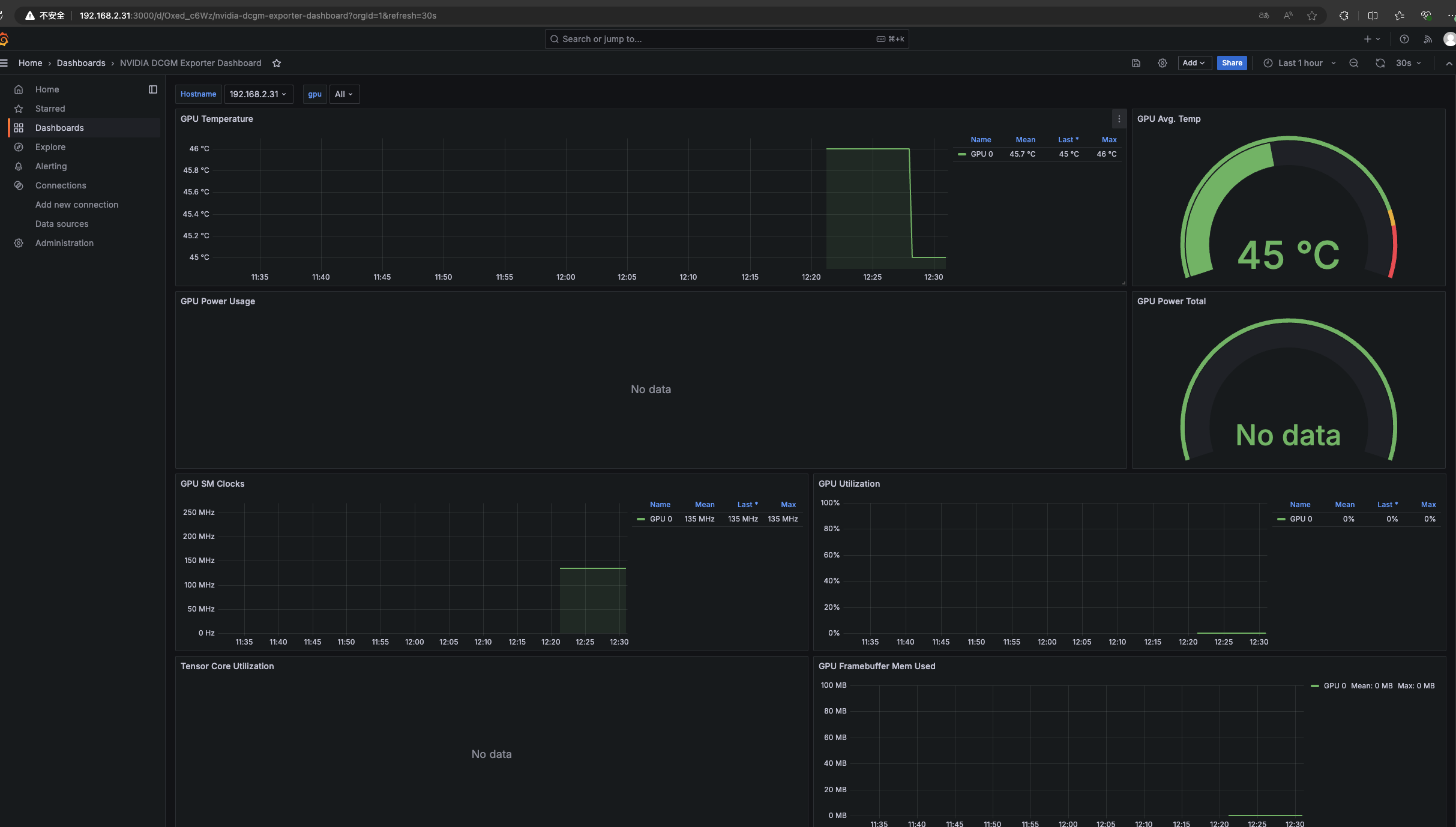
prometheus 监控数据

可使用的面板之一 https://grafana.com/grafana/dashboards/21362-nvidia-dcgm-exporter-dashboard/

id: 21362

https://github.com/NVIDIA/dcgm-exporter

nvidia-dcgm-exporter 数据展示

curl nvidia-dcgm-exporter:port/metrics 当前版本的所有指标

1
2
3
4
5
6
7
8
9
10
11
12
13
14
15
16
17
18
19
20
21
22
23
24
25
26
27
28
29
30
31
32
33
34
35
36
37
38
39
40
41
42
# HELP DCGM_FI_DEV_SM_CLOCK SM clock frequency (in MHz).
# TYPE DCGM_FI_DEV_SM_CLOCK gauge
DCGM_FI_DEV_SM_CLOCK{gpu="0",UUID="GPU-093c5145-c074-80d1-86ed-6433c461682d",device="nvidia0",modelName="NVIDIA GeForce MX450",Hostname="192.168.2.250",DCGM_FI_DRIVER_VERSION="550.54.15"} 300
# HELP DCGM_FI_DEV_MEM_CLOCK Memory clock frequency (in MHz).
# TYPE DCGM_FI_DEV_MEM_CLOCK gauge
DCGM_FI_DEV_MEM_CLOCK{gpu="0",UUID="GPU-093c5145-c074-80d1-86ed-6433c461682d",device="nvidia0",modelName="NVIDIA GeForce MX450",Hostname="192.168.2.250",DCGM_FI_DRIVER_VERSION="550.54.15"} 405
# HELP DCGM_FI_DEV_MEMORY_TEMP Memory temperature (in C).
# TYPE DCGM_FI_DEV_MEMORY_TEMP gauge
DCGM_FI_DEV_MEMORY_TEMP{gpu="0",UUID="GPU-093c5145-c074-80d1-86ed-6433c461682d",device="nvidia0",modelName="NVIDIA GeForce MX450",Hostname="192.168.2.250",DCGM_FI_DRIVER_VERSION="550.54.15"} 0
# HELP DCGM_FI_DEV_GPU_TEMP GPU temperature (in C).
# TYPE DCGM_FI_DEV_GPU_TEMP gauge
DCGM_FI_DEV_GPU_TEMP{gpu="0",UUID="GPU-093c5145-c074-80d1-86ed-6433c461682d",device="nvidia0",modelName="NVIDIA GeForce MX450",Hostname="192.168.2.250",DCGM_FI_DRIVER_VERSION="550.54.15"} 43
# HELP DCGM_FI_DEV_PCIE_REPLAY_COUNTER Total number of PCIe retries.
# TYPE DCGM_FI_DEV_PCIE_REPLAY_COUNTER counter
DCGM_FI_DEV_PCIE_REPLAY_COUNTER{gpu="0",UUID="GPU-093c5145-c074-80d1-86ed-6433c461682d",device="nvidia0",modelName="NVIDIA GeForce MX450",Hostname="192.168.2.250",DCGM_FI_DRIVER_VERSION="550.54.15"} 0
# HELP DCGM_FI_DEV_GPU_UTIL GPU utilization (in %).
# TYPE DCGM_FI_DEV_GPU_UTIL gauge
DCGM_FI_DEV_GPU_UTIL{gpu="0",UUID="GPU-093c5145-c074-80d1-86ed-6433c461682d",device="nvidia0",modelName="NVIDIA GeForce MX450",Hostname="192.168.2.250",DCGM_FI_DRIVER_VERSION="550.54.15"} 0
# HELP DCGM_FI_DEV_MEM_COPY_UTIL Memory utilization (in %).
# TYPE DCGM_FI_DEV_MEM_COPY_UTIL gauge
DCGM_FI_DEV_MEM_COPY_UTIL{gpu="0",UUID="GPU-093c5145-c074-80d1-86ed-6433c461682d",device="nvidia0",modelName="NVIDIA GeForce MX450",Hostname="192.168.2.250",DCGM_FI_DRIVER_VERSION="550.54.15"} 0
# HELP DCGM_FI_DEV_ENC_UTIL Encoder utilization (in %).
# TYPE DCGM_FI_DEV_ENC_UTIL gauge
DCGM_FI_DEV_ENC_UTIL{gpu="0",UUID="GPU-093c5145-c074-80d1-86ed-6433c461682d",device="nvidia0",modelName="NVIDIA GeForce MX450",Hostname="192.168.2.250",DCGM_FI_DRIVER_VERSION="550.54.15"} 0
# HELP DCGM_FI_DEV_DEC_UTIL Decoder utilization (in %).
# TYPE DCGM_FI_DEV_DEC_UTIL gauge
DCGM_FI_DEV_DEC_UTIL{gpu="0",UUID="GPU-093c5145-c074-80d1-86ed-6433c461682d",device="nvidia0",modelName="NVIDIA GeForce MX450",Hostname="192.168.2.250",DCGM_FI_DRIVER_VERSION="550.54.15"} 0
# HELP DCGM_FI_DEV_XID_ERRORS Value of the last XID error encountered.
# TYPE DCGM_FI_DEV_XID_ERRORS gauge
DCGM_FI_DEV_XID_ERRORS{gpu="0",UUID="GPU-093c5145-c074-80d1-86ed-6433c461682d",device="nvidia0",modelName="NVIDIA GeForce MX450",Hostname="192.168.2.250",DCGM_FI_DRIVER_VERSION="550.54.15"} 0
# HELP DCGM_FI_DEV_FB_FREE Framebuffer memory free (in MiB).
# TYPE DCGM_FI_DEV_FB_FREE gauge
DCGM_FI_DEV_FB_FREE{gpu="0",UUID="GPU-093c5145-c074-80d1-86ed-6433c461682d",device="nvidia0",modelName="NVIDIA GeForce MX450",Hostname="192.168.2.250",DCGM_FI_DRIVER_VERSION="550.54.15"} 1863
# HELP DCGM_FI_DEV_FB_USED Framebuffer memory used (in MiB).
# TYPE DCGM_FI_DEV_FB_USED gauge
DCGM_FI_DEV_FB_USED{gpu="0",UUID="GPU-093c5145-c074-80d1-86ed-6433c461682d",device="nvidia0",modelName="NVIDIA GeForce MX450",Hostname="192.168.2.250",DCGM_FI_DRIVER_VERSION="550.54.15"} 0
# HELP DCGM_FI_DEV_NVLINK_BANDWIDTH_TOTAL Total number of NVLink bandwidth counters for all lanes.
# TYPE DCGM_FI_DEV_NVLINK_BANDWIDTH_TOTAL counter
DCGM_FI_DEV_NVLINK_BANDWIDTH_TOTAL{gpu="0",UUID="GPU-093c5145-c074-80d1-86ed-6433c461682d",device="nvidia0",modelName="NVIDIA GeForce MX450",Hostname="192.168.2.250",DCGM_FI_DRIVER_VERSION="550.54.15"} 0
# HELP DCGM_FI_DEV_VGPU_LICENSE_STATUS vGPU License status
# TYPE DCGM_FI_DEV_VGPU_LICENSE_STATUS gauge
DCGM_FI_DEV_VGPU_LICENSE_STATUS{gpu="0",UUID="GPU-093c5145-c074-80d1-86ed-6433c461682d",device="nvidia0",modelName="NVIDIA GeForce MX450",Hostname="192.168.2.250",DCGM_FI_DRIVER_VERSION="550.54.15"} 0

指标解释

nvidia-dcgm-exporter 提供了许多关于 GPU 的关键性能指标,这些指标可以帮助监控和诊断 GPU 的健康和性能。以下是你提到的每个指标的详细解释:

  1. DCGM_FI_DEV_SM_CLOCK

    • 描述: SM(Streaming Multiprocessor)时钟频率,单位为 MHz。
    • 类型: gauge(测量一个特定时间点的值)
    • 示例: 300 表示 SM 时钟频率为 300 MHz。
  2. DCGM_FI_DEV_MEM_CLOCK

    • 描述: 内存时钟频率,单位为 MHz。
    • 类型: gauge
    • 示例: 405 表示内存时钟频率为 405 MHz。
  3. DCGM_FI_DEV_MEMORY_TEMP

    • 描述: 显卡内存温度,单位为摄氏度。
    • 类型: gauge
    • 示例: 0 表示当前内存温度为 0°C。
  4. DCGM_FI_DEV_GPU_TEMP

    • 描述: GPU 温度,单位为摄氏度。
    • 类型: gauge
    • 示例: 43 表示当前 GPU 温度为 43°C。
  5. DCGM_FI_DEV_PCIE_REPLAY_COUNTER

    • 描述: PCIe 重试次数总计。
    • 类型: counter(累积值,随着时间增加)
    • 示例: 0 表示没有发生 PCIe 重试。
  6. DCGM_FI_DEV_GPU_UTIL

    • 描述: GPU 利用率,单位为百分比。
    • 类型: gauge
    • 示例: 0 表示当前 GPU 利用率为 0%。
  7. DCGM_FI_DEV_MEM_COPY_UTIL

    • 描述: 内存复制利用率,单位为百分比。
    • 类型: gauge
    • 示例: 0 表示当前内存复制利用率为 0%。
  8. DCGM_FI_DEV_ENC_UTIL

    • 描述: 编码器利用率,单位为百分比。
    • 类型: gauge
    • 示例: 0 表示当前编码器利用率为 0%。
  9. DCGM_FI_DEV_DEC_UTIL

    • 描述: 解码器利用率,单位为百分比。
    • 类型: gauge
    • 示例: 0 表示当前解码器利用率为 0%。
  10. DCGM_FI_DEV_XID_ERRORS

    • 描述: 最近一次 XID 错误的值。
    • 类型: gauge
    • 示例: 0 表示没有 XID 错误。
  11. DCGM_FI_DEV_FB_FREE

    • 描述: 剩余显存,单位为 MiB。
    • 类型: gauge
    • 示例: 1863 表示当前剩余显存为 1863 MiB。
  12. DCGM_FI_DEV_FB_USED

    • 描述: 已使用显存,单位为 MiB。
    • 类型: gauge
    • 示例: 0 表示当前已使用显存为 0 MiB。
  13. DCGM_FI_DEV_NVLINK_BANDWIDTH_TOTAL

    • 描述: NVLink 总带宽计数,所有通道的总和。
    • 类型: counter
    • 示例: 0 表示 NVLink 带宽总计为 0。
  14. DCGM_FI_DEV_VGPU_LICENSE_STATUS

    • 描述: vGPU 许可证状态。
    • 类型: gauge
    • 示例: 0 表示 vGPU 许可证状态为 0(无许可证)。

这些指标提供了关于 GPU 性能和健康的详细信息,帮助你实时监控和分析 GPU 的状态。在 Prometheus 中抓取这些指标后,可以在 Grafana 等可视化工具中创建仪表板,监控这些关键指标.

测试搭建

prometheus.yml

1
2
3
4
5
6
7
8
9
10
11
12
13
global:
scrape_interval:
external_labels:
monitor: 'codelab-monitor'
# 这里表示抓取对象的配置
scrape_configs:
- job_name: 'prometheus'
scrape_interval: 5s #重写了全局抓取间隔时间,由15秒重写成5秒
static_configs:
- targets: ['localhost:9090']
- job_name: 'nvidia-metrics'
static_configs:
- targets: ['192.168.2.31:30975']

docker

1
2
3
4
5
6
7
8
9
10
11
12
13
docker run -p 3000:3000 --name grafana \
-v /opt/prometheus/grafana/data:/var/lib/grafana \
-e "GF_SECURITY_ADMIN_PASSWORD=grafana123" \
-itd grafana/grafana


docker run -d \
--name=prometheus \
-v /opt/prometheus/config/prometheus.yml:/etc/prometheus/prometheus.yml \
-v /opt/prometheus/data:/prometheus \
-p 9090:9090 \
prom/prometheus

使用上面的模版

nvidia-metrics

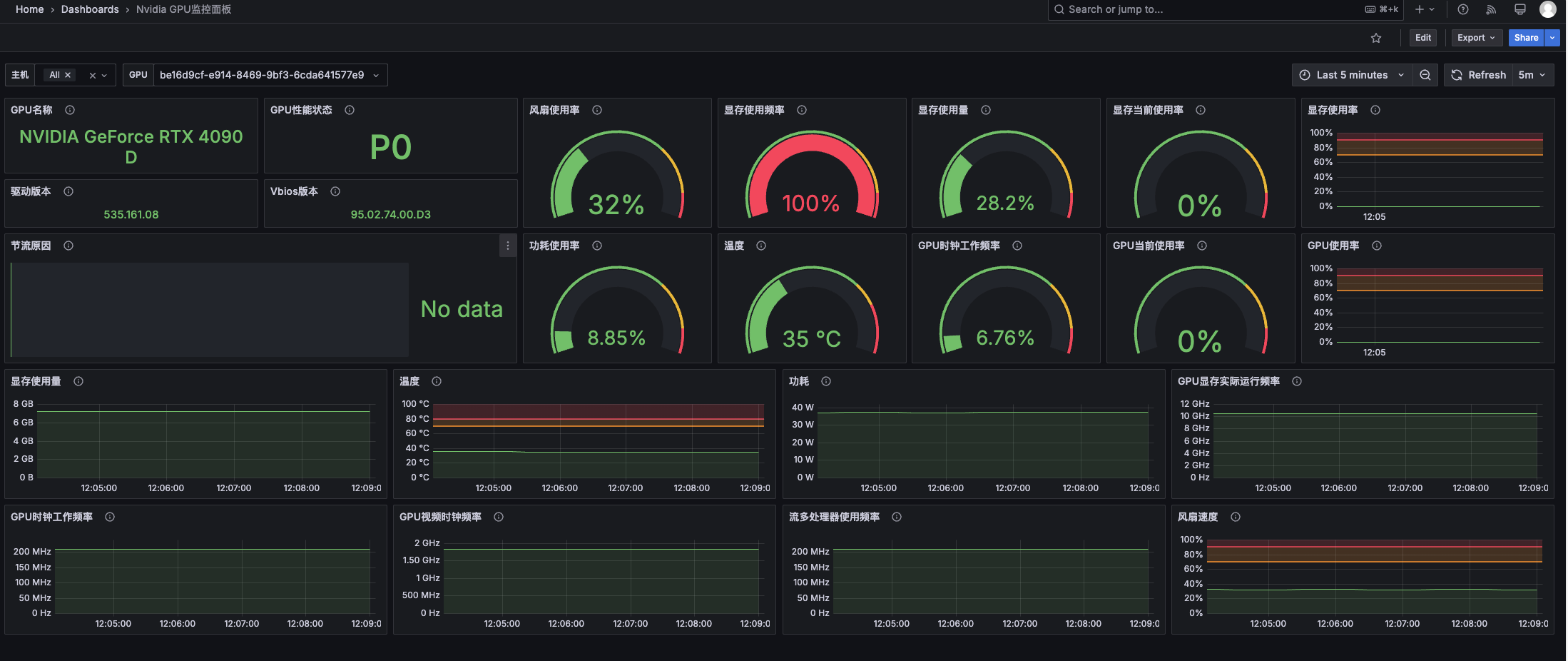
更换面板

项目 https://github.com/utkuozdemir/nvidia_gpu_exporter

面板: https://grafana.com/grafana/dashboards/14574-nvidia-gpu-metrics/

面板id: 14574 中文 20622

1
2
3
4
5
6
7
8
9
10
$ docker run -d \
--name nvidia_smi_exporter \
--restart unless-stopped \
--device /dev/nvidiactl:/dev/nvidiactl \
--device /dev/nvidia0:/dev/nvidia0 \
-v /usr/lib/x86_64-linux-gnu/libnvidia-ml.so:/usr/lib/x86_64-linux-gnu/libnvidia-ml.so \
-v /usr/lib/x86_64-linux-gnu/libnvidia-ml.so.1:/usr/lib/x86_64-linux-gnu/libnvidia-ml.so.1 \
-v /usr/bin/nvidia-smi:/usr/bin/nvidia-smi \
-p 9835:9835 \
utkuozdemir/nvidia_gpu_exporter:1.1.0

效果查看

nvidia-metrics2