📌 学习笔记 :本文为学习与实践过程中整理的技术笔记,内容梳理自官方文档与网络公开资料,主要用于知识沉淀与命令速查。
Python 访问 MySQL 有两条路:直接用原生驱动写 SQL,或者用 ORM 把表映射成类。这篇笔记按这个顺序走一遍,前半部分用原生驱动打磨出一个可复用的查询类,后半部分换成 SQLAlchemy 做同样的增删改查,方便对比两者的取舍。
一、原生驱动:直接写 SQL 安装驱动 常用的驱动是 mysqlclient ,它是 C 扩展,性能好,导入名是 MySQLdb:
如果编译 C 扩展不方便(比如 Windows 或精简镜像),可以换成纯 Python 实现的 pymysql,它提供同样的 DB-API 接口:
1
2
import pymysqlpymysql.install_as_MySQLdb()
本文示例统一用 MySQLdb 这个名字,两种驱动都适用。安装遇到问题也可以参考之前的文章爬取百度百科词条写入数据库 。
从最简单的查询开始 一次查询由三步组成:拿连接、拿游标执行 SQL、关连接。
1
2
3
4
5
6
7
8
9
10
11
12
13
14
15
16
17
18
19
20
import MySQLdbconnection = MySQLdb.connect( host = 'localhost' , user = 'root' , password = 'password' , db = 'school' , charset = 'utf8mb4' , port = 3306 ) cursor = connection.cursor() cursor.execute('SELECT * FROM `students` ORDER BY `in_time` DESC;' ) result = cursor.fetchone() print (result)connection.close()
上面这段代码在任何一步抛异常都会漏掉 close(),所以要用 try / except / finally 改写:
1
2
3
4
5
6
7
8
9
10
11
12
13
14
15
16
17
18
19
20
21
22
23
24
25
26
27
import MySQLdbconnection = None try : connection = MySQLdb.connect( host = 'localhost' , user = 'root' , password = 'password' , db = 'school' , charset = 'utf8mb4' , port = 3306 ) cursor = connection.cursor() cursor.execute('SELECT * FROM `students` ORDER BY `in_time` DESC;' ) result = cursor.fetchone() print (result) except MySQLdb.Error as e: print ('Error : %s ' % e) finally : if connection: connection.close()
开头那句 connection = None 和 finally 里的 if connection 不能省。如果直接把 connection = MySQLdb.connect(...) 放进 try 而 finally 里无条件 connection.close(),一旦连接本身就建立失败(密码错、端口不通),connection 这个名字从来没被绑定过,finally 会抛出 NameError,把真正的连接错误盖掉,排查时只能看到一个莫名其妙的 NameError。
嫌手写 if 啰嗦的话,也可以用 contextlib.closing 包一层,交给 with 去负责关闭:
1
2
3
4
5
6
7
from contextlib import closingwith closing(MySQLdb.connect(host='localhost' , user='root' , password='password' , db='school' , charset='utf8mb4' )) as connection: cursor = connection.cursor() cursor.execute('SELECT * FROM `students` ORDER BY `in_time` DESC;' ) print (cursor.fetchone())
这种写法里 connect() 失败会直接向外抛出原始异常,根本不会进入 with 体,也就没有覆盖异常的问题。
封装成一个查询类 连接与关闭是所有操作都要做的事,把它们收进一个对象,业务方法就只需要关心 SQL 本身。
1
2
3
4
5
6
7
8
9
10
11
12
13
14
15
16
17
18
19
20
21
22
23
24
25
26
27
28
29
30
31
32
33
34
35
36
37
38
39
40
41
42
43
44
45
46
47
48
49
50
51
52
53
54
55
56
57
58
59
60
61
import MySQLdbclass MysqlSearch : def __init__ (self ): self .get_connection() def get_connection (self ): try : self .connection = MySQLdb.connect( host = 'localhost' , user = 'root' , password = 'password' , db = 'school' , charset = 'utf8mb4' , port = 3306 ) except MySQLdb.Error as e: print ('Error : %s ' % e) def close_connection (self ): try : if self .connection: self .connection.close() except MySQLdb.Error as e: print ('Error : %s ' % e) def get_one (self ): cursor = self .connection.cursor() sql = 'SELECT * FROM `students` WHERE `name`=%s ORDER BY `in_time` DESC;' cursor.execute(sql, ('weilai' ,)) result = dict (zip ([k[0 ] for k in cursor.description], cursor.fetchone())) cursor.close() self .close_connection() return result def get_more (self ): cursor = self .connection.cursor() sql = 'SELECT * FROM `students` WHERE `name`=%s ORDER BY `in_time` DESC;' cursor.execute(sql, ('weilai' ,)) result = [dict (zip ([k[0 ] for k in cursor.description], row)) for row in cursor.fetchall()] cursor.close() self .close_connection() return result def main (): obj = MysqlSearch() for item in obj.get_more(): print (item) if __name__ == '__main__' : main()
这里的关键是 cursor.description,它描述了结果集的每一列:
把列名和 fetchone() 返回的行 zip 起来再转成 dict,就得到了可读性好得多的结果:
顺带复习一下 zip:
1 2 3 4 5 6 7 8 9 10 11 12 13 14 15 16 17 >>> a = [1 ,2 ,3 ]>>> b = [4 ,5 ,6 ]>>> c = [4 ,5 ,6 ,7 ,8 ]>>> zipped = zip (a,b) >>> zipped<zip object at 0x103abc288 > >>> list (zipped) [(1 , 4 ), (2 , 5 ), (3 , 6 )] >>> list (zip (a,c)) [(1 , 4 ), (2 , 5 ), (3 , 6 )] >>> a1, a2 = zip (*zip (a,b)) >>> list (a1)[1 , 2 , 3 ] >>> list (a2)[4 , 5 , 6 ]
分页查询 分页只是在 SQL 末尾加 LIMIT,偏移量由页码算出来。注意 LIMIT 的两个值同样用占位符传入:
1 2 3 4 5 6 7 8 9 10 11 12 13 def get_more_by_pages (self, page, page_size ): offset = (page - 1 ) * page_size cursor = self .connection.cursor() sql = ('SELECT * FROM `students` WHERE `name`=%s ' 'ORDER BY `in_time` DESC LIMIT %s , %s;' ) cursor.execute(sql, ('weilai' , offset, page_size)) result = [dict (zip ([k[0 ] for k in cursor.description], row)) for row in cursor.fetchall()] cursor.close() self .close_connection() return result
写入数据与事务回滚 读操作不需要提交,写操作必须显式 commit()。更重要的是出现问题就不应该提交 ,要在 except 里 rollback(),把这一批写入整体撤销:
1 2 3 4 5 6 7 8 9 10 11 12 13 14 15 16 17 18 19 20 21 22 23 def add_one (self ): try : sql = ( "INSERT INTO `students` (`name`,`nickname`,`sex`,`in_time`) VALUE" "(%s,%s,%s,%s);" ) cursor = self .connection.cursor() cursor.execute(sql, ('name1' , 'nickname1' , '男' , None )) cursor.execute(sql, ('name2' , 'nickname2' , '男' , 'haha' )) self .connection.commit() cursor.close() except MySQLdb.Error as e: print ('Error : %s ' % e) self .connection.rollback() self .close_connection()
上面第二条 INSERT 故意把 'haha' 塞进 DATETIME 列,正好可以用来验证回滚是否生效。
二、SQLAlchemy:用 ORM 代替手写 SQL
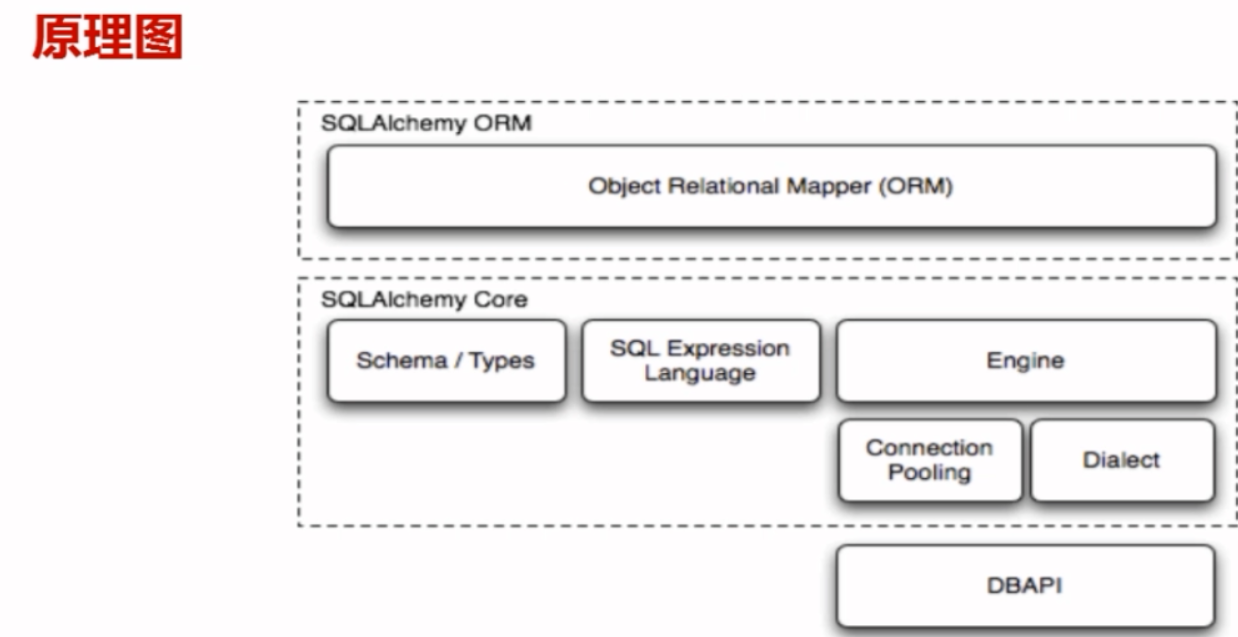
ORM 把表映射成类、把行映射成对象,写业务代码时不再拼 SQL,代价是多一层抽象。
更多用法可以参考flask 鱼书项目 。
连接数据库与定义模型 create_engine 负责连接,declarative_base() 产出所有模型共同继承的基类,模型里的每个 Column 对应表的一列,create_all() 则按模型定义把表建出来。
1 2 3 4 5 6 7 8 9 10 11 12 13 14 15 16 17 18 19 20 21 22 23 24 from sqlalchemy import create_enginefrom sqlalchemy.ext.declarative import declarative_basefrom sqlalchemy import Column, Integer, String, DateTime, Booleanengine = create_engine('mysql://root:password@localhost:3306/school?charset=utf8' ) Base = declarative_base() class News (Base ): __tablename__ = 'students1' id = Column(Integer, primary_key = True ) nickname = Column(String(20 )) name = Column(String(20 ), nullable = False ) sex = Column(String(1 )) in_time = Column(DateTime) is_vaild = Column(Boolean) idcard = Column(Integer, unique = True ) News.metadata.create_all(engine)
基于 session 的增删改查 ORM 的所有操作都挂在 session 上:add() / add_all() 新增,query() 查询,改完对象再 add() 回去就是更新,delete() 删除,最后统一 commit()。
1 2 3 4 5 6 7 8 9 10 11 12 13 14 15 16 17 18 19 20 21 22 23 24 25 26 27 28 29 30 31 32 33 34 35 36 37 38 39 40 41 42 43 44 45 46 47 48 49 50 51 52 53 54 55 56 57 58 59 60 61 62 63 64 65 66 67 68 69 from sqlalchemy.orm import sessionmakerSession = sessionmaker(bind=engine) class OrmTest (object ): def __init__ (self ): self .session = Session() def add_one (self ): new_obj = News( nickname = '123' , name = '321' , sex = '男' , ) self .session.add(new_obj) self .session.commit() return new_obj def add_more (self ): new_obj = News( nickname = '123' , name = '321' , sex = '男' , ) new_obj2 = News( nickname = 'wei' , name = 'lai' , sex = '女' , ) self .session.add_all([new_obj, new_obj2]) self .session.commit() return new_obj def get_one (self ): return self .session.query(News).get(10 ) def get_more (self ): return self .session.query(News).filter_by(is_vaild=True ) def update_data (self ): data_list = self .session.query(News).filter (News.id >= 5 ) for item in data_list: if item: item.is_vaild = 0 self .session.add(item) self .session.commit() def delete_data (self ): data = self .session.query(News).get(8 ) if data: self .session.delete(data) self .session.commit() else : return False def delete_data_more (self ): delete_list = self .session.query(News).filter (News.id <= 5 ) for item in delete_list: if item: self .session.delete(item) else : return False self .session.commit()
串起来跑一遍 get() 有可能返回 None,所以取属性前一定要判空;filter 系列返回的是查询对象,可以直接 count() 或者迭代。
1 2 3 4 5 6 7 8 9 10 11 12 13 14 15 16 17 18 19 20 21 22 23 24 25 26 27 28 29 30 def main (): obj = OrmTest() obj.add_one() obj.add_more() data = obj.get_one() if data: print ('ID:{0} {1}' .format (data.id , data.sex)) else : print ('Not exist' ) data_more = obj.get_more() print (data_more.count()) for new_obj in data_more: print ('ID:{0} {1} {2} {3}' .format ( new_obj.id , new_obj.sex, new_obj.name, new_obj.nickname)) obj.update_data() print ('数据修改成功' ) obj.delete_data() print ('数据删除成功' ) obj.delete_data_more() if __name__ == '__main__' : main()
两种方式的取舍很清楚:临时脚本、报表统计、需要压榨性能的复杂 SQL,用原生驱动更直接;业务模型稳定、增删改查密集的项目,用 ORM 能省下大量样板代码。