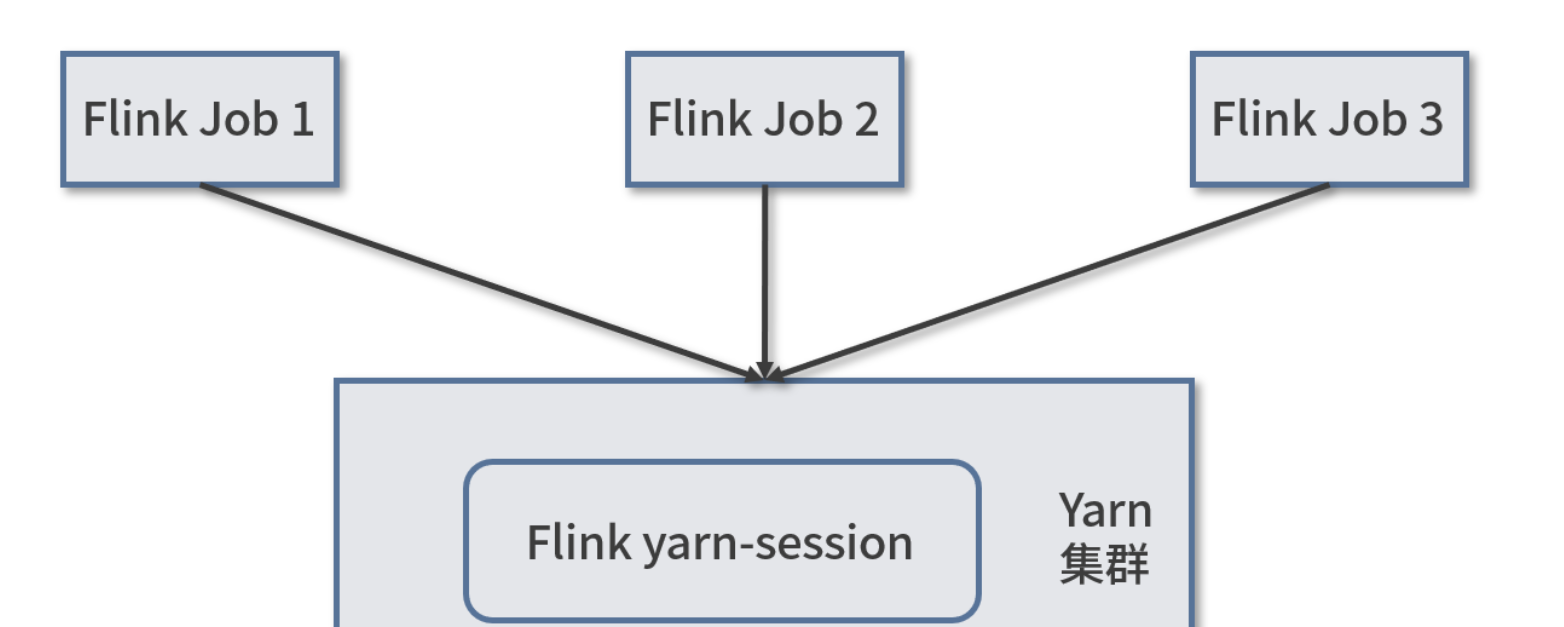
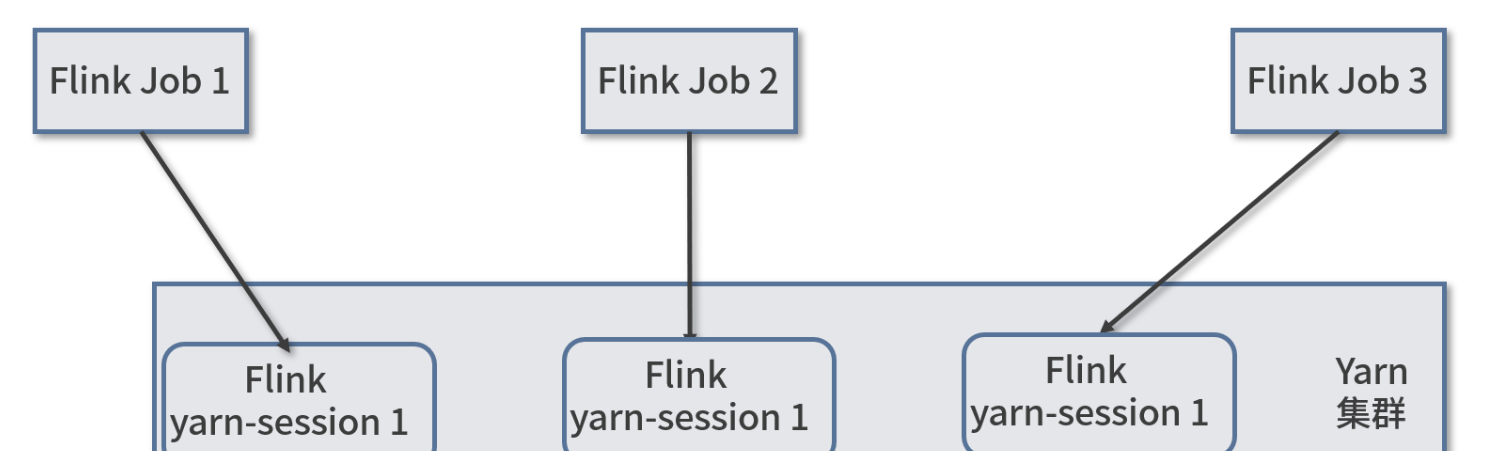
$ cd /opt/bigdata/flink/current/ $ ./bin/yarn-session.sh -d # 日志节选
.......
2022-05-19 22:45:37,278 INFO org.apache.flink.yarn.YarnClusterDescriptor [] - Found Web Interface hadoop01:33237 of application 'application_1652942203850_0022'. JobManager Web Interface: http://hadoop01:33237 2022-05-19 22:45:37,404 INFO org.apache.flink.yarn.cli.FlinkYarnSessionCli [] - The Flink YARN session cluster has been started in detached mode. In order to stop Flink gracefully, use the following command: $ echo "stop" | ./bin/yarn-session.sh -id application_1652942203850_0022 If this should not be possible, then you can also kill Flink via YARN's web interface or via: $ yarn application -kill application_1652942203850_0022 Note that killing Flink might not clean up all job artifacts and temporary files.
$ hdfs dfs -text /logs/count hadoop 4 hive 2 linux 3 mapreduce 1 spark 2 unix 2 windows 2
能看到结果
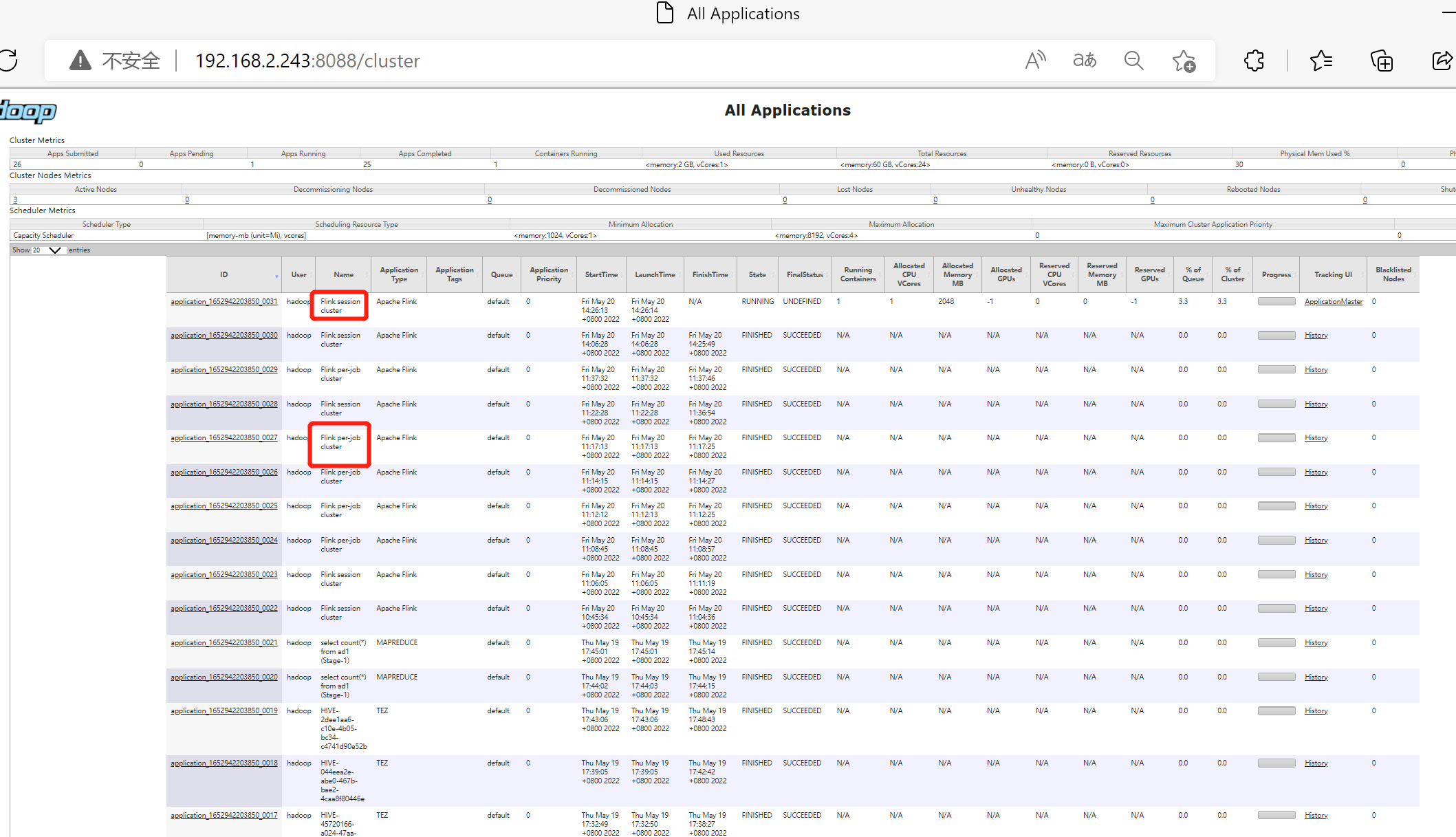
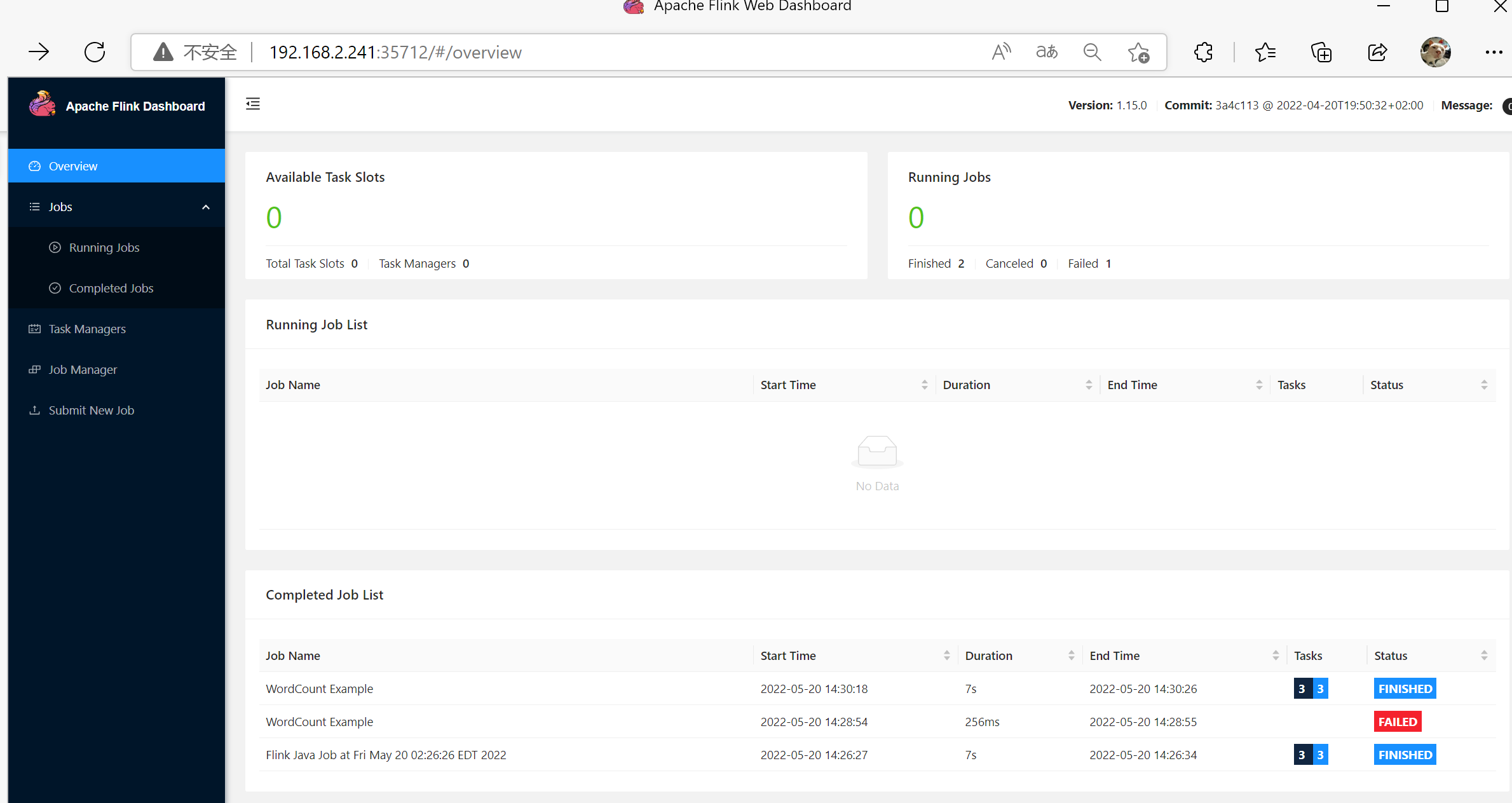
网页查看
遇到的问题
classloader
1 2 3 4 5 6 7 8 9 10 11 12 13 14 15 16
Exception in thread "Thread-5" java.lang.IllegalStateException: Trying to access closed classloader. Please check if you store classloaders directly or indirectly in static fields. If the stacktrace suggests that the leak occurs in a third party library and cannot be fixed immediately, you can disable this check with the configuration 'classloader.check-leaked-classloader'.
        at org.apache.flink.runtime.execution.librarycache.FlinkUserCodeClassLoaders$SafetyNetWrapperClassLoader.ensureInner(FlinkUserCodeClassLoaders.java:164)
        at org.apache.flink.runtime.execution.librarycache.FlinkUserCodeClassLoaders$SafetyNetWrapperClassLoader.getResource(FlinkUserCodeClassLoaders.java:183)
        at org.apache.hadoop.conf.Configuration.getResource(Configuration.java:2830)
        at org.apache.hadoop.conf.Configuration.getStreamReader(Configuration.java:3104)
        at org.apache.hadoop.conf.Configuration.loadResource(Configuration.java:3063)
        at org.apache.hadoop.conf.Configuration.loadResources(Configuration.java:3036)
        at org.apache.hadoop.conf.Configuration.loadProps(Configuration.java:2914)
        at org.apache.hadoop.conf.Configuration.getProps(Configuration.java:2896)
        at org.apache.hadoop.conf.Configuration.get(Configuration.java:1246)
        at org.apache.hadoop.conf.Configuration.getTimeDuration(Configuration.java:1863)
        at org.apache.hadoop.conf.Configuration.getTimeDuration(Configuration.java:1840)
        at org.apache.hadoop.util.ShutdownHookManager.getShutdownTimeout(ShutdownHookManager.java:183)
        at org.apache.hadoop.util.ShutdownHookManager.shutdownExecutor(ShutdownHookManager.java:145)
        at org.apache.hadoop.util.ShutdownHookManager.access$300(ShutdownHookManager.java:65)
        at org.apache.hadoop.util.ShutdownHookManager$1.run(ShutdownHookManager.java:102)
org.apache.flink.client.program.ProgramInvocationException: The main method caused an error: java.util.concurrent.ExecutionExce: java.lang.RuntimeException: org.apache.flink.runtime.client.JobInitializationException: Could not start the JobMaster.
        at org.apache.flink.client.program.PackagedProgram.callMainMethod(PackagedProgram.java:372)
        at org.apache.flink.client.program.PackagedProgram.invokeInteractiveModeForExecution(PackagedProgram.java:222)
        at org.apache.flink.client.ClientUtils.executeProgram(ClientUtils.java:114)
        at org.apache.flink.client.cli.CliFrontend.executeProgram(CliFrontend.java:836)
        at org.apache.flink.client.cli.CliFrontend.run(CliFrontend.java:247)
        at org.apache.flink.client.cli.CliFrontend.parseAndRun(CliFrontend.java:1078)
        at org.apache.flink.client.cli.CliFrontend.lambda$main$10(CliFrontend.java:1156)
        at java.security.AccessController.doPrivileged(Native Method)
        at javax.security.auth.Subject.doAs(Subject.java:422)
        at org.apache.hadoop.security.UserGroupInformation.doAs(UserGroupInformation.java:1878)
        at org.apache.flink.runtime.security.contexts.HadoopSecurityContext.runSecured(HadoopSecurityContext.java:41)
        at org.apache.flink.client.cli.CliFrontend.main(CliFrontend.java:1156)
Caused by: java.lang.RuntimeException: java.util.concurrent.ExecutionException: java.lang.RuntimeException: org.apache.flink.ru.client.JobInitializationException: Could not start the JobMaster.
        at org.apache.flink.util.ExceptionUtils.rethrow(ExceptionUtils.java:319)
        at org.apache.flink.api.java.ExecutionEnvironment.executeAsync(ExecutionEnvironment.java:1061)
        at org.apache.flink.client.program.ContextEnvironment.executeAsync(ContextEnvironment.java:132)
        at org.apache.flink.client.program.ContextEnvironment.execute(ContextEnvironment.java:70)
        at org.apache.flink.examples.java.wordcount.WordCount.main(WordCount.java:93)
        at sun.reflect.NativeMethodAccessorImpl.invoke0(Native Method)
        at sun.reflect.NativeMethodAccessorImpl.invoke(NativeMethodAccessorImpl.java:62)
        at sun.reflect.DelegatingMethodAccessorImpl.invoke(DelegatingMethodAccessorImpl.java:43)
        at java.lang.reflect.Method.invoke(Method.java:498)
        at org.apache.flink.client.program.PackagedProgram.callMainMethod(PackagedProgram.java:355)
        ... 11 more
Caused by: java.util.concurrent.ExecutionException: java.lang.RuntimeException: org.apache.flink.runtime.client.JobInitializatieption: Could not start the JobMaster.
        at java.util.concurrent.CompletableFuture.reportGet(CompletableFuture.java:357)
        at java.util.concurrent.CompletableFuture.get(CompletableFuture.java:1908)
        at org.apache.flink.api.java.ExecutionEnvironment.executeAsync(ExecutionEnvironment.java:1056)
        ... 19 more
Caused by: java.lang.RuntimeException: org.apache.flink.runtime.client.JobInitializationException: Could not start the JobMaste
        at org.apache.flink.util.ExceptionUtils.rethrow(ExceptionUtils.java:319)
        at org.apache.flink.util.function.FunctionUtils.lambda$uncheckedFunction$2(FunctionUtils.java:75)
        at java.util.concurrent.CompletableFuture.uniApply(CompletableFuture.java:616)
        at java.util.concurrent.CompletableFuture$UniApply.tryFire(CompletableFuture.java:591)
        at java.util.concurrent.CompletableFuture$Completion.exec(CompletableFuture.java:457)
        at java.util.concurrent.ForkJoinTask.doExec(ForkJoinTask.java:289)
        at java.util.concurrent.ForkJoinPool$WorkQueue.runTask(ForkJoinPool.java:1067)
        at java.util.concurrent.ForkJoinPool.runWorker(ForkJoinPool.java:1703)
        at java.util.concurrent.ForkJoinWorkerThread.run(ForkJoinWorkerThread.java:172)
Caused by: org.apache.flink.runtime.client.JobInitializationException: Could not start the JobMaster.
        at org.apache.flink.runtime.jobmaster.DefaultJobMasterServiceProcess.lambda$new$0(DefaultJobMasterServiceProcess.java:9
        at java.util.concurrent.CompletableFuture.uniWhenComplete(CompletableFuture.java:774)
        at java.util.concurrent.CompletableFuture$UniWhenComplete.tryFire(CompletableFuture.java:750)
        at java.util.concurrent.CompletableFuture.postComplete(CompletableFuture.java:488)
        at java.util.concurrent.CompletableFuture$AsyncSupply.run(CompletableFuture.java:1609)
        at java.util.concurrent.ThreadPoolExecutor.runWorker(ThreadPoolExecutor.java:1149)
        at java.util.concurrent.ThreadPoolExecutor$Worker.run(ThreadPoolExecutor.java:624)
        at java.lang.Thread.run(Thread.java:750)
Caused by: java.util.concurrent.CompletionException: java.lang.RuntimeException: org.apache.flink.runtime.client.JobExecutionExon: Cannot initialize task 'DataSink (CsvOutputFormat (path: hdfs://bigdata/logs/count, delimiter:  ))': File or directory alrexists. Existing files and directories are not overwritten in NO_OVERWRITE mode. Use OVERWRITE mode to overwrite existing files irectories.
        at java.util.concurrent.CompletableFuture.encodeThrowable(CompletableFuture.java:273)
        at java.util.concurrent.CompletableFuture.completeThrowable(CompletableFuture.java:280)
        at java.util.concurrent.CompletableFuture$AsyncSupply.run(CompletableFuture.java:1606)
        ... 3 more
Caused by: java.lang.RuntimeException: org.apache.flink.runtime.client.JobExecutionException: Cannot initialize task 'DataSink utputFormat (path: hdfs://bigdata/logs/count, delimiter:  ))': File or directory already exists. Existing files and directoriesnot overwritten in NO_OVERWRITE mode. Use OVERWRITE mode to overwrite existing files and directories.
        at org.apache.flink.util.ExceptionUtils.rethrow(ExceptionUtils.java:319)
        at org.apache.flink.util.function.FunctionUtils.lambda$uncheckedSupplier$4(FunctionUtils.java:114)
        at java.util.concurrent.CompletableFuture$AsyncSupply.run(CompletableFuture.java:1604)
        ... 3 more
Caused by: org.apache.flink.runtime.client.JobExecutionException: Cannot initialize task 'DataSink (CsvOutputFormat (path: hdfsgdata/logs/count, delimiter:  ))': File or directory already exists. Existing files and directories are not overwritten in NO_OITE mode. Use OVERWRITE mode to overwrite existing files and directories.
        at org.apache.flink.runtime.executiongraph.DefaultExecutionGraphBuilder.buildGraph(DefaultExecutionGraphBuilder.java:17
        at org.apache.flink.runtime.scheduler.DefaultExecutionGraphFactory.createAndRestoreExecutionGraph(DefaultExecutionGraphry.java:149)
        at org.apache.flink.runtime.scheduler.SchedulerBase.createAndRestoreExecutionGraph(SchedulerBase.java:363)
        at org.apache.flink.runtime.scheduler.SchedulerBase.<init>(SchedulerBase.java:208)
        at org.apache.flink.runtime.scheduler.DefaultScheduler.<init>(DefaultScheduler.java:191)
        at org.apache.flink.runtime.scheduler.DefaultScheduler.<init>(DefaultScheduler.java:139)
        at org.apache.flink.runtime.scheduler.DefaultSchedulerFactory.createInstance(DefaultSchedulerFactory.java:135)
        at org.apache.flink.runtime.jobmaster.DefaultSlotPoolServiceSchedulerFactory.createScheduler(DefaultSlotPoolServiceScheFactory.java:115)
        at org.apache.flink.runtime.jobmaster.JobMaster.createScheduler(JobMaster.java:345)
        at org.apache.flink.runtime.jobmaster.JobMaster.<init>(JobMaster.java:322)
        at org.apache.flink.runtime.jobmaster.factories.DefaultJobMasterServiceFactory.internalCreateJobMasterService(DefaultJoerServiceFactory.java:106)
        at org.apache.flink.runtime.jobmaster.factories.DefaultJobMasterServiceFactory.lambda$createJobMasterService$0(DefaultJterServiceFactory.java:94)
        at org.apache.flink.util.function.FunctionUtils.lambda$uncheckedSupplier$4(FunctionUtils.java:112)
        ... 4 more
Caused by: java.io.IOException: File or directory already exists. Existing files and directories are not overwritten in NO_OVER mode. Use OVERWRITE mode to overwrite existing files and directories.
        at org.apache.flink.core.fs.FileSystem.initOutPathDistFS(FileSystem.java:995)
        at org.apache.flink.api.common.io.FileOutputFormat.initializeGlobal(FileOutputFormat.java:299)
        at org.apache.flink.runtime.jobgraph.InputOutputFormatVertex.initializeOnMaster(InputOutputFormatVertex.java:110)
        at org.apache.flink.runtime.executiongraph.DefaultExecutionGraphBuilder.buildGraph(DefaultExecutionGraphBuilder.java:17
        ... 16 more