Scheduler

简介

Schedulerkubernetes 的调度器,是为一个新创建出来的 Pod,寻找一个最合适的节点(Node)。调度器对一个 Pod 调度成功,实际上就是将它的 spec.nodeName 字段填上调度结果的节点名字

听起来非常简单,但有很多要考虑的问题:(这一块可以很复杂,也可以不关注使用默认)

  1. 公平:如何保证每个节点都能被分配资源资源
  2. 高效利用:集群所有资源最大化被使用
  3. 效率:调度的性能要好,能够尽快地对大批量的 pod 完成调度工作
  4. 灵活:允许用户根据自己的需求控制调度的逻辑

Sheduler 是作为单独的程序运行的,启动之后会一直坚挺 API Server,获取 PodSpec.NodeName 为空的 pod,对每个 pod 都会创建一个 binding,表明该 pod 应该放到哪个节点上

调度过程调度分为几个部分:

  1. 首先是过滤掉不满足条件的节点,这个过程称为 predicate (预选)
  2. 然后对通过的节点按照优先级排序,这个是 priority (优选)
  3. 最后从中选择优先级最高的节点。

如果中间任何一步骤有错误,就直接返回错误

Predicate 有一系列的算法可以使用:

  1. PodFitsResources:节点上剩余的资源是否大于 pod 请求的资源
  2. PodFitsHost:如果 pod 指定了 NodeName,检查节点名称是否和 NodeName 匹配
  3. PodFitsHostPorts:节点上已经使用的 port 是否和 pod 申请的 port 冲突
  4. PodSelectorMatches:过滤掉和 pod 指定的 label 不匹配的节点
  5. NoDiskConflict:已经 mountvolumepod 指定的 volume 不冲突,除非它们都是只读

如果在 predicate 过程中没有合适的节点,pod会一直在 pending 状态,不断重试调度,直到有节点满足条件。经过这个步骤,如果有多个节点满足条件,就继续 priorities 过程:按照优先级大小对节点排序

优先级由一系列键值对组成,键是该优先级项的名称,值是它的权重(该项的重要性)。这些优先级选项包括:

  1. LeastRequestedPriority:通过计算 CPUMemory 的使用率来决定权重,使用率越低权重越高。换句话说,这个优先级指标倾向于资源使用比例更低的节点
  2. BalancedResourceAllocation:节点上 CPUMemory 使用率越接近,权重越高。这个应该和上面的一起使用,不应该单独使用
  3. ImageLocalityPriority:倾向于已经有要使用镜像的节点,镜像总大小值越大,权重越高通过算法对所有的优先级项目和权重进行计算,得出最终的结果自定义调度器

除了 kubernetes 自带的调度器,也可以编写自己的调度器。通过 spec:schedulername 参数指定调度器的名字,可以为 pod 选择某个调度器进行调度。比如下面的 pod 选择 my-scheduler 进行调度,而不是默认的 default-scheduler

1
2
3
4
5
6
7
8
9
10
11
apiVersion: v1
kind: Pod
metadata:
name: annotation-second-scheduler
labels:
name: multischeduler-example
spec:
schedulername: my-scheduler
containers:
- name: pod-with-second-annotation-container
image: gcr.io/google_containers/pause:2.0

default-scheduler原理

default-scheduler原理

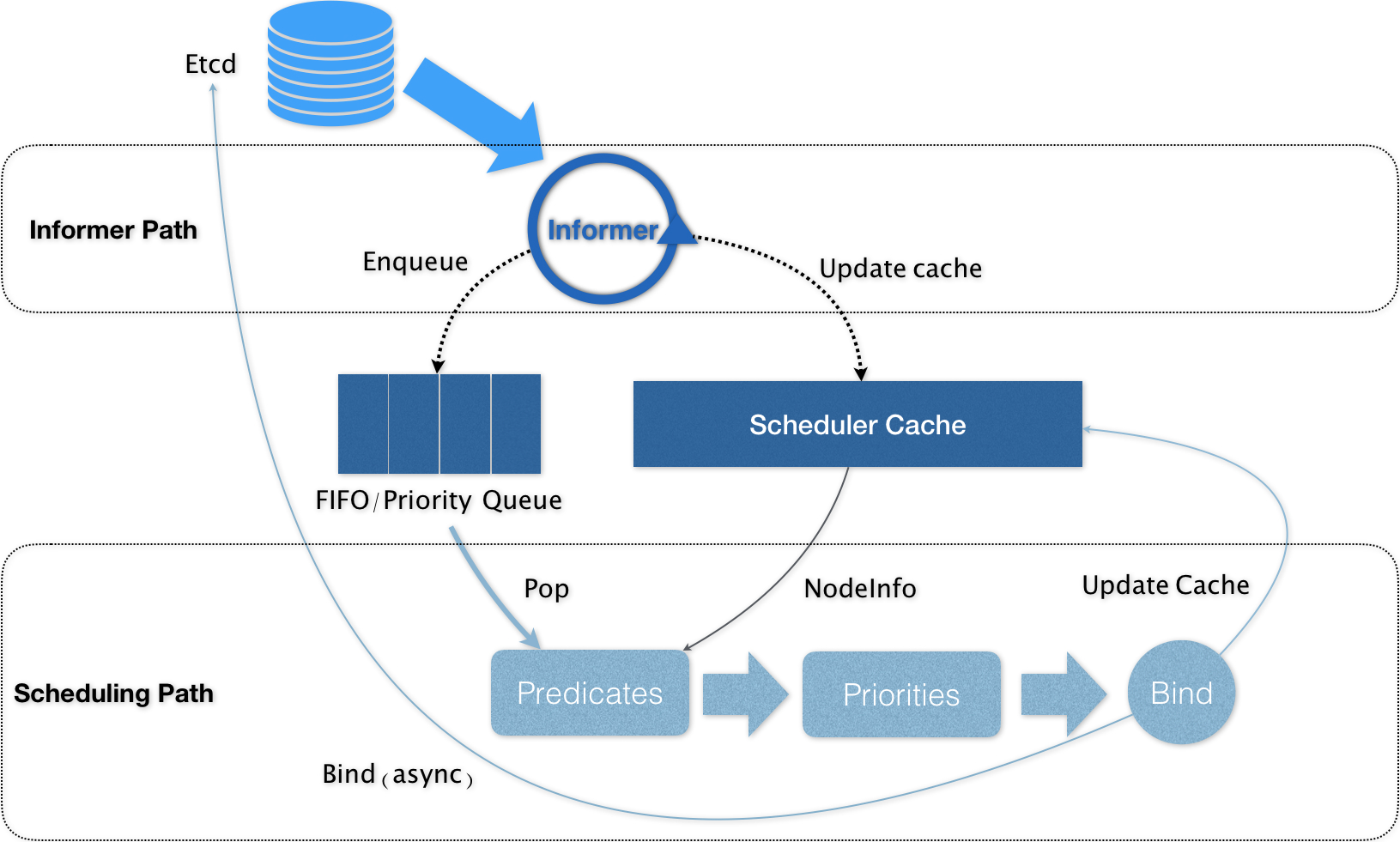
Kubernetes 的调度器的核心,实际上就是两个相互独立的控制循环

  1. Informer Path : 是启动一系列 Informer,用来监听(WatchEtcdPodNodeService 等与调度相关的 API 对象的变化。(eg: 当一个待调度 Pod(即:它的 nodeName 字段是空的)被创建出来之后,调度器就会通过 Pod InformerHandler,将这个待调度 Pod 添加进调度队列)
  2. Scheduling Path : 是调度器负责 Pod 调度的主循环, 不断地从调度队列里出队一个 Pod , 然后按照指定的算法,预选,优选,打分等操作(基于 Cache 然后 Assume ),最后 Bind Node

将默认调度器进一步做轻做薄,并且插件化,才是 kube-scheduler 正确的演进方向。

默认调度器重要的设计 : “Cache 化”和“乐观绑定”,“无锁化”

  1. Kubernetes 调度部分进行性能优化的一个最根本原则,就是尽最大可能将集群信息 Cache 化,以便从根本上提高 PredicatePriority 调度算法的执行效率。

  2. Kubernetes 的默认调度器在 Bind 阶段,只会更新 Scheduler Cache 里的 PodNode 的信息。这种基于“乐观”假设的 API 对象更新方式,在 Kubernetes 里被称作 Assume

  3. Kubernetes 调度器只有对调度队列和 Scheduler Cache 进行操作时,才需要加锁。而这两部分操作,都不在 Scheduling Path 的算法执行路径上。

示例

节点亲和性(pod与node的亲和性)

pod.spec.nodeAffinity 关键字

preferredDuringSchedulingIgnoredDuringExecution(优先执行计划):软策略

requiredDuringSchedulingIgnoredDuringExecution(要求执行计划):硬策略

键值运算关系:

  1. Inlabel 的值在某个列表中
  2. NotInlabel 的值不在某个列表中
  3. Gtlabel 的值大于某个值
  4. Ltlabel 的值小于某个值
  5. Exists:某个 label 存在
  6. DoesNotExist:某个 label 不存在
1
2
3
4
5
[root@k8s01 ~]# kubectl get node --show-labels  # 查看标签 -L env,beta.kubernetes.io/arch
NAME STATUS ROLES AGE VERSION LABELS
k8s01 Ready master 29d v1.18.6 beta.kubernetes.io/arch=amd64,beta.kubernetes.io/os=linux,kubernetes.io/arch=amd64,kubernetes.io/hostname=k8s01,kubernetes.io/os=linux,node-role.kubernetes.io/master=
k8s02 Ready <none> 29d v1.18.6 beta.kubernetes.io/arch=amd64,beta.kubernetes.io/os=linux,kubernetes.io/arch=amd64,kubernetes.io/hostname=k8s02,kubernetes.io/os=linux
k8s03 Ready <none> 29d v1.18.6 beta.kubernetes.io/arch=amd64,beta.kubernetes.io/os=linux,kubernetes.io/arch=amd64,kubernetes.io/hostname=k8s03,kubernetes.io/os=linux

requiredDuringSchedulingIgnoredDuringExecution

节点硬策略。排除 k8s02,只能在 k8s03 上运行
required_pod_example.yaml

1
2
3
4
5
6
7
8
9
10
11
12
13
14
15
16
17
18
19
apiVersion: v1
kind: Pod
metadata:
name: required
labels:
app: node-affinity-pod
spec:
containers:
- name: with-node-affinity
image: nginx:1.7.9
affinity: #亲和性
nodeAffinity: #node亲和性
requiredDuringSchedulingIgnoredDuringExecution:
nodeSelectorTerms:
- matchExpressions:
- key: kubernetes.io/hostname
operator: NotIn #键值运算关系 ,NotIn:label的值不在某个列表中
values:
- k8s02

1
2
3
4
5
[root@k8s01 Scheduler]# kubectl apply -f required_pod_example.yaml
pod/affinity created
[root@k8s01 Scheduler]# kubectl get pod -o wide # 多次运行都只会在 k8s03 ,因为 k8s01 master 默认打上了污点 # kubectl taint nodes --all node-role.kubernetes.io/master- 让k8s01 节点也能调度
NAME READY STATUS RESTARTS AGE IP NODE NOMINATED NODE READINESS GATES
affinity 1/1 Running 0 11s 172.18.235.181 k8s03 <none> <none>

preferredDuringSchedulingIgnoredDuringExecution

节点软策略。优先选择 k8s03 节点
prefer_pod_example.yaml

1
2
3
4
5
6
7
8
9
10
11
12
13
14
15
16
17
18
19
20
21
22

apiVersion: v1
kind: Pod
metadata:
name: prefer
labels:
app: node-affinity-pod
spec:
containers:
- name: with-node-affinity
image: nginx:1.7.9
affinity: #亲和性
nodeAffinity: #node亲和性
preferredDuringSchedulingIgnoredDuringExecution:
- weight: 1 #权重,权重越大越亲和(多个软策略的情况)

preference:
matchExpressions:
- key: kubernetes.io/hostname
operator: In
values:
- k8s03

合体

1
2
3
4
5
6
7
8
9
10
11
12
13
14
15
16
17
18
19
20
21
22
23
24
25
26
27
28
29
apiVersion: v1
kind: Pod
metadata:
name: prefer_require
labels:
app: node-affinity-pod
spec:
containers:
- name: with-node-affinity
image: nginx:1.7.9
affinity: #亲和性
nodeAffinity: #node亲和性
requiredDuringSchedulingIgnoredDuringExecution:
nodeSelectorTerms:
- matchExpressions:
- key: kubernetes.io/hostname
operator: NotIn #键值运算关系 ,NotIn:label的值不在某个列表中
values:
- k8s02

preferredDuringSchedulingIgnoredDuringExecution:
- weight: 1 #权重,权重越大越亲和(多个软策略的情况)

preference:
matchExpressions:
- key: kubernetes.io/hostname
operator: In
values:
- k8s03

Pod 亲和性(pod与pod之间的亲和性)

pod.spec.affinity.podAffinity/podAntiAffinity

pod-Affinity.yaml

1
2
3
4
5
6
7
8
9
10
11
12
13
14
15
16
17
18
19
20
21
22
23
24
25
26
27
28
29
30
31
apiVersion: v1
kind: Pod
metadata:
name: pod-3
labels:
app: pod-3
spec:
containers:
- name: pod-3
image: nginx:1.7.9
affinity:
podAffinity:
requiredDuringSchedulingIgnoredDuringExecution: # 硬策略 app=nginx
- labelSelector:
matchExpressions:
- key: app
operator: In
values:
- nginx
topologyKey: kubernetes.io/hostname
podAntiAffinity:
preferredDuringSchedulingIgnoredDuringExecution:
- weight: 1
podAffinityTerm:
labelSelector:
matchExpressions:
- key: app
operator: In
values:
- pod-2
topologyKey: kubernetes.io/hostname

1
2
3
4
5
6
7
8
9
10
11
12
13
14
15
16
17
18
19
20
[root@k8s01 ~]# kubectl apply -f podAffinity.yaml
pod/pod-3 created
[root@k8s01 ~]# kubectl get pod -o wide # 硬策略没有匹配到, Pending 状态
NAME READY STATUS RESTARTS AGE IP NODE NOMINATED NODE READINESS GATES
nginx 1/1 Running 1 24h 172.18.235.138 k8s03 <none> <none>
pod-3 0/1 Pending 0 4s <none> <none> <none> <none>
[root@k8s01 ~]# kubectl get pod --show-labels # 查看标签
NAME READY STATUS RESTARTS AGE LABELS
nginx 1/1 Running 1 24h run=nginx
pod-3 0/1 Pending 0 57s app=pod-3
[root@k8s01 ~]# kubectl label pod nginx app=nginx --overwrite=true # 打上标签,强制覆盖 kubectl label pod nginx app=nginx - 删除标签
pod/nginx labeled
[root@k8s01 ~]# kubectl get pod --show-labels
NAME READY STATUS RESTARTS AGE LABELS
nginx 1/1 Running 1 24h app=nginx,run=nginx
pod-3 1/1 Running 0 2m56s app=pod-3
[root@k8s01 ~]# kubectl get pod -o wide # 已经Running 并且和 app=nginx 在同一 node 上
NAME READY STATUS RESTARTS AGE IP NODE NOMINATED NODE READINESS GATES
nginx 1/1 Running 1 24h 172.18.235.138 k8s03 <none> <none>
pod-3 1/1 Running 0 3m1s 172.18.235.136 k8s03 <none> <none>

topologyKey 拓补域

要实现更细粒度的控制,你可以设置拓扑分布约束来将 Pod 分布到不同的拓扑域下, 从而实现高可用性或节省成本

topologyKey: kubernetes.io/hostname : 以 kubernetes.io/hostnamekey 的拓补域

节点信息

1
2
3
4
5
6
NAME    STATUS   ROLES    AGE     VERSION   LABELS
node1 Ready <none> 4m26s v1.20.0 node=node1,zone=zoneA
node2 Ready <none> 3m58s v1.20.0 node=node2,zone=zoneA
node3 Ready <none> 3m17s v1.20.0 node=node3,zone=zoneB
node4 Ready <none> 2m43s v1.20.0 node=node4,zone=zoneB
node4 Ready <none> 1m56s v1.20.0 node=node5,zone=zoneC

使用拓补域

1
2
3
4
5
6
7
8
9
10
11
12
13
14
15
16
17
18
19
20
21
22
23
24
25
26
kind: Pod
apiVersion: v1
metadata:
name: mypod
labels:
foo: bar
spec:
topologySpreadConstraints:
- maxSkew: 1 # Pod 分布不均的程度,默认为 1
topologyKey: zone # 使用 zone 为 key 划分
whenUnsatisfiable: DoNotSchedule # 默认 DoNotSchedule(不调度), ScheduleAnyway (仍然调度,偏差最小化)
labelSelector:
matchLabels:
foo: bar
affinity:
nodeAffinity:
requiredDuringSchedulingIgnoredDuringExecution:
nodeSelectorTerms:
- matchExpressions:
- key: zone
operator: NotIn
values:
- zoneC # 不要 调度到 zoneC
containers:
- name: pause
image: k8s.gcr.io/pause:3.2

指定调度节点

1. Pod.spec.nodeName

Pod 直接调度到指定的 Node 节点上,会跳过 Scheduler 的调度策略,该匹配规则是强制匹配.

pod_k8s03.yaml

1
2
3
4
5
6
7
8
9
10
11
12
13
14
15
16
17
18
19
20
apiVersion: apps/v1
kind: Deployment
metadata:
name: myweb
spec:
replicas: 7
selector:
matchLabels:
app: myweb
template:
metadata:
labels:
app: myweb
spec:
nodeName: k8s03 # 指定 Node 节点
containers:
- name: myweb
image: nginx:1.7.9
ports:
- containerPort: 80

1
2
3
4
5
6
7
8
9
10
11
[root@k8s01 Scheduler]# kubectl apply -f pod_k8s03.yaml
deployment.apps/myweb created
[root@k8s01 Scheduler]# kubectl get pod -o wide # 全在 k8s03 节点
NAME READY STATUS RESTARTS AGE IP NODE NOMINATED NODE READINESS GATES
myweb-8678fd58f8-8l2fc 1/1 Running 0 59s 172.18.235.187 k8s03 <none> <none>
myweb-8678fd58f8-h46zk 1/1 Running 0 59s 172.18.235.183 k8s03 <none> <none>
myweb-8678fd58f8-p9jtj 1/1 Running 0 59s 172.18.235.186 k8s03 <none> <none>
myweb-8678fd58f8-rrjhn 1/1 Running 0 59s 172.18.235.188 k8s03 <none> <none>
myweb-8678fd58f8-rxtfh 1/1 Running 0 59s 172.18.235.189 k8s03 <none> <none>
myweb-8678fd58f8-t6snp 1/1 Running 0 59s 172.18.235.185 k8s03 <none> <none>
myweb-8678fd58f8-w8xsm 1/1 Running 0 59s 172.18.235.184 k8s03 <none> <none>

2. Pod.spec.nodeSelector

通过 kuberneteslabel-selector 机制选择节点,由调度器调度策略匹配 label,而后调度 Pod 到目标节点,该匹配规则属于强制约束

pod_select_k8s03.yaml

1
2
3
4
5
6
7
8
9
10
11
12
13
14
15
16
17
18
19
20
21
apiVersion: apps/v1
kind: Deployment
metadata:
name: myweb02
spec:
replicas: 5
selector:
matchLabels:
app: myweb
template:
metadata:
labels:
app: myweb
spec:
nodeSelector:
disk: ssd # 标签
containers:
- name: myweb
image: nginx:1.7.9
ports:
- containerPort: 80

1
2
3
4
5
6
7
8
9
10
11
12
13
14
15
16
[root@k8s01 Scheduler]# kubectl apply -f pod_select_k8s02.yaml
deployment.apps/myweb02 created
[root@k8s01 Scheduler]# kubectl get pod -o wide # 还是pending 状态,因为 disk=ssd 的标签还没打上
NAME READY STATUS RESTARTS AGE IP NODE NOMINATED NODE READINESS GATES
myweb-8678fd58f8-8l2fc 1/1 Running 0 8m50s 172.18.235.187 k8s03 <none> <none>
myweb-8678fd58f8-h46zk 1/1 Running 0 8m50s 172.18.235.183 k8s03 <none> <none>
myweb-8678fd58f8-p9jtj 1/1 Running 0 8m50s 172.18.235.186 k8s03 <none> <none>
myweb-8678fd58f8-rrjhn 1/1 Running 0 8m50s 172.18.235.188 k8s03 <none> <none>
myweb-8678fd58f8-rxtfh 1/1 Running 0 8m50s 172.18.235.189 k8s03 <none> <none>
myweb-8678fd58f8-t6snp 1/1 Running 0 8m50s 172.18.235.185 k8s03 <none> <none>
myweb-8678fd58f8-w8xsm 1/1 Running 0 8m50s 172.18.235.184 k8s03 <none> <none>
myweb02-77589bcf45-85r2l 0/1 Pending 0 26s <none> <none> <none> <none>
myweb02-77589bcf45-cllsk 0/1 Pending 0 26s <none> <none> <none> <none>
myweb02-77589bcf45-clmhd 0/1 Pending 0 26s <none> <none> <none> <none>
myweb02-77589bcf45-j8cwt 0/1 Pending 0 26s <none> <none> <none> <none>
myweb02-77589bcf45-nm4jc 0/1 Pending 0 26s <none> <none> <none> <none>
1
2
3
4
5
6
7
8
9
10
11
12
13
14
15
16
17

[root@k8s01 Scheduler]# kubectl label node k8s02 disk=ssd # node k8s02 打上标签 disk=ssd
node/k8s02 labeled
[root@k8s01 Scheduler]# kubectl get pod -o wide # 已在 k8s02 上 Running
NAME READY STATUS RESTARTS AGE IP NODE NOMINATED NODE READINESS GATES
myweb-8678fd58f8-8l2fc 1/1 Running 0 13m 172.18.235.187 k8s03 <none> <none>
myweb-8678fd58f8-h46zk 1/1 Running 0 13m 172.18.235.183 k8s03 <none> <none>
myweb-8678fd58f8-p9jtj 1/1 Running 0 13m 172.18.235.186 k8s03 <none> <none>
myweb-8678fd58f8-rrjhn 1/1 Running 0 13m 172.18.235.188 k8s03 <none> <none>
myweb-8678fd58f8-rxtfh 1/1 Running 0 13m 172.18.235.189 k8s03 <none> <none>
myweb-8678fd58f8-t6snp 1/1 Running 0 13m 172.18.235.185 k8s03 <none> <none>
myweb-8678fd58f8-w8xsm 1/1 Running 0 13m 172.18.235.184 k8s03 <none> <none>
myweb02-77589bcf45-85r2l 1/1 Running 0 5m12s 172.18.236.176 k8s02 <none> <none>
myweb02-77589bcf45-cllsk 1/1 Running 0 5m12s 172.18.236.180 k8s02 <none> <none>
myweb02-77589bcf45-clmhd 1/1 Running 0 5m12s 172.18.236.179 k8s02 <none> <none>
myweb02-77589bcf45-j8cwt 1/1 Running 0 5m12s 172.18.236.177 k8s02 <none> <none>
myweb02-77589bcf45-nm4jc 1/1 Running 0 5m12s 172.18.236.178 k8s02 <none> <none>

Taint 和 Toleration (污点与容忍度)

节点亲和性,是 pod 的一种属性(偏好或硬性要求),它使 pod被吸引到一类特定的节点。

Taint 则相反,它使节点能够排斥一类特定的 pod.

Tainttoleration 相互配合,可以用来避免 pod 被分配到不合适的节点上。每个节点上都可以应用一个或多个 taint ,这表示对于那些不能容忍这些 taintpod,是不会被该节点接受的。如果将 toleration 应用于 pod 上,则表示这些 pod 可以(但不要求)被调度到具有匹配 taint 的节点上。

Taint

使用 kubectl taint 命令可以给某个 Node 节点设置污点,Node 被设置上污点之后就和 Pod 之间存在了一种相斥的关系,可以让 Node 拒绝 Pod 的调度执行,甚至将 Node 已经存在的 Pod 驱逐出去

每个污点的组成如下 key=value:effect

每个污点有一个 keyvalue 作为污点的标签,其中 value 可以为空,effect 描述污点的作用。当前 taint effect 支持如下三个选项:

  1. NoSchedule: 新的不能容忍的 pod 不能再调度过来,但是老的运行在 node 上不受影响
  2. NoExecute:新的不能容忍的 pod 不能调度过来,老的 pod 也会被驱逐
  3. PreferNoSchedule:尽量避免将 pod 分配到该节点
污点的设置、查看和去除

查看污点 : kubectl describe node k8s01

1
2
3
4
5
6
7
8
[root@k8s01 Scheduler]# kubectl describe node k8s01  
## 节选
Taints: node-role.kubernetes.io/master:NoSchedule # master 默认打上 NoSchedule
Unschedulable: false
Lease:
HolderIdentity: k8s01
AcquireTime: <unset>
RenewTime: Wed, 26 Aug 2020 12:25:00 -0400

设置污点 : kubectl taint nodes k8s02 key1=value1:NoExecute

去除污点 : kubectl taint nodes node1 key1=value1:NoSchedule-

当有多 master 时,为了防止资源浪费,可以如下设置

1
2
kubectl taint nodes k8s01 node-role.kubernetes.io/master=:NoSchedule-  # 去除 NoSchedule 污点
kubectl taint nodes k8s01 node-role.kubernetes.io/master=:PreferNoSchedule # 打上 PreferNoSchedule 污点
1
2
3
4
5
6
7
8
9
10
11
12
13
14
15
16
17
18
19
20
21
22
23
24
25
26
27
28
29
30
31
32
33
34
35
36
37
38
39
40
41
42
43
44
45
46
47
48
49
50
51
[root@k8s01 Scheduler]# kubectl taint nodes k8s02 key1=value1:NoExecute # 设置污点 k8s02 上的 pod 将驱逐
node/k8s02 tainted
[root@k8s01 Scheduler]# kubectl get pod -o wide
NAME READY STATUS RESTARTS AGE IP NODE NOMINATED NODE READINESS GATES
myweb-8678fd58f8-8l2fc 1/1 Running 0 27m 172.18.235.187 k8s03 <none> <none>
myweb-8678fd58f8-h46zk 1/1 Running 0 27m 172.18.235.183 k8s03 <none> <none>
myweb-8678fd58f8-p9jtj 1/1 Running 0 27m 172.18.235.186 k8s03 <none> <none>
myweb-8678fd58f8-rrjhn 1/1 Running 0 27m 172.18.235.188 k8s03 <none> <none>
myweb-8678fd58f8-rxtfh 1/1 Running 0 27m 172.18.235.189 k8s03 <none> <none>
myweb-8678fd58f8-t6snp 1/1 Running 0 27m 172.18.235.185 k8s03 <none> <none>
myweb-8678fd58f8-w8xsm 1/1 Running 0 27m 172.18.235.184 k8s03 <none> <none>
myweb02-77589bcf45-28kk2 0/1 Pending 0 4s <none> <none> <none> <none>
myweb02-77589bcf45-85r2l 0/1 Terminating 0 18m 172.18.236.176 k8s02 <none> <none>
myweb02-77589bcf45-cllsk 0/1 Terminating 0 18m 172.18.236.180 k8s02 <none> <none>
myweb02-77589bcf45-clmhd 0/1 Terminating 0 18m <none> k8s02 <none> <none>
myweb02-77589bcf45-ggq22 0/1 Pending 0 4s <none> <none> <none> <none>
myweb02-77589bcf45-j8cwt 0/1 Terminating 0 18m 172.18.236.177 k8s02 <none> <none>
myweb02-77589bcf45-mw98x 0/1 Pending 0 4s <none> <none> <none> <none>
myweb02-77589bcf45-nm4jc 0/1 Terminating 0 18m 172.18.236.178 k8s02 <none> <none>
myweb02-77589bcf45-rwqzk 0/1 Pending 0 4s <none> <none> <none> <none>
myweb02-77589bcf45-sxrtx 0/1 Pending 0 4s <none> <none> <none> <none>
[root@k8s01 Scheduler]# kubectl get pod -o wide # 但是这个pod 固定了 k8s02
NAME READY STATUS RESTARTS AGE IP NODE NOMINATED NODE READINESS GATES
myweb-8678fd58f8-8l2fc 1/1 Running 0 27m 172.18.235.187 k8s03 <none> <none>
myweb-8678fd58f8-h46zk 1/1 Running 0 27m 172.18.235.183 k8s03 <none> <none>
myweb-8678fd58f8-p9jtj 1/1 Running 0 27m 172.18.235.186 k8s03 <none> <none>
myweb-8678fd58f8-rrjhn 1/1 Running 0 27m 172.18.235.188 k8s03 <none> <none>
myweb-8678fd58f8-rxtfh 1/1 Running 0 27m 172.18.235.189 k8s03 <none> <none>
myweb-8678fd58f8-t6snp 1/1 Running 0 27m 172.18.235.185 k8s03 <none> <none>
myweb-8678fd58f8-w8xsm 1/1 Running 0 27m 172.18.235.184 k8s03 <none> <none>
myweb02-77589bcf45-28kk2 0/1 Pending 0 39s <none> <none> <none> <none>
myweb02-77589bcf45-ggq22 0/1 Pending 0 39s <none> <none> <none> <none>
myweb02-77589bcf45-mw98x 0/1 Pending 0 39s <none> <none> <none> <none>
myweb02-77589bcf45-rwqzk 0/1 Pending 0 39s <none> <none> <none> <none>
myweb02-77589bcf45-sxrtx 0/1 Pending 0 39s <none> <none> <none> <none>
[root@k8s01 Scheduler]# kubectl taint nodes k8s02 key1=value1:NoExecute- # 去除污点
node/k8s02 untainted
[root@k8s01 Scheduler]# kubectl get pod -o wide
NAME READY STATUS RESTARTS AGE IP NODE NOMINATED NODE READINESS GATES
myweb-8678fd58f8-8l2fc 1/1 Running 0 28m 172.18.235.187 k8s03 <none> <none>
myweb-8678fd58f8-h46zk 1/1 Running 0 28m 172.18.235.183 k8s03 <none> <none>
myweb-8678fd58f8-p9jtj 1/1 Running 0 28m 172.18.235.186 k8s03 <none> <none>
myweb-8678fd58f8-rrjhn 1/1 Running 0 28m 172.18.235.188 k8s03 <none> <none>
myweb-8678fd58f8-rxtfh 1/1 Running 0 28m 172.18.235.189 k8s03 <none> <none>
myweb-8678fd58f8-t6snp 1/1 Running 0 28m 172.18.235.185 k8s03 <none> <none>
myweb-8678fd58f8-w8xsm 1/1 Running 0 28m 172.18.235.184 k8s03 <none> <none>
myweb02-77589bcf45-28kk2 1/1 Running 0 68s 172.18.236.182 k8s02 <none> <none>
myweb02-77589bcf45-ggq22 1/1 Running 0 68s 172.18.236.185 k8s02 <none> <none>
myweb02-77589bcf45-mw98x 1/1 Running 0 68s 172.18.236.181 k8s02 <none> <none>
myweb02-77589bcf45-rwqzk 1/1 Running 0 68s 172.18.236.183 k8s02 <none> <none>
myweb02-77589bcf45-sxrtx 1/1 Running 0 68s 172.18.236.184 k8s02 <none> <none>

Toleration

设置了污点的 Node 将根据 tainteffect:NoSchedule、PreferNoSchedule、NoExecutePod 之间产生互斥的关系,Pod 将在一定程度上不会被调度到 Node 上。
但我们可以在 Pod 上设置容忍 ( Toleration ) ,意思是设置了容忍的 Pod 将可以容忍污点的存在,可以被调度到存在污点的 Node 上。

pod-Toleration.yaml

1
2
3
4
5
6
7
8
9
10
11
12
13
14
15
16
17
18
19
20
21
22
23
24
25
apiVersion: apps/v1
kind: Deployment
metadata:
name: nginx-deploy
spec:
replicas: 10
selector:
matchLabels:
app: nginx
template:
metadata:
labels:
app: nginx
spec:
containers:
- name: nginx
image: nginx:1.7.9
ports:
- containerPort: 80
tolerations: #containers同级
- key: "key1" #能容忍的污点key
operator: "Equal" #Equal等于表示key=value , Exists不等于,表示当值不等于下面value正常
value: "value1" #值
effect: "NoExecute" #effect策略,见上面
tolerationSeconds: 3600 #原始的pod多久驱逐,注意只有effect: "NoExecute"才能设置,不然报错

1
2
3
4
5
6
7
8
9
10
11
12
13
14
15
16
17
18
[root@k8s01 ~]# kubectl taint nodes k8s02 key1=value1:NoExecute  # k8s02打上污点
node/k8s02 tainted
[root@k8s01 ~]# kubectl apply -f pod-Toleration.yaml # 能容忍 key1=value1:NoExecute 这个污点
deployment.apps/nginx-deploy created
[root@k8s01 ~]# kubectl get pod -o wide # 所以 k8s02 节点也有 pod
NAME READY STATUS RESTARTS AGE IP NODE NOMINATED NODE READINESS GATES
nginx 1/1 Running 1 24h 172.18.235.138 k8s03 <none> <none>
nginx-deploy-785cc8f568-78svq 1/1 Running 0 20s 172.18.235.145 k8s03 <none> <none>
nginx-deploy-785cc8f568-8kzgb 1/1 Running 0 20s 172.18.236.142 k8s02 <none> <none>
nginx-deploy-785cc8f568-8l5wc 1/1 Running 0 20s 172.18.235.144 k8s03 <none> <none>
nginx-deploy-785cc8f568-977fg 1/1 Running 0 20s 172.18.235.146 k8s03 <none> <none>
nginx-deploy-785cc8f568-c7xv5 1/1 Running 0 20s 172.18.235.143 k8s03 <none> <none>
nginx-deploy-785cc8f568-dtlbn 1/1 Running 0 20s 172.18.235.147 k8s03 <none> <none>
nginx-deploy-785cc8f568-hfvl6 1/1 Running 0 20s 172.18.235.141 k8s03 <none> <none>
nginx-deploy-785cc8f568-hw5m2 1/1 Running 0 20s 172.18.235.142 k8s03 <none> <none>
nginx-deploy-785cc8f568-rpqqq 1/1 Running 0 20s 172.18.235.148 k8s03 <none> <none>
nginx-deploy-785cc8f568-vtpwl 1/1 Running 0 20s 172.18.236.140 k8s02 <none> <none>
pod-3 1/1 Running 0 18m 172.18.235.136 k8s03 <none> <none>