Volume

Volume

容器销毁时,保存在容器内部文件系统中的数据会被清除,为了持久化保存容器数据,可以使用 Kubernetes Volum

Volume 生命周期独立于容器, Pod 中容器可能销毁重建,但 Volume 会被保留。

emptyDir

一个 emptyDir VolumeHost 上的一个空目录。

emptyDir Volume 对容器是持久的。但 Pod 从节点删除时,Volume 的内容也会被删除。容器销毁而 Pod 还在,则 Volume 不受影响。

emptyDir Volume 的生命周期与 Pod 一致。

emptyDir 的用法有:

  1. 暂存空间,例如用于基于磁盘的合并排序
  2. 用作长时间计算崩溃恢复时的检查点
  3. Web 服务器容器提供数据时,保存内容管理器容器提取的文件

emptyDir-example.yaml

1
2
3
4
5
6
7
8
9
10
11
12
13
14
15
16
17
18
19
20
21
apiVersion: v1
kind: Pod
metadata:
name: test-pd
spec:
containers:
- image: nginx:1.7.9
name: test-container01
volumeMounts:
- mountPath: /cache
name: cache-volume
- name: test-container02
image: busybox:1.32.0
imagePullPolicy: IfNotPresent
command: ["/bin/sh","-c","sleep 3600"]
volumeMounts:
- mountPath: /test
name: cache-volume
volumes:
- name: cache-volume
emptyDir: {}

1
2
3
4
5
6
7
8
9
10
11
12
13
14
15
16
17
18
19
20
21
22
23
24
25
26
27
28
[root@k8s01 ~]# kubectl apply -f emptyDir-example.yaml
pod/test-pd created
[root@k8s01 ~]# kubectl get pod
NAME READY STATUS RESTARTS AGE
test-pd 2/2 Running 0 3s

[root@k8s01 ~]# kubectl exec test-pd -c test-container01 -it -- /bin/bash # 进入test-container01 下的/cache 目录
root@test-pd:/# cd cache/
root@test-pd:/cache# date >> index.txt
root@test-pd:/cache# cat index.txt
Mon Aug 31 17:03:13 UTC 2020

### 新开一个窗口
[root@k8s01 ~]# kubectl exec test-pd -c test-container02 -it -- /bin/sh # 进入test-container02 下的 /test 目录
/ # cd test
/test # ls # 发现与 test-container01 下的 /cache 目录 文件内容相同
index.txt
/test # cat index.txt
Mon Aug 31 17:03:13 UTC 2020
/test # date >> index.txt
/test # cat index.txt
Mon Aug 31 17:03:13 UTC 2020
Mon Aug 31 17:05:43 UTC 2020

### 第一个窗口
root@test-pd:/cache# cat index.txt # 内容也同步更新
Mon Aug 31 17:03:13 UTC 2020
Mon Aug 31 17:05:43 UTC 2020

实际路径, pod 调度到了 k8s03 节点上。 文件位置如下

1
2
3
4
5
[root@k8s01 ~]#  kubectl get  pod/test-pd -o yaml | grep uid
uid: a6ccf3c2-6f2c-47ff-a6f5-8175e90c01f2

[root@hdp03 ~]# cat /var/lib/kubelet/pods/a6ccf3c2-6f2c-47ff-a6f5-8175e90c01f2/volumes/kubernetes.io~empty-dir/cache-volume/index.txt
Tue Sep 13 02:17:34 UTC 2022

hostPath

hostPath VolumeDocker Host 文件系统中已经存在的目录 mountPod 的容器。一般不会使用,因为增加了 Pod 与节点的耦合,限制了 Pod 的使用。不过 那些需要访问 k8s, Docker 内部数据的应用则需要使用 hostPath

eg: kube-apisrverkube-controller-manager

kubectl edit --namespace=kube-system pod kube-apiserver-k8s-master 查看 kube-apiserver Pod 的配置。

Pod 销毁,hostPath 对应的目录还会保留。 但 Host 崩溃,hostPath 就无法访问了。

使用这种卷类型是请注意

  1. 因为:由于每个节点上的文件都不同,具有相同配置(例如从 podTemplate 创建的)的 pod 在不同节点上的行为可能会有所不同
  2. Kubernetes 按照计划添加资源感知调度时,将无法考虑 hostPath 使用的资源
  3. 在底层主机上创建的文件或目录只能由 root 写入。您需要在特权容器中以 root 身份运行进程,或修改主机上的文件权限以便写入 hostPath

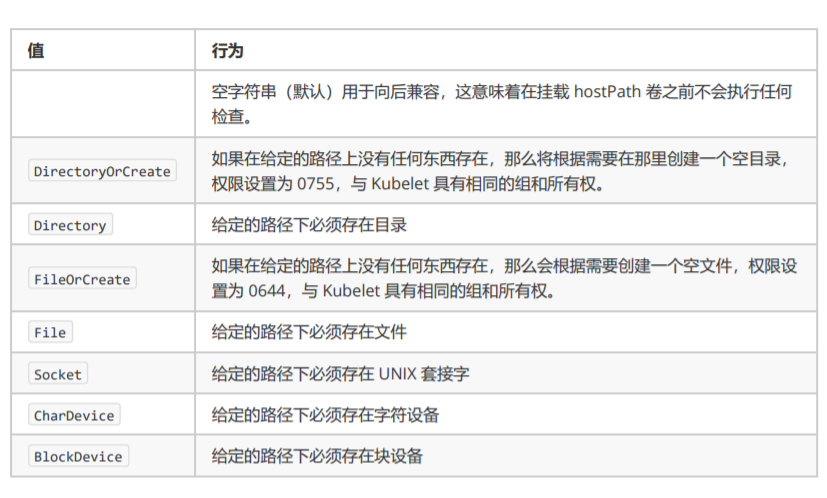
    hostPath更多使用方法

hostPath-example.yaml

1
2
3
4
5
6
7
8
9
10
11
12
13
14
15
16
17
18
apiVersion: v1
kind: Pod
metadata:
name: test-pd
spec:
containers:
- image: nginx:1.7.9
name: test-container
volumeMounts:
- mountPath: /test-pd
name: test-volume
volumes:
- name: test-volume
hostPath:
# directory location on host
path: /data
# this field is optional
type: Directory
hostPath_type

1
2
3
4
5
6
7
8
9
10
11
12
13
14
15
16
17
18
19
20
21
22
23
24
25
26
27
28
29
30
31
32
33
34
35
36
37
38
39
40
41
42
43
44
45
46
47
48
[root@k8s01 ~]# kubectl apply -f  hostPath-example.yaml
pod/test-pd02 created
[root@k8s01 ~]# kubectl get pod # 一直处于 ContainerCreating
NAME READY STATUS RESTARTS AGE
test-pd 2/2 Running 0 19m
test-pd02 0/1 ContainerCreating 0 16s

[root@k8s01 ~]# kubectl describe pod test-pd02 # 查看日志,发现是因为 k8s03上没有 /data 目录

[root@k8s03 ~]# mkdir /data
[root@k8s01 ~]# kubectl describe pod test-pd02 # 节选
Events:
Type Reason Age From Message
---- ------ ---- ---- -------
Normal Scheduled 4m42s default-scheduler Successfully assigned default/test-pd02 to k8s03
Warning FailedMount 3m38s (x8 over 4m41s) kubelet, k8s03 MountVolume.SetUp failed for volume "test-volume" : hostPath type check failed: /data is not a directory
Warning FailedMount 2m39s kubelet, k8s03 Unable to attach or mount volumes: unmounted volumes=[test-volume], unattached volumes=[test-volume default-token-rr77c]: timed out waiting for the condition
Normal Pulled 2m26s kubelet, k8s03 Container image "nginx:1.7.9" already present on machine
Normal Created 2m26s kubelet, k8s03 Created container test-container
Normal Started 2m26s kubelet, k8s03 Started container test-container

[root@k8s01 ~]# kubectl exec test-pd02 -it -- /bin/bash
root@test-pd02:/# ls
bin boot dev etc home lib lib64 media mnt opt proc root run sbin selinux srv sys test-pd tmp usr var
root@test-pd02:/# cd test-pd/
root@test-pd02:/test-pd# date >> index.txt
root@test-pd02:/test-pd# cat index.txt
Mon Aug 31 17:25:09 UTC 2020

[root@k8s03 ~]# cat /data/index.txt # /data 下已有 index.txt 文件,内容相同
Mon Aug 31 17:25:09 UTC 2020
[root@k8s03 ~]# date >> /data/index.txt # /data/index.txt 写入
[root@k8s03 ~]# cat /data/index.txt
Mon Aug 31 17:25:09 UTC 2020
Mon Aug 31 13:27:03 EDT 2020


root@test-pd02:/test-pd# cat index.txt # 容器内也是相同内容
Mon Aug 31 17:25:09 UTC 2020
Mon Aug 31 13:27:03 EDT 2020

[root@k8s01 ~]# kubectl delete pod test-pd02 # 删除 Pod
pod "test-pd02" deleted

[root@k8s03 ~]# cat /data/index.txt # 文件还在 k8s03 节点存在
Mon Aug 31 17:25:09 UTC 2020
Mon Aug 31 13:27:03 EDT 2020

当一个 Pod 调度到一个节点上之后,kubelet 就要负责为这个 Pod 创建它的 Volume 目录。默认情况下,kubeletVolume 创建的目录是如下所示的一个宿主机上的路径:

1
/var/lib/kubelet/pods/<Pod的ID>/volumes/kubernetes.io~<Volume类型>/<Volume名字>

接下来,kubelet 要做的操作就取决于 Volume 类型。

eg: 远程磁盘

  1. attach : 将远程磁盘挂载到 pod 所在 node 节点上 (nfs 等不在远程的,可以直接执行第二步)(nodeName,即宿主机的名字。)
  2. mount : 格式化此磁盘,然后将它挂载到宿主机的指定挂载点 (dir,即 Volume 的宿主机目录)
1
2
3
4
5
6
7
8
9
10
11
# 过程类似于:
# 第一步
$ gcloud compute instances attach-disk <虚拟机名字> --disk <远程磁盘名字>

# 第二步
# 通过lsblk命令获取磁盘设备ID
$ sudo lsblk
# 格式化成ext4格式
$ sudo mkfs.ext4 -m 0 -F -E lazy_itable_init=0,lazy_journal_init=0,discard /dev/<磁盘设备ID>
# 挂载到挂载点
$ sudo mkdir -p /var/lib/kubelet/pods/<Pod的ID>/volumes/kubernetes.io~<Volume类型>/<Volume名字>