简介
Istio 包含控制面 Istiod 和数据面 Envoy 两个组件。
Istiod : 负责配置校验(Galley)和下发(Pilot)、证书轮转(Citadel)等工作
Envoy : 负责数据代理和流量路由等工作
Envoy 是 C++ 编写的高性能边缘网关和代理程序,支持 HTTP、gRPC、Thrift、Redis、MongoDB 等多种协议代理。支持最好的还是 HTTP,几乎具备了 Service Mesh 数据面需要的所有功能,比如服务发现、限流熔断、多种负载均衡策略、精准流量路由等。
补充说明
1.5.0 版本以后 Istio 控制面由以下几个组件组成。
Pilot:Istio 控制面中最核心的模块,负责运行时配置下发,具体来说,就是和 Envoy 之间基于 xDS 协议进行的各种 Envoy 配置信息的推送,包括服务发现、路由发现、集群发现、监听器发现等。
Citadel:负责证书的分发和轮换,使 Sidecar 代理两端实现双向 TLS 认证、访问授权等。
Galley:配置信息的格式和正确性校验,将配置信息提供给 Pilot 使用。
安装
用当前最新版本 1.9.01
2
3
4
5
6
7
8
9
10
11
12
13
14
15
16
17
18
19
20
21
22
23
24
25
26
27
28
29
30
31
32
33
34
35
36
37
38
39
40
41
42
43
44
45
46
47
48
49
50
51
52
53
54
55
56
57
58
59
60
61
62
63
64
65
66
67
68
69
70
71
72
73
74
75
76
77root@k8s01 ~]# curl -L https://istio.io/downloadIstio | ISTIO_VERSION=1.9.0 TARGET_ARCH=x86_64 sh -
% Total % Received % Xferd Average Speed Time Time Time Current
Dload Upload Total Spent Left Speed
100 102 100 102 0 0 73 0 0:00:01 0:00:01 --:--:-- 73
100 4579 100 4579 0 0 552 0 0:00:08 0:00:08 --:--:-- 1219
Downloading istio-1.9.0 from https://github.com/istio/istio/releases/download/1.9.0/istio-1.9.0-linux-amd64.tar.gz ...
Istio 1.9.0 Download Complete!
Istio has been successfully downloaded into the istio-1.9.0 folder on your system.
Next Steps:
See https://istio.io/latest/docs/setup/install/ to add Istio to your Kubernetes cluster.
To configure the istioctl client tool for your workstation,
add the /root/istio-1.9.0/bin directory to your environment path variable with:
export PATH="$PATH:/root/istio-1.9.0/bin"
Begin the Istio pre-installation check by running:
istioctl x precheck
Need more information? Visit https://istio.io/latest/docs/setup/install/
[root@k8s01 ~]# istioctl x precheck # 检查
Checking the cluster to make sure it is ready for Istio installation...
#1. Kubernetes-api
-----------------------
Can initialize the Kubernetes client.
Can query the Kubernetes API Server.
#2. Kubernetes-version
-----------------------
Istio is compatible with Kubernetes: v1.20.0.
#3. Istio-existence
-----------------------
Istio will be installed in the istio-system namespace.
#4. Kubernetes-setup
-----------------------
Can create necessary Kubernetes configurations: Namespace,ClusterRole,ClusterRoleBinding,CustomResourceDefinition,Role,ServiceAccount,Service,Deployments,ConfigMap.
#5. SideCar-Injector
-----------------------
This Kubernetes cluster supports automatic sidecar injection. To enable automatic sidecar injection see https://istio.io/v1.9/docs/setup/additional-setup/sidecar-injection/#deploying-an-app
-----------------------
Install Pre-Check passed! The cluster is ready for Istio installation.
[root@k8s01 ~]# istioctl install # istioctl install --set profile=demo -y
This will install the Istio 1.9.0 profile with ["Istio core" "Istiod" "Ingress gateways"] components into the cluster. Proceed? (y/N) y
✔ Istio core installed
✔ Processing resources for Istiod. Waiting for Deployment/istio-system/istiod
✔ Istiod installed
✔ Ingress gateways installed
✔ Installation complete
[root@k8s01 ~]# kubectl label namespace default istio-injection=enabled # 在默认命名空间开启自动注入 Envoy Sidecar
namespace/default labeled
[root@k8s01 ~]# kubectl get svc -n istio-system
NAME TYPE CLUSTER-IP EXTERNAL-IP PORT(S) AGE
istio-ingressgateway LoadBalancer 10.99.32.157 <pending> 15021:32027/TCP,80:31794/TCP,443:30320/TCP,15012:31269/TCP,15443:31456/TCP 23h
istiod ClusterIP 10.109.186.86 <none> 15010/TCP,15012/TCP,443/TCP,15014/TCP 23h
[root@k8s01 ~]# istioctl analyze -n default
[root@k8s01 ~]# istioctl profile list
[root@k8s01 ~]# istioctl profile dump demo > demo.yaml
istio API resources:
VirtualService
Gateway
ServiceEntry
DestinationRule
sidecars
测试
- 部署 Bookinfo 示例应用
1 | [root@k8s01 ~]# kubectl apply -f samples/bookinfo/platform/kube/bookinfo.yaml |
- 把应用关联到
Istio网关
1 | [root@k8s01 istio-1.9.0]# kubectl apply -f samples/bookinfo/networking/bookinfo-gateway.yaml |
- 确定入站
ip和portip为node ip(192.168.43.101,192.168.43.102,192.168.43.103)port为31794(80) ,30320(443)
1 | [root@k8s01 istio-1.9.0]# kubectl get svc istio-ingressgateway -n istio-system # LoadBalancer , 本地环境无此项 |
- 验证
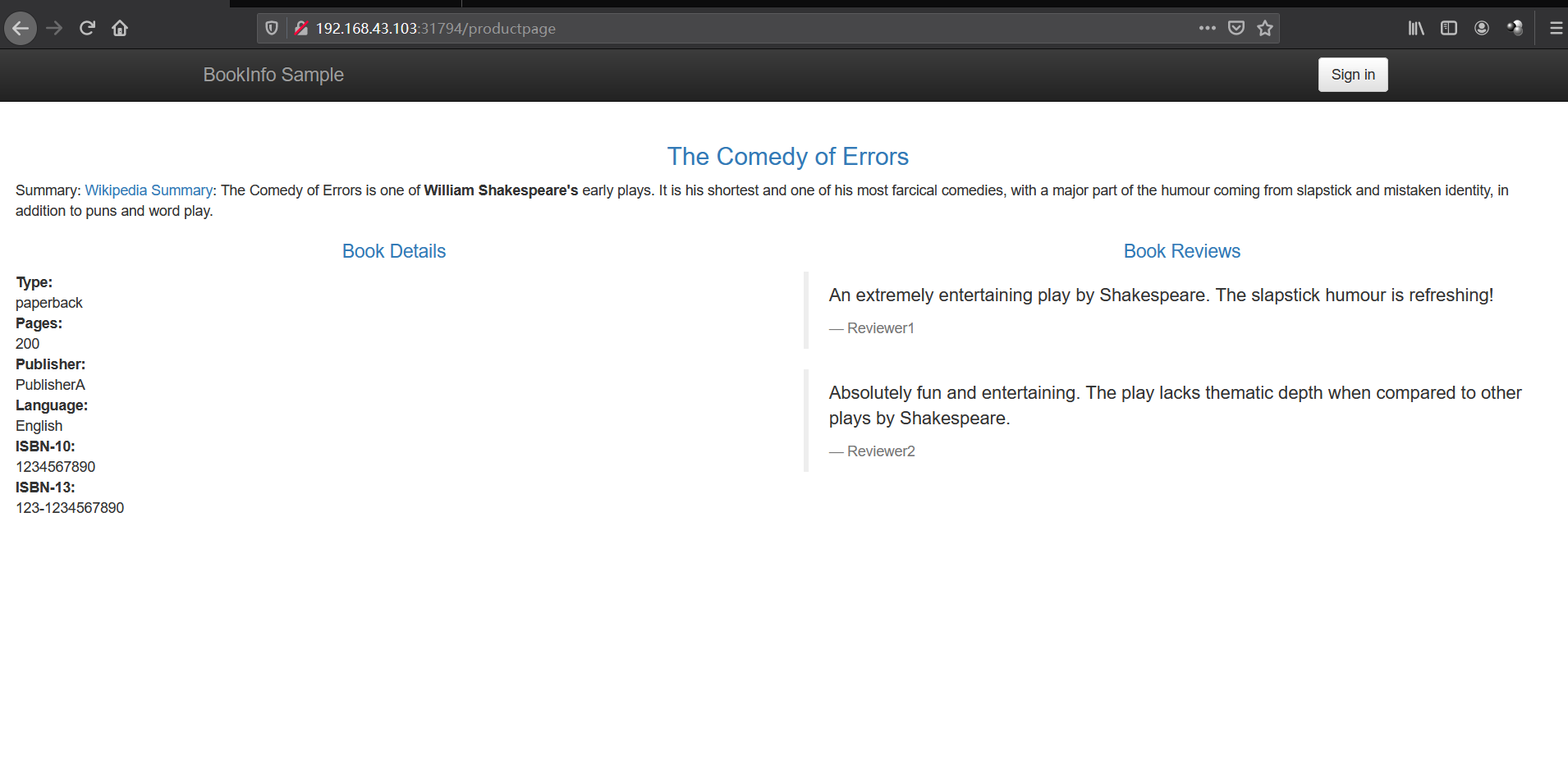
Ingress 和 Egress
Ingress 可以理解为入口网关,而 Egress 和 Ingress 的功能相仿,只是流量的代理流向不同,Egress 负责出口流量的代理。
Ingress
kubernetes 中的 Ingress 解决了 NodePort 配置不方便的问题,但通过 YAML 的方式控制 Ingress 依然是一件麻烦事,另外 Ingress 内部依然是使用 ClusterIP 的方式来访问 Service,而这样的方式是通过 IPVS 四层转发做到的。具体可查看 之前的文章 Ingress
Istio 用 Istio Gateway 来代替 Kubernetes 中的 Ingress 资源类型。Gateway 允许外部流量访问内部服务,只需要配置流量转发即可。
使用方法 见 前面 部署 Bookinfo 示例应用
Egress
####kubernetes 中的 Egress 只是在 IP 地址或端口层面(OSI 第 3 层或第 4 层)控制网络流量
eg:1
2
3
4
5
6
7
8
9
10
11
12
13
14
15
16
17
18
19
20
21
22
23
24
25
26
27
28
29
30
31
32
33
34apiVersion: networking.k8s.io/v1
kind: NetworkPolicy
metadata:
name: test-network-policy
namespace: default
spec:
podSelector:
matchLabels:
role: db
policyTypes:
- Ingress
- Egress
ingress:
- from:
- ipBlock:
cidr: 172.17.0.0/16
except:
- 172.17.1.0/24
- namespaceSelector:
matchLabels:
project: myproject
- podSelector:
matchLabels:
role: frontend
ports:
- protocol: TCP
port: 6379
egress:
- to:
- ipBlock:
cidr: 10.0.0.0/24
ports:
- protocol: TCP
port: 5978
Istio Egress
Istio 的 Egress 本质上是一个 Envoy Proxy,通过 Envoy 强大的七层代理功能,提供丰富的路由策略,而不局限于简单的四层网络 IP 端口黑白名单的配置。
默认安装未开启1
2
3
4
5
6
7
8
9
10
11
12
13[root@k8s01 istio-1.9.0]# istioctl manifest apply --set values.global.istioNamespace=istio-system --set values.gateways.istio-ingressgateway.enabled=true --set values.gateways.istio-egressgateway.enabled=true
This will install the Istio 1.9.0 profile with ["Istio core" "Istiod" "Ingress gateways" "Egress gateways"] components into the cluster. Proceed? (y/N) y
✔ Istio core installed
✔ Istiod installed
✔ Egress gateways installed
✔ Ingress gateways installed
✔ Installation complete
[root@k8s01 user-gateway]# kubectl get pod -n istio-system # 当前已开启
NAME READY STATUS RESTARTS AGE
istio-egressgateway-956cbd66f-xkncd 1/1 Running 0 19m
istio-ingressgateway-758985db4f-nglq6 1/1 Running 0 14m
istiod-7c9c9d46d4-dn58c 1/1 Running 4 25h
测试
1 | [root@k8s01 istio-1.9.0]# cat samples/sleep/sleep.yaml |
创建一个
ServiceEntry,允许流量直接访问一个外部服务
ServiceEntry-test.yaml1
2
3
4
5
6
7
8
9
10
11
12
13
14
15apiVersion: networking.istio.io/v1alpha3
kind: ServiceEntry
metadata:
name: cnn
spec:
hosts:
- edition.cnn.com
ports:
- number: 80
name: http-port
protocol: HTTP
- number: 443
name: https
protocol: HTTPS
resolution: DNS为
edition.cnn.com端口80创建Egress Gateway,并为指向Egress Gateway的流量创建一个Destination Rule:
1 | apiVersion: networking.istio.io/v1alpha3 |
定义一个
VirtualService,将流量从Sidecar引导至Egress Gateway,再从Egress Gateway引导至外部服务1
2
3
4
5
6
7
8
9
10
11
12
13
14
15
16
17
18
19
20
21
22
23
24
25
26
27
28
29
30
31
32apiVersion: networking.istio.io/v1alpha3
kind: VirtualService
metadata:
name: direct-cnn-through-egress-gateway
spec:
hosts:
- edition.cnn.com
gateways:
- istio-egressgateway
- mesh
http:
- match:
- gateways:
- mesh
port: 80
route:
- destination:
host: istio-egressgateway.istio-system.svc.cluster.local
subset: cnn
port:
number: 80
weight: 100
- match:
- gateways:
- istio-egressgateway
port: 80
route:
- destination:
host: edition.cnn.com
port:
number: 80
weight: 100访问第三方服务
1 | [root@k8s01 istio-1.9.0]# kubectl exec -it $SOURCE_POD -c sleep -- curl -sL -o /dev/null -D - http://edition.cnn.com/politics |
- 删除测试
1 | kubectl delete gateway istio-egressgateway |
金丝雀发布
金丝雀发布也被称为灰度发布,实际上就是将少量的生产流量路由到线上服务的新版本中,以验证新版本的准确性和稳定性。
k8s 原生方式
启动 两个 版本 ,service 指向这 两个版本,完成简单的金丝雀发布。但这样的方式依然达不到精准控制的目的
eg:
svc1
2
3
4
5
6
7
8
9
10
11
12
13
14[root@k8s01 test]# cat service.yaml
apiVersion: v1
kind: Service
metadata:
name: my-nginx-svc
namespace: demo
labels:
app: nginx
spec:
type: ClusterIP
ports:
- port: 80
selector:
app: nginx
my-nginx-deployment-v1.yaml1
2
3
4
5
6
7
8
9
10
11
12
13
14
15
16
17
18
19
20
21
22
23apiVersion: apps/v1
kind: Deployment
metadata:
name: my-nginx-v1
namespace: demo
labels:
app: nginx
version: v1
spec:
replicas: 3
selector:
matchLabels:
app: nginx
template:
metadata:
labels:
app: nginx
spec:
containers:
- name: nginx
image: nginx:1.14.2
ports:
- containerPort: 80
my-nginx-deployment-v2.yaml1
2
3
4
5
6
7
8
9
10
11
12
13
14
15
16
17
18
19
20
21
22
23apiVersion: apps/v1
kind: Deployment
metadata:
name: my-nginx-v2
namespace: demo
labels:
app: nginx
version: v2
spec:
replicas: 3
selector:
matchLabels:
app: nginx
template:
metadata:
labels:
app: nginx
spec:
containers:
- name: nginx
image: nginx:1.7.9
ports:
- containerPort: 80
测试
1 | [root@k8s01 test]# kubectl get svc -n demo |
istio 中的金丝雀发布
还是使用 book_info
节选1
2
3
4
5
6
7
8
9
10
11
12
13
14
15
16
17
18
19
20
21
22
23
24
25
26
27
28
29
30
31
32
33
34
35
36
37
38
39
40
41
42
43
44
45
46
47
48
49
50
51
52
53
54
55
56
57
58
59
60---
apiVersion: apps/v1
kind: Deployment
metadata:
name: reviews-v1
labels:
app: reviews
version: v1
spec:
replicas: 1
selector:
matchLabels:
app: reviews
version: v1
template:
metadata:
labels:
app: reviews
version: v1
...
---
apiVersion: apps/v1
kind: Deployment
metadata:
name: reviews-v2
labels:
app: reviews
version: v2
spec:
replicas: 1
selector:
matchLabels:
app: reviews
version: v2
template:
metadata:
labels:
app: reviews
version: v2
....
---
apiVersion: apps/v1
kind: Deployment
metadata:
name: reviews-v3
labels:
app: reviews
version: v3
spec:
replicas: 1
selector:
matchLabels:
app: reviews
version: v3
template:
metadata:
labels:
app: reviews
version: v3
....
查看信息1
2
3
4
5[root@k8s01 istio-1.9.0]# kubectl get pod -l app=reviews
NAME READY STATUS RESTARTS AGE
reviews-v1-545db77b95-zzlv8 2/2 Running 2 26h
reviews-v2-7bf8c9648f-7vtss 2/2 Running 2 26h
reviews-v3-84779c7bbc-85nn2 2/2 Running 2 26h
访问 http://192.168.43.101:31794/productpage 三个版本几乎是随机出现的,类似于 k8s 原生方式
创建一个 reviews 的路由规则,为了方便验证,这个配置将所有流量指向 reviews 的 v1 版本1
2
3
4
5
6
7
8
9
10
11
12
13
14
15
16
17
18
19
20
21
22
23
24
25
26
27
28
29
30
31kubectl apply -f - <<EOF
apiVersion: networking.istio.io/v1alpha3
kind: VirtualService
metadata:
name: reivews
spec:
hosts:
- reviews
http:
- route:
- destination:
host: # svc
subset: v1
---
apiVersion: networking.istio.io/v1alpha3
kind: DestinationRule
metadata:
name: reviews
spec:
host: reviews # svc
subsets:
- name: v1
labels:
version: v1
- name: v2
labels:
version: v2
- name: v3
labels:
version: v3
EOF
多次刷新界面,http://192.168.43.101:31794/productpage 均为 v1 界面。
50% 去 v1, 10% 去 v2, 40% 去 v31
2
3
4
5
6
7
8
9
10
11
12
13
14
15
16
17
18
19
20
21
22
23kubectl apply -f - <<EOF
apiVersion: networking.istio.io/v1alpha3
kind: VirtualService
metadata:
name: reivews
spec:
hosts:
- reviews
http:
- route:
- destination:
host: reviews
subset: v1
weight: 50
- destination:
host: reviews
subset: v2
weight: 10
- destination:
host: reviews
subset: v3
weight: 40
EOF
多次刷新界面,http://192.168.43.101:31794/productpage 得以验证。
卸载
卸载1
2
3
4
5
6
7
8
9
10
11
12
13
14
15
16
17
18
19
20
21
22
23
24
25
26
27
28
29
30
31
32
33
34
35
36
37
38
39
40
41
42
43
44
45
46
47
48
49
50
51
52
53
54
55
56
57
58[root@k8s01 ~]# istioctl x uninstall --purge
All Istio resources will be pruned from the cluster
Proceed? (y/N) y
Removed IstioOperator:istio-system:installed-state.
Removed HorizontalPodAutoscaler:istio-system:istio-egressgateway.
Removed HorizontalPodAutoscaler:istio-system:istio-ingressgateway.
Removed HorizontalPodAutoscaler:istio-system:istiod.
Removed PodDisruptionBudget:istio-system:istio-egressgateway.
Removed PodDisruptionBudget:istio-system:istio-ingressgateway.
Removed PodDisruptionBudget:istio-system:istiod.
Removed Deployment:istio-system:istio-egressgateway.
Removed Deployment:istio-system:istio-ingressgateway.
Removed Deployment:istio-system:istiod.
Removed Service:istio-system:istio-egressgateway.
Removed Service:istio-system:istio-ingressgateway.
Removed Service:istio-system:istiod.
Removed ConfigMap:istio-system:istio.
Removed ConfigMap:istio-system:istio-sidecar-injector.
Removed Pod:istio-system:istio-egressgateway-54658cd5f5-fvlwg.
Removed Pod:istio-system:istio-ingressgateway-7cc49dcd99-ppmhp.
Removed Pod:istio-system:istiod-db9f9f86-7665m.
Removed ServiceAccount:istio-system:istio-egressgateway-service-account.
Removed ServiceAccount:istio-system:istio-ingressgateway-service-account.
Removed ServiceAccount:istio-system:istio-reader-service-account.
Removed ServiceAccount:istio-system:istiod-service-account.
Removed RoleBinding:istio-system:istio-egressgateway-sds.
Removed RoleBinding:istio-system:istio-ingressgateway-sds.
Removed RoleBinding:istio-system:istiod-istio-system.
Removed Role:istio-system:istio-egressgateway-sds.
Removed Role:istio-system:istio-ingressgateway-sds.
Removed Role:istio-system:istiod-istio-system.
Removed EnvoyFilter:istio-system:metadata-exchange-1.8.
Removed EnvoyFilter:istio-system:metadata-exchange-1.9.
Removed EnvoyFilter:istio-system:stats-filter-1.8.
Removed EnvoyFilter:istio-system:stats-filter-1.9.
Removed EnvoyFilter:istio-system:tcp-metadata-exchange-1.8.
Removed EnvoyFilter:istio-system:tcp-metadata-exchange-1.9.
Removed EnvoyFilter:istio-system:tcp-stats-filter-1.8.
Removed EnvoyFilter:istio-system:tcp-stats-filter-1.9.
Removed MutatingWebhookConfiguration::istio-sidecar-injector.
Removed ValidatingWebhookConfiguration::istiod-istio-system.
Removed ClusterRole::istio-reader-istio-system.
Removed ClusterRole::istiod-istio-system.
Removed ClusterRoleBinding::istio-reader-istio-system.
Removed ClusterRoleBinding::istiod-istio-system.
Removed CustomResourceDefinition::authorizationpolicies.security.istio.io.
Removed CustomResourceDefinition::destinationrules.networking.istio.io.
Removed CustomResourceDefinition::envoyfilters.networking.istio.io.
Removed CustomResourceDefinition::gateways.networking.istio.io.
Removed CustomResourceDefinition::istiooperators.install.istio.io.
Removed CustomResourceDefinition::peerauthentications.security.istio.io.
Removed CustomResourceDefinition::requestauthentications.security.istio.io.
Removed CustomResourceDefinition::serviceentries.networking.istio.io.
Removed CustomResourceDefinition::sidecars.networking.istio.io.
Removed CustomResourceDefinition::virtualservices.networking.istio.io.
Removed CustomResourceDefinition::workloadentries.networking.istio.io.
Removed CustomResourceDefinition::workloadgroups.networking.istio.io.
✔ Uninstall complete
删除
1 | kubectl delete namespace istio-system |