k8s安装-三主两工作节点高可用-kubeadm

请结合 k8s 简介与安装 操作

准备条件

VIP 192.168.43.100
| 主机名 | IP | 角色 |
| —— | ———— | —— |
| k8s01 | 192.168.43.101 | master |
| k8s02 | 192.168.43.102 | worker |
| k8s03 | 192.168.43.103 | worker |
| k8s04 | 192.168.43.104 | master |
| k8s05 | 192.168.43.105 | master |

前置条件与单 master 相同

所有节点执行

1
2
3
4
5
6
7
8
9
10
11
12
13
14
15
16
17
18
19
20
21
22
23
24
25
26
27
28
29
30
31
32
33
34
35
36
37
38
39
40
41
42
43
44
45
46
47
48
49
50
51
52
53
54
55
56
57
58
59
60
61
62
63
64
# 根据规划设置主机名
hostnamectl set-hostname <hostname>

# 在master添加hosts
cat >> /etc/hosts << EOF
192.168.43.100 k8s-vip master.k8s.io
192.168.43.101 k8s01 k8s01.k8s.io
192.168.43.102 k8s02 k8s02.k8s.io
192.168.43.103 k8s03 k8s03.k8s.io
192.168.43.104 k8s04 k8s04.k8s.io
192.168.43.105 k8s05 k8s05.k8s.io
EOF

## 所有节点执行以下内容
#!/bin/sh
#关闭防火墙
systemctl disable --now firewalld
setenforce 0
sed -i 's/enforcing/disabled/' /etc/selinux/config
#关闭swap分区
swapoff -a
sed -i.bak 's/^.*centos-swap/#&/g' /etc/fstab
#优化系统
cat > /etc/sysctl.d/k8s.conf << EOF
net.ipv4.ip_forward = 1
net.bridge.bridge-nf-call-iptables = 1
net.bridge.bridge-nf-call-ip6tables = 1
fs.may_detach_mounts = 1
vm.overcommit_memory=1
vm.panic_on_oom=0
fs.inotify.max_user_watches=89100
fs.file-max=52706963
fs.nr_open=52706963
net.ipv4.tcp_keepalive_time = 600
net.ipv4.tcp.keepaliv.probes = 3
net.ipv4.tcp_keepalive_intvl = 15
net.ipv4.tcp.max_tw_buckets = 36000
net.ipv4.tcp_tw_reuse = 1
net.ipv4.tcp.max_orphans = 327680
net.ipv4.tcp_orphan_retries = 3
net.ipv4.tcp_syncookies = 1
net.ipv4.tcp_max_syn_backlog = 16384
net.ipv4.ip_conntrack_max = 65536
net.ipv4.tcp_max_syn_backlog = 16384
net.ipv4.top_timestamps = 0
net.core.somaxconn = 16384
EOF

#立即生效
sysctl --system

#配置阿里云的base和epel源
mv /etc/yum.repos.d/* /tmp
curl -o /etc/yum.repos.d/CentOS-Base.repo https://mirrors.aliyun.com/repo/Centos-7.repo
curl -o /etc/yum.repos.d/epel.repo http://mirrors.aliyun.com/repo/epel-7.repo
#安装dnf工具

yum install dnf -y
dnf makecache
#安装ntpdate工具
dnf install ntpdate -y
#同步阿里云时间
ln -sf /usr/share/zoneinfo/Asia/Shanghai /etc/localtime
ntpdate ntp.aliyun.com

安装

1. Haproxy+Keepalived配置高可用VIP (推荐使用 nginx + keepalived)

在 三个 master 节点安装

1
dnf install -y keepalived haproxy

2. 配置 Keepalived 服务

k8s01

1
2
3
4
5
6
7
8
9
10
11
12
13
14
15
16
17
18
19
20
21
22
23
24
25
26
27
28
29
30
31
32
33
34
cat > /etc/keepalived/keepalived.conf <<EOF 
! Configuration File for keepalived

global_defs {
router_id k8s
}

vrrp_script check_haproxy {
script "killall -0 haproxy"
interval 3
weight -2
fall 10
rise 2
}

vrrp_instance VI_1 {
state MASTER # 主节点
interface ens33 # 当前用的 ens33 网卡
virtual_router_id 51
priority 100 # 优先级配置 k8s01 100 k8s04 99 k8s05 98
advert_int 2
authentication {
auth_type PASS
auth_pass K8SHA_KA_AUTH
}
virtual_ipaddress { # VIP
192.168.43.100
}
track_script {
check_kubernetes # 集群检查脚本
}

}
EOF

k8s04k8s05

1
2
3
4
5
6
7
8
9
10
11
12
13
14
15
16
17
18
19
20
21
22
23
24
25
26
27
28
29
30
31
32
33
34
cat > /etc/keepalived/keepalived.conf <<EOF 
! Configuration File for keepalived

global_defs {
router_id k8s
}

vrrp_script check_haproxy {
script "killall -0 haproxy"
interval 3
weight -2
fall 10
rise 2
}

vrrp_instance VI_1 {
state BACKUP # 主节点
interface ens33 # 当前用的 ens33 网卡
virtual_router_id 51
priority 100 # 优先级配置 k8s01 100 k8s04 99 k8s05 98
advert_int 2
authentication {
auth_type PASS
auth_pass K8SHA_KA_AUTH
}
virtual_ipaddress { # VIP
192.168.43.100
}
track_script {
check_kubernetes # 集群检查脚本
}

}
EOF

3. 配置健康检测脚本

/etc/keepalived/check_kubernetes.sh

1
2
3
4
5
6
7
8
9
10
11
12
13
14
15
16
17
18
19
20
21
22
23
24
cat > /etc/keepalived/check_kubernetes.sh <<EOF 
#!/bin/bash

function chech_kubernetes() {
for ((i=0;i<5;i++));do
apiserver_pid_id=$(pgrep kube-apiserver)
if [[ ! -z $apiserver_pid_id ]];then
return
else
sleep 2
fi
apiserver_pid_id=0
done
}

# 1:running 0:stopped
check_kubernetes
if [[ $apiserver_pid_id -eq 0 ]];then
/usr/bin/systemctl stop keepalived
exit 1
else
exit 0
fi
EOF

添加 x 权限

1
chmod +x /etc/keepalived/check_kubernetes.sh

4. 配置 haproxy (推荐使用 nginx)

三台 master 节点的配置均相同,配置中声明了后端代理的三个 master 节点服务器,指定了 haproxy 运行的端口为 16443 等,因此 16443 端口为集群的入口
/etc/haproxy/haproxy.cfg

1
2
3
4
5
6
7
8
9
10
11
12
13
14
15
16
17
18
19
20
21
22
23
24
25
26
27
28
29
30
31
32
33
34
35
36
37
38
39
40
41
42
43
44
45
46
47
48
49
50
51
52
53
54
55
56
57
58
59
60
61
62
63
64
65
66
67
68
69
70
71
72
73
74
75
cat > /etc/haproxy/haproxy.cfg << EOF
#---------------------------------------------------------------------
# Global settings
#---------------------------------------------------------------------
global
# to have these messages end up in /var/log/haproxy.log you will
# need to:
# 1) configure syslog to accept network log events. This is done
# by adding the '-r' option to the SYSLOGD_OPTIONS in
# /etc/sysconfig/syslog
# 2) configure local2 events to go to the /var/log/haproxy.log
# file. A line like the following can be added to
# /etc/sysconfig/syslog
#
# local2.* /var/log/haproxy.log
#
log 127.0.0.1 local2

chroot /var/lib/haproxy
pidfile /var/run/haproxy.pid
maxconn 4000
user haproxy
group haproxy
daemon

# turn on stats unix socket
stats socket /var/lib/haproxy/stats
#---------------------------------------------------------------------
# common defaults that all the 'listen' and 'backend' sections will
# use if not designated in their block
#---------------------------------------------------------------------
defaults
mode http
log global
option httplog
option dontlognull
option http-server-close
option forwardfor except 127.0.0.0/8
option redispatch
retries 3
timeout http-request 10s
timeout queue 1m
timeout connect 10s
timeout client 1m
timeout server 1m
timeout http-keep-alive 10s
timeout check 10s
maxconn 3000
#---------------------------------------------------------------------
# kubernetes apiserver frontend which proxys to the backends
#---------------------------------------------------------------------
frontend kubernetes-apiserver
mode tcp
bind *:16443
option tcplog
default_backend kubernetes-apiserver
#---------------------------------------------------------------------
# round robin balancing between the various backends
#---------------------------------------------------------------------
backend kubernetes-apiserver
mode tcp
balance roundrobin
server k8s01.k8s.io 192.168.43.101:6443 check
server k8s04.k8s.io 192.168.43.104:6443 check
server k8s05.k8s.io 192.168.43.105:6443 check
#---------------------------------------------------------------------
# collection haproxy statistics message
#---------------------------------------------------------------------
listen stats
bind *:1080
stats auth admin:awesomePassword
stats refresh 5s
stats realm HAProxy\ Statistics
stats uri /admin?stats
EOF

5. 设置开机启动并检查是否正常

1
2
3
4
5
6
7
~]# systemctl enable --now keepalived haproxy
~]# systemctl restart keepalived haproxy
~]# systemctl status keepalived haproxy
~]# ping 192.168.43.100 #检测一下是否通
PING 192.168.43.100 (192.168.43.100) 56(84) bytes of data.
64 bytes from 192.168.43.100: icmp_seq=1 ttl=64 time=0.778 ms
64 bytes from 192.168.43.100: icmp_seq=2 ttl=64 time=0.339 ms

6. 修改初始化文件

~]# kubeadm config print init-defaults > kubeadm-init.yaml # 需要修改

修改后如下

1
2
3
4
5
6
7
8
9
10
11
12
13
14
15
16
17
18
19
20
21
22
23
24
25
26
27
28
29
30
31
32
33
34
35
36
37
38
39
40
41
42
43
44
45
46
47
48
49
50
51
52
53
54
55
56
57
apiVersion: kubeadm.k8s.io/v1beta2
bootstrapTokens:
- groups:
- system:bootstrappers:kubeadm:default-node-token
token: abcdef.0123456789abcdef
ttl: 24h0m0s
usages:
- signing
- authentication
kind: InitConfiguration
localAPIEndpoint:
advertiseAddress: 192.168.43.101 # 本地节点 ip
bindPort: 6443
nodeRegistration:
criSocket: /var/run/dockershim.sock
name: k8s01
taints:
- effect: NoSchedule
key: node-role.kubernetes.io/master
---
apiServer:
timeoutForControlPlane: 4m0s
certSANs:
- k8s01
- k8s04
- k8s05
- master.k8s.io
- 192.168.43.100 # VIP
- 192.168.43.101
- 192.168.43.104
- 192.168.43.105
- 127.0.0.1
apiVersion: kubeadm.k8s.io/v1beta2
certificatesDir: /etc/kubernetes/pki
clusterName: kubernetes
controlPlaneEndpoint: "192.168.43.100:16443" # 填 VIP 及对应 PORT
controllerManager: {}
dns:
type: CoreDNS
etcd:
local:
dataDir: /var/lib/etcd
imageRepository: registry.aliyuncs.com/google_containers
kind: ClusterConfiguration
kubernetesVersion: v1.18.0
networking:
dnsDomain: cluster.local
serviceSubnet: 10.96.0.0/12
podSubnet: 10.244.0.0/16 # 添加pod网段
scheduler: {}
---
apiVersion: kubeproxy.config.k8s.io/v1alpha1
kind: KubeProxyConfiguration
mode: ipvs
ipvs:
excludeCIDRs:
- 10.103.97.2/32

7 在master1节点执行

1
2
3
4
5
6
7
8
9
10
11
12
13
14
15
16
17
18
19
20
21
22
23
24
25
26
27
28
29
30
31
32
33
34
$ kubeadm init --config kubeadm_init.yaml --upload-certs

# 节选
Your Kubernetes control-plane has initialized successfully!

To start using your cluster, you need to run the following as a regular user:

mkdir -p $HOME/.kube
sudo cp -i /etc/kubernetes/admin.conf $HOME/.kube/config
sudo chown $(id -u):$(id -g) $HOME/.kube/config


Alternatively, if you are the root user, you can run:

export KUBECONFIG=/etc/kubernetes/admin.conf

You should now deploy a pod network to the cluster.
Run "kubectl apply -f [podnetwork].yaml" with one of the options listed at:
https://kubernetes.io/docs/concepts/cluster-administration/addons/

You can now join any number of the control-plane node running the following command on each as root:

kubeadm join master.k8s.io:16443 --token abcdef.0123456789abcdef \
--discovery-token-ca-cert-hash sha256:e51a918cb751d64640fc6fdec938470a4ec0ab28b6ac9fd56df0fc736dd9e774 \
--control-plane --certificate-key f23f279296d7154c2c95c2cea10156e0019e39aecf1e0557aaa6a9074e89f10b

Please note that the certificate-key gives access to cluster sensitive data, keep it secret!
As a safeguard, uploaded-certs will be deleted in two hours; If necessary, you can use
"kubeadm init phase upload-certs --upload-certs" to reload certs afterward.

Then you can join any number of worker nodes by running the following on each as root:

kubeadm join master.k8s.io:16443 --token abcdef.0123456789abcdef \
--discovery-token-ca-cert-hash sha256:e51a918cb751d64640fc6fdec938470a4ec0ab28b6ac9fd56df0fc736dd9e774

按照提示配置环境变量,使用 kubectl 工具:

1
2
3
mkdir -p $HOME/.kube
sudo cp -i /etc/kubernetes/admin.conf $HOME/.kube/config
sudo chown $(id -u):$(id -g) $HOME/.kube/config

8. 安装集群网络

从官方地址获取到 calicoyaml ,在 k8s01上执行

1
2
3
4
5
6
7
8
9
10
11
12
13
14
15
16
17
18
19
20
21
22
23
24
25
[root@k8s01 ~]# kubectl create -f calico.yaml
configmap/calico-config created
customresourcedefinition.apiextensions.k8s.io/bgpconfigurations.crd.projectcalico.org created
customresourcedefinition.apiextensions.k8s.io/bgppeers.crd.projectcalico.org created
customresourcedefinition.apiextensions.k8s.io/blockaffinities.crd.projectcalico.org created
customresourcedefinition.apiextensions.k8s.io/clusterinformations.crd.projectcalico.org created
customresourcedefinition.apiextensions.k8s.io/felixconfigurations.crd.projectcalico.org created
customresourcedefinition.apiextensions.k8s.io/globalnetworkpolicies.crd.projectcalico.org created
customresourcedefinition.apiextensions.k8s.io/globalnetworksets.crd.projectcalico.org created
customresourcedefinition.apiextensions.k8s.io/hostendpoints.crd.projectcalico.org created
customresourcedefinition.apiextensions.k8s.io/ipamblocks.crd.projectcalico.org created
customresourcedefinition.apiextensions.k8s.io/ipamconfigs.crd.projectcalico.org created
customresourcedefinition.apiextensions.k8s.io/ipamhandles.crd.projectcalico.org created
customresourcedefinition.apiextensions.k8s.io/ippools.crd.projectcalico.org created
customresourcedefinition.apiextensions.k8s.io/kubecontrollersconfigurations.crd.projectcalico.org created
customresourcedefinition.apiextensions.k8s.io/networkpolicies.crd.projectcalico.org created
customresourcedefinition.apiextensions.k8s.io/networksets.crd.projectcalico.org created
clusterrole.rbac.authorization.k8s.io/calico-kube-controllers created
clusterrolebinding.rbac.authorization.k8s.io/calico-kube-controllers created
clusterrole.rbac.authorization.k8s.io/calico-node created
clusterrolebinding.rbac.authorization.k8s.io/calico-node created
daemonset.apps/calico-node created
serviceaccount/calico-node created
deployment.apps/calico-kube-controllers created
serviceaccount/calico-kube-controllers created

9. 其他节点加入集群

9.1 复制密钥及相关文件(测试后续版本不需要复制文件的过程)

k8s01 复制密钥及相关文件到 k8s04 , k8s05

1
2
3
4
5
6
7
8
9
10
11
ssh [email protected] mkdir -p /etc/kubernetes/pki/etcd

scp /etc/kubernetes/admin.conf [email protected]:/etc/kubernetes

scp /etc/kubernetes/pki/{ca.*,sa.*,front-proxy-ca.*} [email protected]:/etc/kubernetes/pki

scp /etc/kubernetes/pki/etcd/ca.* [email protected]:/etc/kubernetes/pki/etcd

9.2 其他 master 加入集群

执行在 k8s01init 后输出的 join 命令,需要带上参数 --control-plane 表示把 master 控制节点加入集群

1
2
3
4
5
6
7
8
kubeadm join master.k8s.io:16443 --token abcdef.0123456789abcdef \
--discovery-token-ca-cert-hash sha256:8904c82ab09f67fca54cd8137412d5ad917548604326e952edeedb5165facf87 \
--control-plane


mkdir -p $HOME/.kube
sudo cp -i /etc/kubernetes/admin.conf $HOME/.kube/config
sudo chown $(id -u):$(id -g) $HOME/.kube/config

9.3 加入Kubernetes Node

向集群添加新 worker 节点,执行在 kubeadm init 输出的 kubeadm join 命令:

1
2
kubeadm join master.k8s.io:16443 --token abcdef.0123456789abcdef \
--discovery-token-ca-cert-hash sha256:8904c82ab09f67fca54cd8137412d5ad917548604326e952edeedb5165facf87

检查状态

1
2
3
4
5
6
7
8
9
10
11
12
13
14
15
16
17
18
19
20
21
22
23
24
25
26
27
28
29
30
31
32
33
34
35
36
37
38
[root@k8s01 ~]# kubectl get node
NAME STATUS ROLES AGE VERSION
k8s01 Ready master 6m15s v1.18.6
k8s02 Ready <none> 71s v1.18.6
k8s03 Ready <none> 62s v1.18.6
k8s04 Ready master 2m2s v1.18.6
k8s05 Ready master 118s v1.18.6
[root@k8s01 ~]# kubectl get pods -A
NAMESPACE NAME READY STATUS RESTARTS AGE
kube-system calico-kube-controllers-76d4774d89-4s2zk 1/1 Running 0 4m15s
kube-system calico-node-bnc6s 1/1 Running 0 2m17s
kube-system calico-node-j4mjd 1/1 Running 0 86s
kube-system calico-node-rmzrb 1/1 Running 5 4m15s
kube-system calico-node-tspg2 1/1 Running 0 2m12s
kube-system calico-node-vnnv8 1/1 Running 0 77s
kube-system coredns-7ff77c879f-bst6d 1/1 Running 0 6m16s
kube-system coredns-7ff77c879f-gjnnm 1/1 Running 0 6m16s
kube-system etcd-k8s01 1/1 Running 0 6m22s
kube-system etcd-k8s04 1/1 Running 0 2m15s
kube-system etcd-k8s05 1/1 Running 0 2m1s
kube-system kube-apiserver-k8s01 1/1 Running 0 6m22s
kube-system kube-apiserver-k8s04 1/1 Running 0 2m17s
kube-system kube-apiserver-k8s05 1/1 Running 0 2m11s
kube-system kube-controller-manager-k8s01 1/1 Running 1 6m22s
kube-system kube-controller-manager-k8s04 1/1 Running 0 2m17s
kube-system kube-controller-manager-k8s05 1/1 Running 0 2m11s
kube-system kube-proxy-287zs 1/1 Running 0 2m17s
kube-system kube-proxy-5lqd8 1/1 Running 0 6m15s
kube-system kube-proxy-5thjh 1/1 Running 0 86s
kube-system kube-proxy-7vbmf 1/1 Running 0 77s
kube-system kube-proxy-wthx6 1/1 Running 0 2m12s
kube-system kube-scheduler-k8s01 1/1 Running 1 6m22s
kube-system kube-scheduler-k8s04 1/1 Running 0 2m16s
kube-system kube-scheduler-k8s05 1/1 Running 0 2m11s

# 让管理节点可调度
[root@k8s01 ~]# kubectl taint nodes <node-name> node-role.kubernetes.io/master-
[root@k8s01 ~]# ## kubectl taint nodes <node-name> node-role.kubernetes.io/control-plane-

10. 测试kubernetes集群

Kubernetes 集群中创建一个pod,验证是否正常运行:

1
2
3
4
5
6
7
8
9
10
11
12
13
14
15
16
17
18
19
20
21
22
23
24
25
26
27
[root@k8s01 ~]# kubectl create deployment nginx --image=imwl/myapp
deployment.apps/nginx created
[root@k8s01 ~]# kubectl expose deployment nginx --port=80 --type=NodePort
service/nginx exposed
[root@k8s01 ~]# kubectl get pod,svc
NAME READY STATUS RESTARTS AGE
pod/nginx-7cffc8d665-wzlvx 1/1 Running 0 26s

NAME TYPE CLUSTER-IP EXTERNAL-IP PORT(S) AGE
service/kubernetes ClusterIP 10.96.0.1 <none> 443/TCP 7m37s
service/nginx NodePort 10.107.221.225 <none> 80:32713/TCP 16s
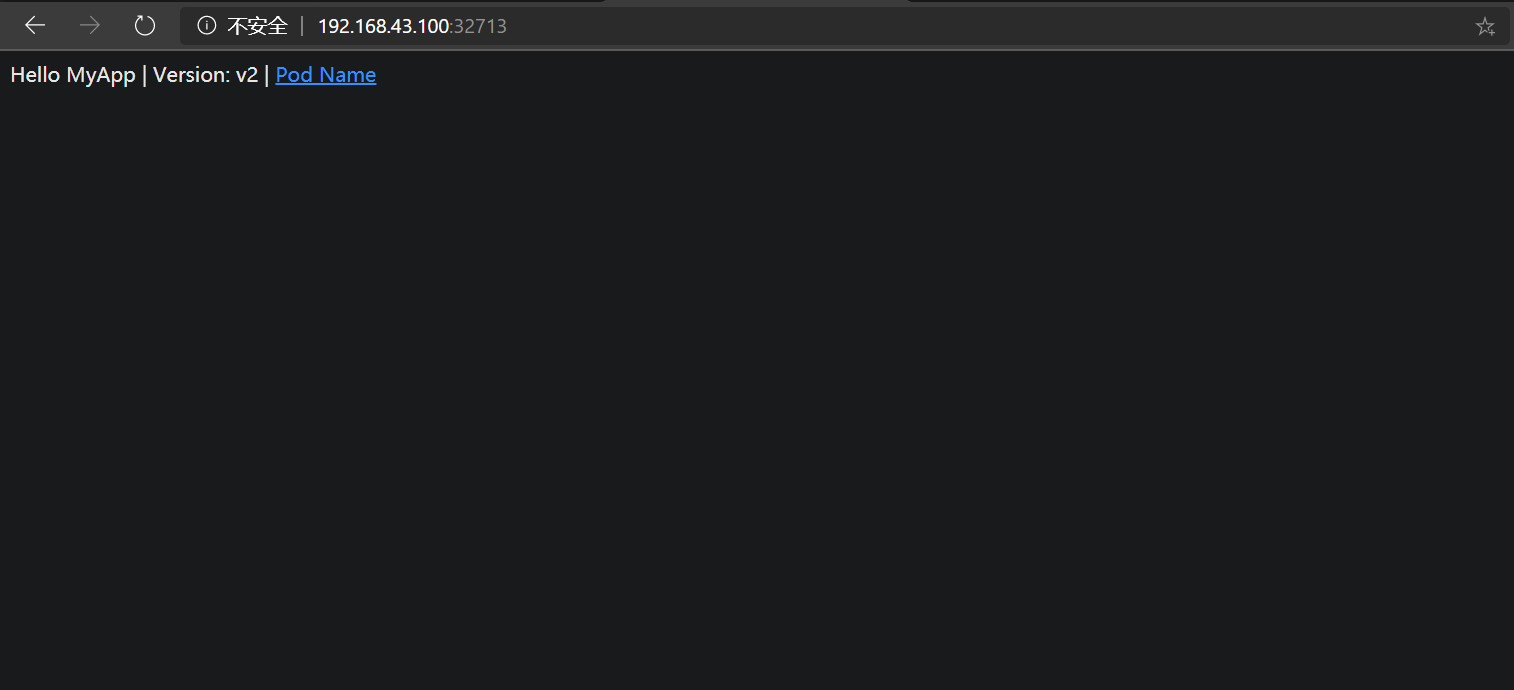
[root@k8s01 ~]# curl 192.168.43.100:32713
Hello MyApp | Version: v2 | <a href="hostname.html">Pod Name</a>
[root@k8s01 ~]#
[root@k8s01 ~]# kubectl create deployment nginx --image=imwl/myapp
deployment.apps/nginx created
[root@k8s01 ~]# kubectl expose deployment nginx --port=80 --type=NodePort
service/nginx exposed
[root@k8s01 ~]# kubectl get pod,svc
NAME READY STATUS RESTARTS AGE
pod/nginx-7cffc8d665-wzlvx 1/1 Running 0 26s

NAME TYPE CLUSTER-IP EXTERNAL-IP PORT(S) AGE
service/kubernetes ClusterIP 10.96.0.1 <none> 443/TCP 7m37s
service/nginx NodePort 10.107.221.225 <none> 80:32713/TCP 16s
[root@k8s01 ~]# curl 192.168.43.100:32713
Hello MyApp | Version: v2 | <a href="hostname.html">Pod Name</a> # 验证 OK

访问地址:http://192.168.43.100:32713

myapp