master主机名错误
没有修改主机名就进行了 kubeadm config print init-defaults > kubeadm_init.yaml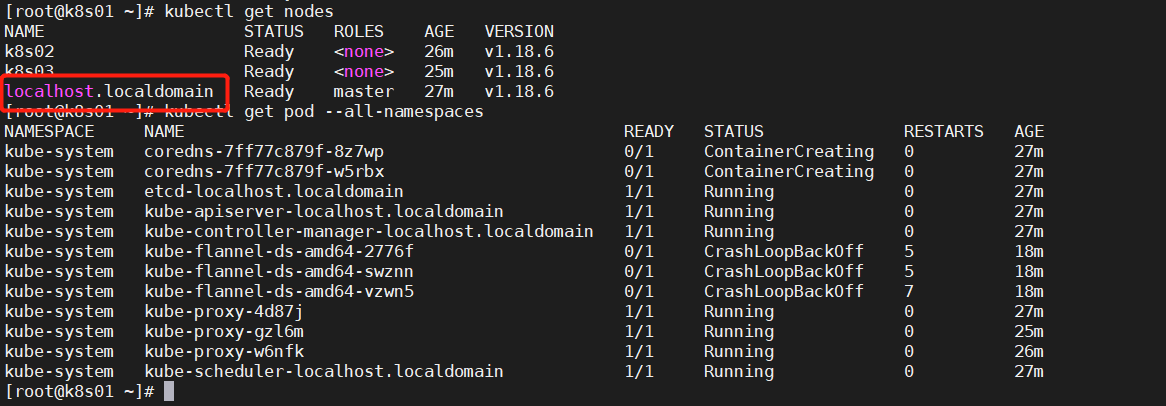
配置文件节选1
2
3
4
5
6nodeRegistration:
criSocket: /var/run/dockershim.sock
name: loaclhost.localdomain
taints:
- effect: NoSchedule
key: node-role.kubernetes.io/master
Unable to connect to the server: x509: certificate signed by unknown authority
配置文件没有删除干净
先执行1
2yes|kubeadm reset # 所有节点执行,重置
rm -rf $HOME/.kube # master 节点
然后1
2
3
4
5kubeadm init --config kubeadm_init.yaml
mkdir -p $HOME/.kube
sudo cp -i /etc/kubernetes/admin.conf $HOME/.kube/config
sudo chown $(id -u):$(id -g) $HOME/.kube/config
source <(kubectl completion bash) # 自动补充
ImageInspectError
1 | [root@k8s01 ~]# kubectl get pods --all-namespaces|grep Inspect |
删除重新部署
1 | [root@k8s01 ~]# docker rmi registry.aliyuncs.com/google_containers/coredns:1.6.7 |
部署 dashboard 时,提示权限问题
eg:1
2
3customresourcedefinitions.apiextensions.k8s.io is forbidden: User "system:serviceaccount:kubernetes-dashboard:kubernetes-dashboard" cannot list resource "customresourcedefinitions" in API group "apiextensions.k8s.io" at the cluster scope
secrets is forbidden: User "system:serviceaccount:kubernetes-dashboard:kubernetes-dashboard" cannot list resource "secrets" in API group "" in the namespace "default"
services is forbidden: User "system:serviceaccount:kubernetes-dashboard:kubernetes-dashboard" cannot list resource "services" in API group "" in the namespace "default"
需要修改配置文件
1 | apiVersion: rbac.authorization.k8s.io/v1beta1 |
api 版本不对
过程1
2
3
4
5
6[root@k8s01 stroage]# cat CronJob_test.yaml # 节选
apiVersion: batch/v1
kind: CronJob
[root@k8s01 stroage]# kubectl apply -f CronJob_test.yaml
error: unable to recognize "CronJob_test.yaml": no matches for kind "CronJob" in version "batch/v1"
排查过程 kubectl api-resources 查看 api 版本信息
1 | [root@k8s01 stroage]# kubectl api-resources |grep CronJob |
pod 一直处于 pending 状态
kubectl describe1
2
3
4
5
6
7QoS Class: Burstable
Node-Selectors: application/env=quant
Tolerations: test:NoExecute
Events:
Type Reason Age From Message
---- ------ ---- ---- -------
Warning FailedScheduling 9s (x20 over 4m) default-scheduler 0/4 nodes are available: 3 Insufficient memory, 3 MatchNodeSelector.
打了污点 和 容忍度 发现合适的节点内存不足
待调度的 pod 信息节选1
2
3
4
5
6Limits:
cpu: 2
memory: 10Gi
Requests:
cpu: 2
memory: 5Gi
查看主机的内存
1 | [root@k8s03 ~]# free -h |
发现内存是 满足的
经过定位发现,有多个 pod 都处于 pending, 因为 存在 request 保证之前 pod 的内存使用量,导致新的 pod 无法调度
待调度 pod 的 request 值总和超过该节点提供的空闲资源, 不会调度到该节点 node 上;
Error response from daemon: OCI runtime create failed
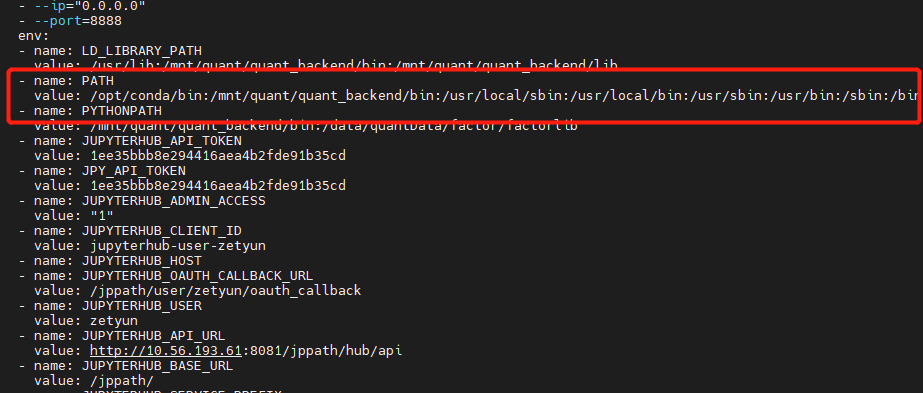
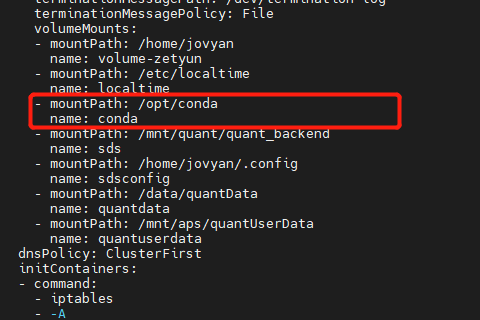
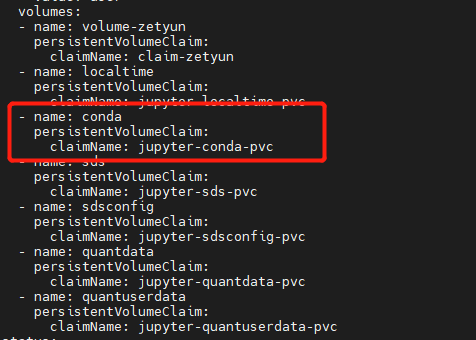
Error response from daemon: OCI runtime create failed: container_linux.go:345: starting container process caused \”exec: \\”tini\\”: executable file not found in $PATH\”
此问题定位起来很复杂, 此 pod 在 新建用户时,会自动创建一个 pod, 但 pod 会启动失败,随即被删除。
后来发现有 pod 创建, 需要 的 PATH 缺少 conda文件,补充文件到指定目录下,重启成功
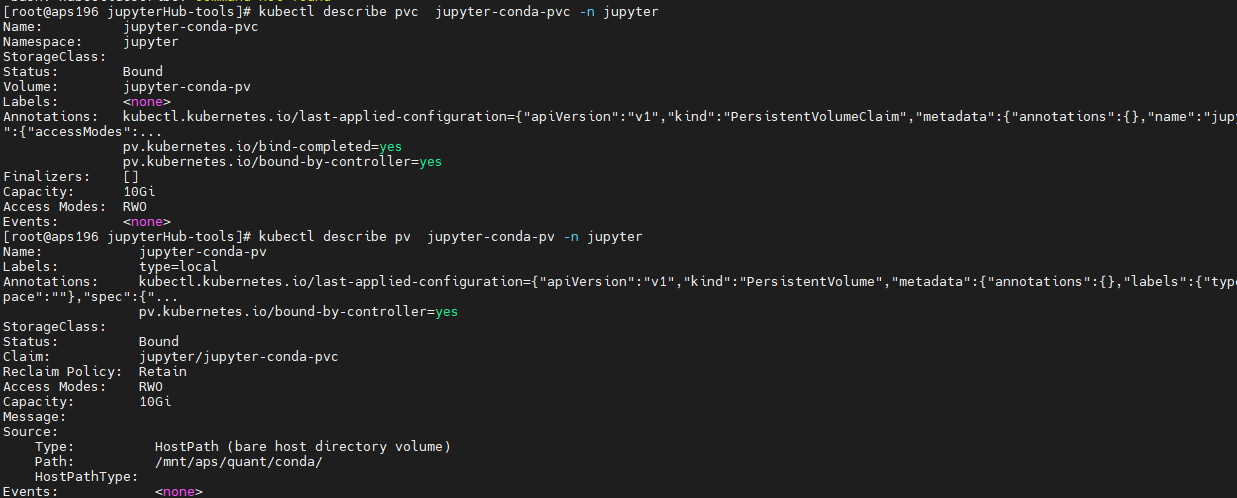
pod 被驱逐,提示DiskPressure
磁盘空间不足,导致 /var 目录满了
运行的 pod 用了 emptyDir ,emptyDir 使用的空间是 /var/lib/kubelet/pods/podxxxxx 。 pod 被删除后,目录被清空。所以看不到 实际空间被占用. 需要扩容 /var 目录
EvictionThresholdMet Attempting to reclaim nodefs
某个node notReady, describe node 后提示 Warning: EvictionThresholdMet Attempting to reclaim nodefs
资源不足
在 失败节点 df -Th 发现根目录已满
du -h / –max-depth=2
发现有个日志文件 有 300多G , tail -f 发现还在暴增,并且提示 socket too many open files
网络连接问题,查看 ulimit -a open files 设置的足够大1
2[root@test173 ~]# ulimit -n
655360
代码错误
ns 无法删除,一直处于 termning 状态
ns 为 rook-ceph1
2
3
4
5
6
7
8
[root@test-173 ~]# kubectl get ns |grep Terminating
rook-ceph Terminating 13h
[root@test-249 ~]# kubectl api-resources --verbs=list --namespaced -o name | xargs -n 1 kubectl get --show-kind --ignore-not-found -n rook-ceph
NAME ACTIVEMDS AGE
cephfilesystem.ceph.rook.io/test 1 34m
发现此 crds 无法删除
1 | kubectl patch crds cephfilesystems.ceph.rook.io -p '{"metadata":{"finalizers": []}}' --type=merge |
然后顺利删除
1 | [root@test-249 ~]# kubectl get ns |grep Terminating |
或者1
2
3[root@hdp01 examples]# kubectl api-resources --verbs=list --namespaced -o name | xargs -n 1 kubectl get --show-kind --ignore-not-found -n rook-ceph
edit 资源,改 finalizers: []
实在无法删除,可以尝试 直接从 etcd 删数据(不建议)
1 | etcdctl get --prefix /registry/namespaces/ |
业务 pod 一直 CrashLoopBackOff, 重启,Liveness probe failed
很多 容器 只有最基础的 命令, 可以使用 debug 容器
下面是在宿主机上操作1
Liveness probe failed: dial tcp 100.103.203.89:8887: connect: connection refused
能 ping 通1
2
3
4[root@imwl-175 ~]# ping 100.103.203.89
PING 100.103.203.89 (100.103.203.89) 56(84) bytes of data.
64 bytes from 100.103.203.89: icmp_seq=1 ttl=63 time=0.584 ms
64 bytes from 100.103.203.89: icmp_seq=2 ttl=63 time=0.531 ms
telnet 失败
1 | [root@imwl-175 ~]# telnet 100.103.203.89 8887 |
扫描端口是关闭的1
2
3
4
5
6
7
8
9[root@imwl-175 ~]# nmap -p 8887 100.103.203.89
Starting Nmap 6.40 ( http://nmap.org ) at 2021-04-15 07:57 UTC
Nmap scan report for 100.103.203.89
Host is up (0.00067s latency).
PORT STATE SERVICE
8887/tcp closed unknown
Nmap done: 1 IP address (1 host up) scanned in 0.46 seconds
节点下线
1 | kubectl cordon 192.168.250.101 # 设置不可调度 |
k8s 中 command、args 和 dockerfile 中 entrypoint、cmd 之间的作用
当用户同时在kubernetes中的yaml文件中写了command和args的时候,默认是会覆盖DockerFile中的命令行和参数,完整的情况分类如下:
1、如果command和args都没有写,那么用DockerFile默认的配置。
2、如果command写了,但args没有写,那么Docker默认的配置会被忽略, 而且仅仅执行.yaml文件的command(不带任何参数的)。
3、如果command没写,但args写了,那么Docker默认配置的ENTRYPOINT的命令行会被执行,但是调用的参数是.yaml中的args。
4、如果如果command和args都写了,那么Docker默认的配置被忽略,使用.yaml的配置
不小心删除掉了重要的 namespaces
因为 etcd 每日凌晨都有备份, 从 etcd 中恢复
停止 master 的 kube-apiserver
1
2
3systemctl stop kube-apiserver
# mv /etc/kubernetes/manifests /etc/kubernetes/manifests.bak # 当使用 kubeadm 时停止 etcd
1
systemctl stop etcd
备份原有数据
1 | mv /var/lib/etcd/data /var/lib/etcd/data.bak |
恢复 etcd (所有 etcd 节点执行,可用同一份文件恢复)
1
2
3
4
5ETCDCTL_API=3 etcdctl snapshot restore etcd-snapshot-20191222.db --name etcd1 -initial-cluster=etcd1=https://172.20.19.16:2380,etcd2=https://172.20.19.18:2380,etcd3=https://172.20.19.19:2380 --initial-cluster-token etcd-cluster --initial-advertise-peer-urls https://172.20.19.16:2380 --data-dir=/var/lib/etcd/data
ETCDCTL_API=3 etcdctl snapshot restore etcd-snapshot-20191222.db --name etcd2 -initial-cluster=etcd1=https://172.20.19.16:2380,etcd2=https://172.20.19.18:2380,etcd3=https://172.20.19.19:2380 --initial-cluster-token etcd-cluster --initial-advertise-peer-urls https://172.20.19.18:2380 --data-dir=/var/lib/etcd/data
ETCDCTL_API=3 etcdctl snapshot restore etcd-snapshot-20191222.db --name etcd3 -initial-cluster=etcd1=https://172.20.19.16:2380,etcd2=https://172.20.19.18:2380,etcd3=https://172.20.19.19:2380 --initial-cluster-token etcd-cluster --initial-advertise-peer-urls https://172.20.19.19:2380 --data-dir=/var/lib/etcd/data检查数据
1
ETCDCTL_API=3 etcdctl --cacert=/etc/kubernetes/ssl/ca.pem --cert=/etc/etcd/ssl/etcd.pem --key=/etc/etcd/ssl/etcd-key.pem --endpoints=https://172.20.19.16:2379,https://172.20.19.18:2379,https://172.20.19.19:2379 endpoint health
重启 kube-apiserver
1
2
3systemctl restart kube-apiserver
# mv /etc/kubernetes/manifests.bak /etc/kubernetes/manifests # 当使用 kubeadm 时
Usage of EmptyDir volume “cache-volume” exceeds the limit “1Gi”
当前 pod 需要使用 /dev/shm. 写入的数据量超过了限制导致 pod 被驱逐
配置文件示例1
2
3
4
5
6
7
8
9
10
11
12
13
14
15
16
17
18apiVersion: v1
kind: Pod
metadata:
name: test-pd-shm
spec:
containers:
- image: busybox
name: busybox-test
command: [ "sleep", "1000000" ]
imagePullPolicy: "IfNotPresent"
volumeMounts:
- mountPath: /dev/shm
name: cache-volume
volumes:
- emptyDir:
medium: Memory
sizeLimit: 1Gi
name: cache-volume
可以不设置 sizeLimit , 或考虑业务场景 设置一个 合理的值(最好不超过宿主机内存的一半)
timeout expired waiting for volumes to attach or umount for pod xxx
当前容器内用户使用的 A 用户,宿主机目录所属用户为 B 用户。A 用户没有权限读取 B 用户目录下的文件。
将目录权限设置为 777 解决, 或者修改 镜像 将用户改为 B 用户
tls: failed to verify client’s certificate: x509: certificate has expired or is not yet valid
生成证书的机器时间要比服务器时间快,导致服务器验证时,证书超出了时间使用范围。
解决办法:
1、服务器和生成证书机器进行时间同步更新
2、或者直接调整生成证书的机器时间,小于服务器的时间
date -s "2022-08-23 01:01:01"
failed to check network namespace closed: remove netns:unlinkat *: device or resource busy
在CentOS7.4引入了一个新的参数来控制内核的行为。 /proc/sys/fs/may_detach_mounts 默认设置为0;当系统有容器运行的时候,需要将该值设置为1
1 | echo 1 > /proc/sys/fs/may_detach_mounts |
或者 写文件
1 | fs.may_detach_mounts = 1 |
sysctl -p /etc/sysctl.d/95-k8s-sysctl.conf
ceph问题pvc 一直处于 pending
describe 发现没有 ceph 的 replicapool
1 | failed to provision volume with StorageClass "rook-ceph-block-retain": rpc error: code = Internal desc = pool not found: pool (replicapool) not found in Ceph cluster |
创建 ceph osd pool create replicapool 64 64
使用主机网络 ,pid ,root用户
1 | hostIPC: true |
查看进程属于哪个容器
containerd
可能需要安装 jq
1 | [root@test-2 test]# ps -ef |grep 30846 |
helm (install/upgrade/rollback) is in progress
1 | [root@test-2 k8s-test]# /etc/kubeasz/bin/helm upgrade prometheus --install -n monitor -f /etc/kubeasz/clusters/k8s-test/yml/prom-values.yaml /etc/kubeasz/roles/cluster-addon/files/kube-prometheus-stack-45.23.0.tgz |
calico 换 flannel
多网卡下1
2- name: IP_AUTODETECTION_METHOD
value: "interface=bond0" #(使用ip a查看网卡配置)
换成flannel后提示plugin type=”calico” failed (add): error getting ClusterInformation: resource does not exist: ClusterInformation(default) with error:
1 | kubectl delete -f calico.yaml |
配置非 NetworkManager 受管设备
1 | cat > /etc/NetworkManager/conf.d/99-unmanaged-devices.conf <<EOF |
修复 ssl/tls 漏洞
SSL/TLS 协议信息泄露漏洞 (CVE-2016-2183) 具体是使用了 3DES, 以 kube-apiserver 为例
修改前1
2
3
4
5
6
7
8
9
10
11
12
13
14
15
16
17
18
19
20
21
22
23
24
25
26
27
28
29
30
31
32
33
34
35
36[root@test-61 ~]# nmap --script ssl-enum-ciphers -p 6443 172.20.19.61
Starting Nmap 7.93 ( https://nmap.org ) at 2022-08-01 15:28 CST
Nmap scan report for 172.20.19.61
Host is up (0.00033s latency).
PORT STATE SERVICE
6443/tcp open sun-sr-https
| ssl-enum-ciphers:
| TLSv1.2:
| ciphers:
| TLS_ECDHE_RSA_WITH_AES_128_GCM_SHA256 (secp256r1) - A
| TLS_ECDHE_RSA_WITH_CHACHA20_POLY1305_SHA256 (secp256r1) - A
| TLS_ECDHE_RSA_WITH_AES_256_GCM_SHA384 (secp256r1) - A
| TLS_ECDHE_RSA_WITH_AES_128_CBC_SHA (secp256r1) - A
| TLS_ECDHE_RSA_WITH_AES_256_CBC_SHA (secp256r1) - A
| TLS_RSA_WITH_AES_128_GCM_SHA256 (rsa 2048) - A
| TLS_RSA_WITH_AES_256_GCM_SHA384 (rsa 2048) - A
| TLS_RSA_WITH_AES_128_CBC_SHA (rsa 2048) - A
| TLS_RSA_WITH_AES_256_CBC_SHA (rsa 2048) - A
| TLS_ECDHE_RSA_WITH_3DES_EDE_CBC_SHA (secp256r1) - C
| TLS_RSA_WITH_3DES_EDE_CBC_SHA (rsa 2048) - C
| compressors:
| NULL
| cipher preference: server
| warnings:
| 64-bit block cipher 3DES vulnerable to SWEET32 attack
| TLSv1.3:
| ciphers:
| TLS_AKE_WITH_AES_128_GCM_SHA256 (ecdh_x25519) - A
| TLS_AKE_WITH_AES_256_GCM_SHA384 (ecdh_x25519) - A
| TLS_AKE_WITH_CHACHA20_POLY1305_SHA256 (ecdh_x25519) - A
| cipher preference: server
|_ least strength: C
MAC Address: FA:96:38:B0:A6:00 (Unknown)
Nmap done: 1 IP address (1 host up) scanned in 1.11 seconds
修改配置重启 /etc/systemd/system/kube-apiserver.service;
新加内容1
--tls-cipher-suites=TLS_ECDHE_RSA_WITH_AES_128_GCM_SHA256,TLS_ECDHE_RSA_WITH_AES_256_GCM_SHA384
配置这两项即可,也可以把上面的依次添加,删掉 3DES 相关的配置
完整内容1
2
3
4
5
6
7
8
9
10
11
12
13
14
15
16
17
18
19
20
21
22
23
24
25
26
27
28
29
30
31
32
33
34
35
36
37
38
39
40
41
42
43
44
45
46[Unit]
Description=Kubernetes API Server
Documentation=https://github.com/GoogleCloudPlatform/kubernetes
After=network.target
[Service]
ExecStart=/opt/kube/bin/kube-apiserver \
--allow-privileged=true \
--anonymous-auth=false \
--api-audiences=api,istio-ca \
--authorization-mode=Node,RBAC \
--bind-address=172.20.19.61 \
--client-ca-file=/etc/kubernetes/ssl/ca.pem \
--endpoint-reconciler-type=lease \
--etcd-cafile=/etc/kubernetes/ssl/ca.pem \
--etcd-certfile=/etc/kubernetes/ssl/kubernetes.pem \
--etcd-keyfile=/etc/kubernetes/ssl/kubernetes-key.pem \
--etcd-servers=https://172.20.19.61:2379,https://172.20.19.62:2379,https://172.20.19.63:2379 \
--kubelet-certificate-authority=/etc/kubernetes/ssl/ca.pem \
--kubelet-client-certificate=/etc/kubernetes/ssl/kubernetes.pem \
--kubelet-client-key=/etc/kubernetes/ssl/kubernetes-key.pem \
--tls-cipher-suites=TLS_ECDHE_RSA_WITH_AES_128_GCM_SHA256,TLS_ECDHE_RSA_WITH_AES_256_GCM_SHA384 \ # 添加内容
--secure-port=6443 \
--service-account-issuer=https://kubernetes.default.svc \
--service-account-signing-key-file=/etc/kubernetes/ssl/ca-key.pem \
--service-account-key-file=/etc/kubernetes/ssl/ca.pem \
--service-cluster-ip-range=10.68.0.0/16 \
--service-node-port-range=30000-32767 \
--tls-cert-file=/etc/kubernetes/ssl/kubernetes.pem \
--tls-private-key-file=/etc/kubernetes/ssl/kubernetes-key.pem \
--requestheader-client-ca-file=/etc/kubernetes/ssl/ca.pem \
--requestheader-allowed-names= \
--requestheader-extra-headers-prefix=X-Remote-Extra- \
--requestheader-group-headers=X-Remote-Group \
--requestheader-username-headers=X-Remote-User \
--proxy-client-cert-file=/etc/kubernetes/ssl/aggregator-proxy.pem \
--proxy-client-key-file=/etc/kubernetes/ssl/aggregator-proxy-key.pem \
--enable-aggregator-routing=true \
--v=2
Restart=always
RestartSec=5
Type=notify
LimitNOFILE=65536
[Install]
WantedBy=multi-user.target
检验
1 | [root@test-61 ~]# nmap --script ssl-enum-ciphers -p 6443 172.20.19.61 |
etcd , k8s 其他组件修复方式相似
etcd 添加的配置1
--cipher-suites=TLS_ECDHE_RSA_WITH_AES_128_GCM_SHA256,TLS_ECDHE_RSA_WITH_AES_256_GCM_SHA384
kube-controller kube-scheduler kubelet 和 kube-apiserver 处理方式一样
pod 创建 pid 受到限制
报错 libgomp: Thread creation failed: Resource temporarily unavailable
查看信息,说是 创建的 pid 默认是 1024。首先确保系统层面没限制
/etc/security/limits.conf1
2
3
4
5
6#配置 文件句柄数
* soft nofile 65536
* hard nofile 131072
#配置 内存锁定交换
* soft memlock unlimited
* hard memlock unlimited
另外的文件 /etc/security/limits.d/20-nproc.conf1
2
3
4
5
6
7
8
9
10
11
12
13
14# Default limit for number of user's processes to prevent
# accidental fork bombs.
# See rhbz #432903 for reasoning.
* soft nproc unlimited
root soft nproc unlimited
test soft nproc unlimited
* hard nproc unlimited
root hard nproc unlimited
test hard nproc unlimited
* hard memlock unlimited
* soft memlock unlimited
* soft core unlimited
* hard core unlimited
改完后查看1
2
3
4
5
6
7
8
9
10
11
12
13
14
15
16
17[root@172-20-60-113 log]# sysctl -p ; ulimit -a
core file size (blocks, -c) unlimited
data seg size (kbytes, -d) unlimited
scheduling priority (-e) 0
file size (blocks, -f) unlimited
pending signals (-i) 966484
max locked memory (kbytes, -l) unlimited
max memory size (kbytes, -m) unlimited
open files (-n) 65536
pipe size (512 bytes, -p) 8
POSIX message queues (bytes, -q) 819200
real-time priority (-r) 0
stack size (kbytes, -s) 8192
cpu time (seconds, -t) unlimited
max user processes (-u) unlimited
virtual memory (kbytes, -v) unlimited
file locks (-x) unlimited
查看进程的限制,没有限制1
2
3
4
5
6
7
8
9
10
11
12
13
14
15
16
17
18[root@172-20-60-113 limits.d]# cat /proc/24571/limits
Limit Soft Limit Hard Limit Units
Max cpu time unlimited unlimited seconds
Max file size unlimited unlimited bytes
Max data size unlimited unlimited bytes
Max stack size 8388608 unlimited bytes
Max core file size 0 unlimited bytes
Max resident set unlimited unlimited bytes
Max processes 966484 966484 processes
Max open files 1048576 1048576 files
Max locked memory 65536 65536 bytes
Max address space unlimited unlimited bytes
Max file locks unlimited unlimited locks
Max pending signals 966484 966484 signals
Max msgqueue size 819200 819200 bytes
Max nice priority 0 0
Max realtime priority 0 0
Max realtime timeout unlimited unlimited us
但还是报错,pod 内创建的进程还是不能超过 1024
最后修改
/var/lib/kubelet/config.yaml1
2# podPidsLimit: 1024 # 修改为 -1 不限制
podPidsLimit: -1
重启 kubelet 后,进程数也无限制
补 查看 pod 创建的线程ps -T -p 1 如果没有显示可以 在 node 节点上查看 ps -T -p 24571
coredns 配置
自定义1
2
3
4
5
6
7
8
9
10
11
12
13
14
15
16
17
18
19
20
21
22
23
24
25
26
27
28
29
30
31
32
33
34
35
36data:
Corefile: |
.:53 {
errors
health {
lameduck 5s
}
ready
kubernetes cluster.local in-addr.arpa ip6.arpa {
pods insecure
fallthrough in-addr.arpa ip6.arpa
ttl 30
}
hosts {
172.20.1.61 test-61
172.20.1.62 test-62
172.20.1.63 test-63
172.20.19.14 test-14
172.20.19.17 test-17
172.20.19.9 test-9
172.20.19.11 test-11
172.20.19.12 test-12
172.20.19.13 test-13
fallthrough
}
prometheus :9153
forward . 114.114.114.114 8.8.8.8 {
# policy random|round_robin|sequential
policy sequential
max_concurrent 1000
}
cache 30
loop
reload
loadbalance
}
或者 写文件或cm
示例写 cm
修改 coredns yaml 文件
1 | # deployment |
自定义 add-hosts.yaml
1 | apiVersion: v1 |
或者从文件生成1
2cp /etc/hosts ./customer-hosts
kubectl -n kube-system create cm customer-hosts --from-file=customer-hosts
无权限操作 /run/containerd/containerd.sock
eg: imwl 用户无权限
使用 docker
1
2
3sudo groupadd docker
sudo gpasswd -a $USER docker
systemctl restart docker.service使用 crictl
加入 crontab
1 | @reboot /bin/chmod 666 /run/containerd/containerd.sock |
或者 修改 启动文件 /etc/systemd/system/containerd.service
添加1
2[Service]
ExecStartPost=/bin/sh -c "/bin/sleep 5 && /bin/chmod 666 /run/containerd/containerd.sock"
然后重启
1 | sudo systemctl daemon-reload |
使用 config 文件登录 dashboard
报错信息
Internal error (500): Not enough data to create auth info structure.
需要在 config 文件中添加 token 字段
1 | apiVersion: v1 |
k8s导出所有镜像
1 | #!/bin/bash |
获取 secrets-cm
1 | # cat get-secret-cm.sh |