kuberay简单使用

ray 简介

Ray是一个开源的分布式机器学习框架,不仅拥有高效的分布式训练能力,也有丰富的机器学习应用,极大地降低了大规模机器学习的门槛,非常适合人工智能方向的科研人员和工程师们学习!

Ray有诸多模块,包括

  1. 实现基本分布式能力的Ray Core
  2. 进行数据处理的Ray Data
  3. 进行训练的Ray Train
  4. 超参数调整的Ray Tune
  5. 实现推理的Ray Serve
  6. 强化学习库Ray RLlib
  7. 以及集合了多种功能的上层机器学习API Ray AIR

kuberay

安装

官网文档: https://docs.ray.io/en/latest/cluster/kubernetes/getting-started.html

使用 helm 安装 ,以 1.3.0 为例

1
2
3
4
helm repo add kuberay https://ray-project.github.io/kuberay-helm/
helm repo update
# Install both CRDs and KubeRay operator v1.3.0.
helm install kuberay-operator kuberay/kuberay-operator --version 1.3.0

验证

1
2
3
4
5
6
7
8
# kubectl get crd|grep ray
rayclusters.ray.io 2025-06-10T06:21:47Z
rayjobs.ray.io 2025-06-10T06:21:47Z
rayservices.ray.io 2025-06-10T06:21:47Z

# kubectl get pod
NAME READY STATUS RESTARTS AGE
kuberay-operator-5c7f84f8bc-zndrk 1/1 Running 0 24h

安装 raycluster

1
2
helm install raycluster kuberay/ray-cluster --version 1.3.0
# helm install raycluster kuberay/ray-cluster --version 1.3.0 --set 'image.tag=2.41.0-aarch64' # arm64

验证

1
2
3
4
5
6
7
8
9
# kubectl get rayclusters
NAME DESIRED WORKERS AVAILABLE WORKERS CPUS MEMORY GPUS STATUS AGE
raycluster-kuberay 1 1 2 3G 0 ready 24h

# kubectl get pod
NAME READY STATUS RESTARTS AGE
kuberay-operator-5c7f84f8bc-zndrk 1/1 Running 0 24h
raycluster-kuberay-head-wsf5m 1/1 Running 0 24h
raycluster-kuberay-workergroup-worker-5b7bl 1/1 Running 0 24h

head 可以理解为 master 节点, worker 工作节点

测试

简单测试

1
2
3
4
5
export HEAD_POD=$(kubectl get pods --selector=ray.io/node-type=head -o custom-columns=POD:metadata.name --no-headers)
echo $HEAD_POD

# Print the cluster resources.
kubectl exec -it $HEAD_POD -- python -c "import pprint; import ray; ray.init(); pprint.pprint(ray.cluster_resources(), sort_dicts=True)"

通过 sdk

1
2
3
4
5
# Execute this in a separate shell.
kubectl port-forward service/raycluster-kuberay-head-svc 8265:8265 > /dev/null &

# The following job's logs will show the Ray cluster's total resource capacity, including 2 CPUs.
ray job submit --address http://localhost:8265 -- python -c "import pprint; import ray; ray.init(); pprint.pprint(ray.cluster_resources(), sort_dicts=True)"

使用 Rayjob 和 RayService

可以参考文件

1
2
3
kubectl apply -f https://raw.githubusercontent.com/ray-project/kuberay/v1.3.0/ray-operator/config/samples/ray-job.sample.yaml
kubectl apply -f https://raw.githubusercontent.com/ray-project/kuberay/v1.3.0/ray-operator/config/samples/ray-service.sample.yaml
`

验证

1
2
3
4
5
6
7
8
9
10
11
12
13
14
15
16
17
18
19
20
21
22
23
24
25
26
27
28
❯ kubectl get rayjobs.ray.io
NAME JOB STATUS DEPLOYMENT STATUS START TIME END TIME AGE
rayjob-sample SUCCEEDED Complete 2025-06-11T07:34:16Z 2025-06-11T07:36:50Z 13m
❯ kubectl logs -f rayjob-sample-lgfk4
2025-06-11 00:35:36,540 INFO cli.py:39 -- Job submission server address: http://rayjob-sample-raycluster-lvnm8-head-svc.default.svc.cluster.local:8265
2025-06-11 00:35:45,257 SUCC cli.py:63 -- ------------------------------------------------
2025-06-11 00:35:45,258 SUCC cli.py:64 -- Job 'rayjob-sample-4rht2' submitted successfully
2025-06-11 00:35:45,259 SUCC cli.py:65 -- ------------------------------------------------
2025-06-11 00:35:45,259 INFO cli.py:289 -- Next steps
2025-06-11 00:35:45,260 INFO cli.py:290 -- Query the logs of the job:
2025-06-11 00:35:45,260 INFO cli.py:292 -- ray job logs rayjob-sample-4rht2
2025-06-11 00:35:45,260 INFO cli.py:294 -- Query the status of the job:
2025-06-11 00:35:45,260 INFO cli.py:296 -- ray job status rayjob-sample-4rht2
2025-06-11 00:35:45,260 INFO cli.py:298 -- Request the job to be stopped:
2025-06-11 00:35:45,261 INFO cli.py:300 -- ray job stop rayjob-sample-4rht2
2025-06-11 00:35:45,285 INFO cli.py:307 -- Tailing logs until the job exits (disable with --no-wait):
2025-06-11 00:35:42,923 INFO job_manager.py:530 -- Runtime env is setting up.
2025-06-11 00:36:18,923 INFO worker.py:1514 -- Using address 192.168.194.25:6379 set in the environment variable RAY_ADDRESS
2025-06-11 00:36:18,926 INFO worker.py:1654 -- Connecting to existing Ray cluster at address: 192.168.194.25:6379...
2025-06-11 00:36:19,106 INFO worker.py:1832 -- Connected to Ray cluster. View the dashboard at 192.168.194.25:8265
test_counter got 1
test_counter got 2
test_counter got 3
test_counter got 4
test_counter got 5
2025-06-11 00:36:46,744 SUCC cli.py:63 -- -----------------------------------
2025-06-11 00:36:46,745 SUCC cli.py:64 -- Job 'rayjob-sample-4rht2' succeeded
2025-06-11 00:36:46,745 SUCC cli.py:65 -- -----------------------------------

rayservice

1
2
3
4
5
6
7
8
9
# kubectl get pod |grep rayservice
rayservice-sample-raycluster-bwdmm-head-jvtnq 1/1 Running 0 80s
rayservice-sample-raycluster-bwdmm-small-group-worker-wmqk4 1/1 Running 0 80s
# kubectl get rayclusters.ray.io
NAME DESIRED WORKERS AVAILABLE WORKERS CPUS MEMORY GPUS STATUS AGE
rayservice-sample-raycluster-bwdmm 1 1 2500m 4Gi 0 ready 91s
# kubectl get rayservices.ray.io
NAME SERVICE STATUS NUM SERVE ENDPOINTS
rayservice-sample Running 2

添加 ingress 测试

1
2
3
4
5
6
7
8
9
10
11
12
13
14
15
16
17
18
19
20
21
22
23
24
25
26
27
28
29
30
31
32
33
34
35
36
37
38
39
40
41
42
43
44
45
46
47
48
---
apiVersion: networking.k8s.io/v1
kind: Ingress
metadata:
name: kuberay
annotations:
cert-manager.io/cluster-issuer: "letsencrypt-http01"
spec:
ingressClassName: nginx
tls:
- hosts:
- kuberay.grafana.eu.org
secretName: tls-kuberay.grafana.eu.org
rules:
- host: kuberay.grafana.eu.org
http:
paths:
- path: /
pathType: Prefix
backend:
service:
name: rayservice-sample-head-svc
port:
number: 8265
---
apiVersion: networking.k8s.io/v1
kind: Ingress
metadata:
name: kuberay-serve
annotations:
cert-manager.io/cluster-issuer: "letsencrypt-http01"
spec:
ingressClassName: nginx
tls:
- hosts:
- kuberay-serve.grafana.eu.org
secretName: tls-kuberay-serve.grafana.eu.org
rules:
- host: kuberay-serve.grafana.eu.org
http:
paths:
- path: /
pathType: Prefix
backend:
service:
name: rayservice-sample-head-svc
port:
number: 8000

执行命令

1
2
3
4
5
6
7
$ curl -sS -X POST -H 'Content-Type: application/json' https://kuberay-serve.grafana.eu.org/calc/ -d '["MUL", 3]'

15 pizzas please!

$ curl -sS -X POST -H 'Content-Type: application/json' https://kuberay-serve.grafana.eu.org/fruit/ -d '["MANGO", 2]'

6

网页查看
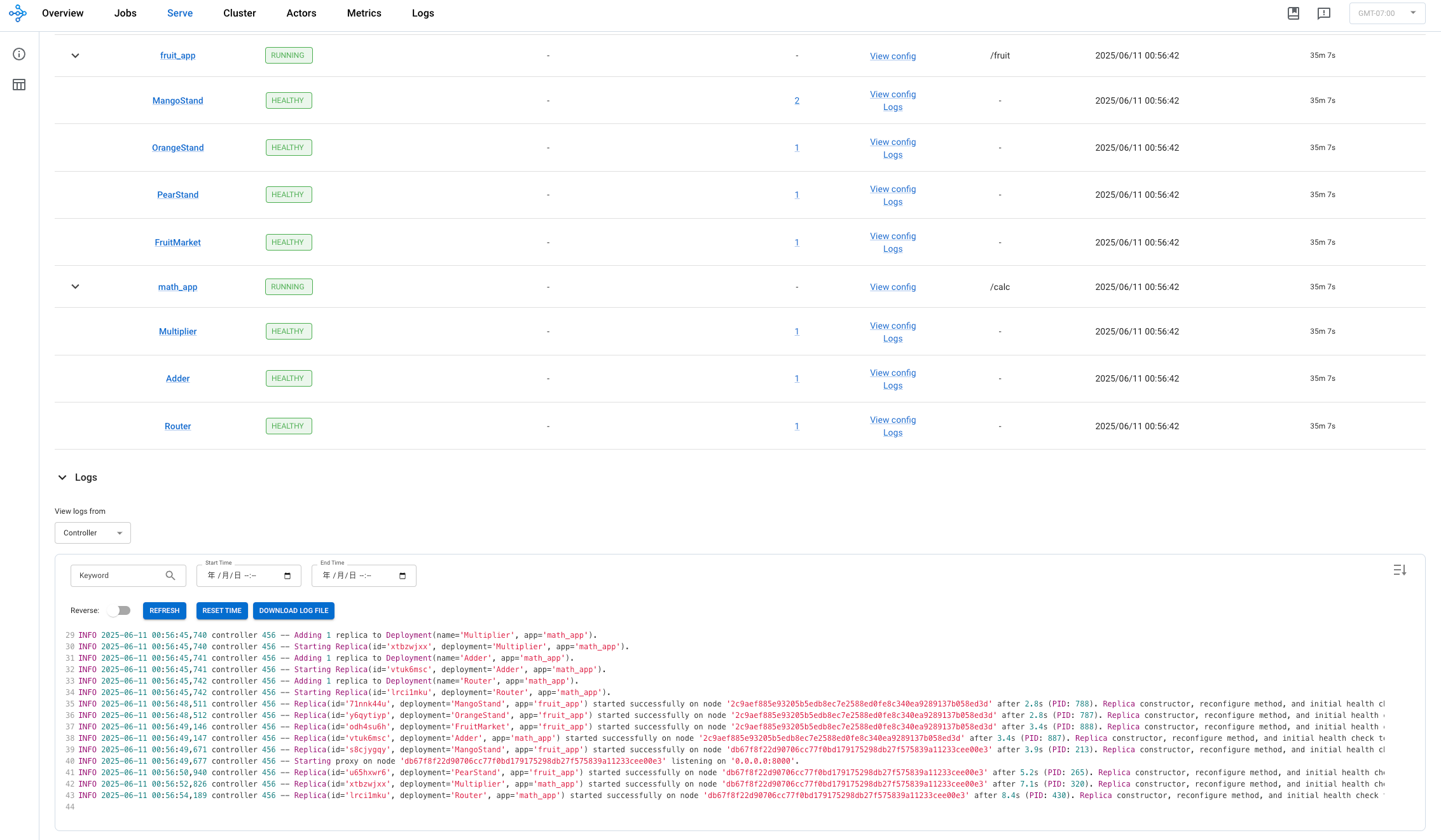
kuberay-dashboard