Service
Service 的概念
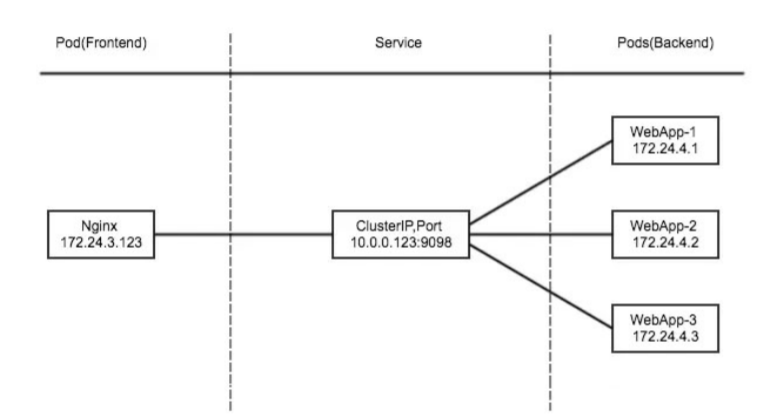
Kubernetes Service 定义了这样一种抽象:一个Pod的逻辑分组,一种可以访问它们的策略 —— 通常称为微服务。这一组 Pod 能够被 Service 访问到,通常是通过 Label Selector。
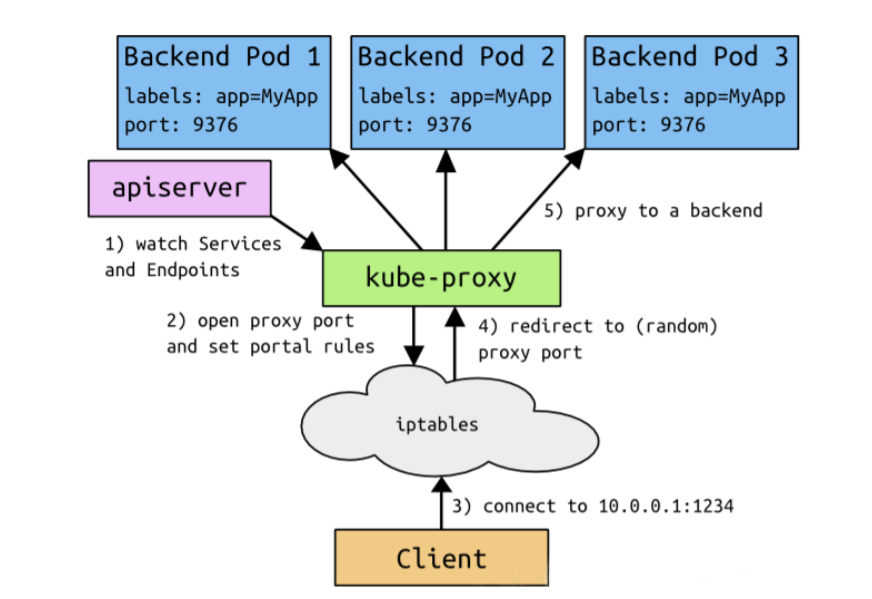
Service 是由 kube-proxy 组件,加上 iptables 来共同实现的。
Service能够提供负载均衡的能力,但是在使用上有以下限制:只提供 4 层负载均衡能力,而没有 7 层功能,但有时我们可能需要更多的匹配规则来转发请求,这点上 4 层负载均衡是不支持的
service 类型
Service 在 K8s 中 有以下四种类型
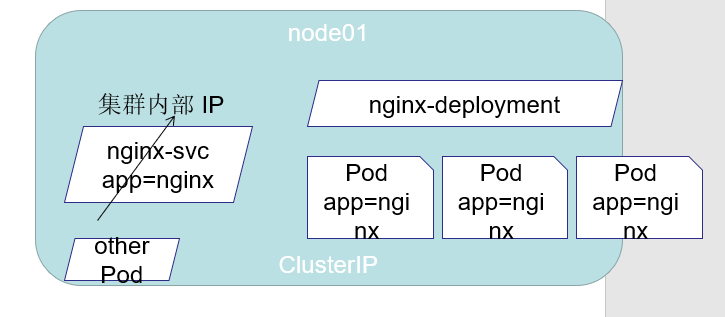
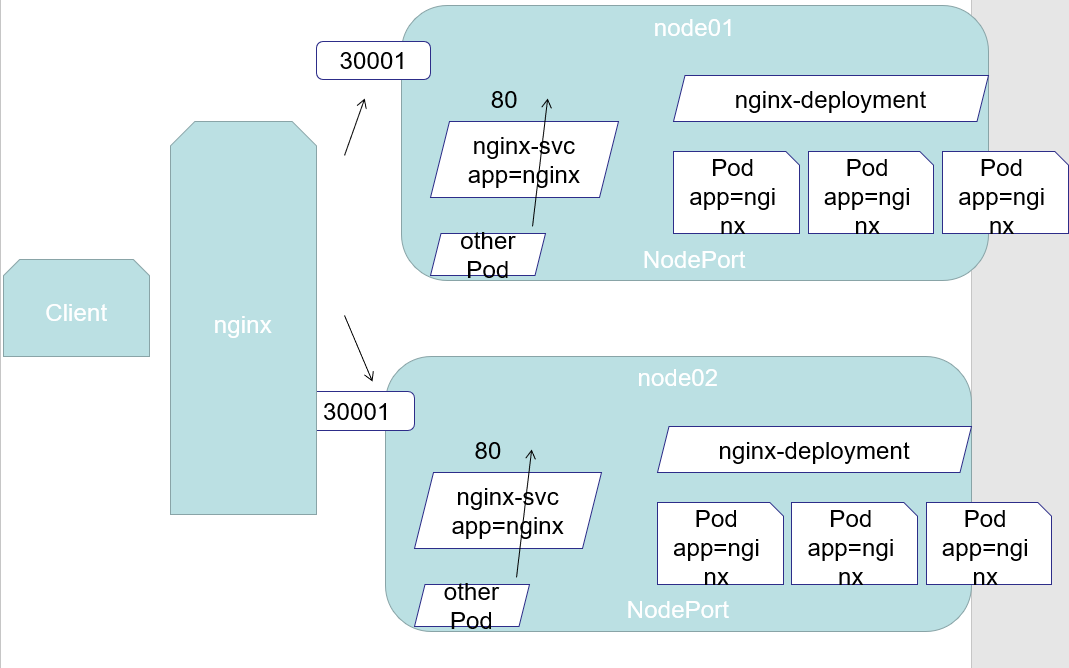
ClusterIp:默认类型,自动分配一个仅Cluster内部可以访问的虚拟IPNodePort:在ClusterIP基础上为Service在每台机器上绑定一个端口,这样就可以通过:NodePort来访问该服务LoadBalancer:在NodePort的基础上,借助cloud provider创建一个外部负载均衡器,并将请求转发到:NodePortExternalName:把集群外部的服务引入到集群内部来,在集群内部直接使用。没有任何类型代理被创建
代理模式的分类
当你通过 Service 的域名去访问时,会先通过 CoreDNS 解析出 Service 对应的 Cluster IP,即虚拟 IP。然后请求到达宿主机的网络后,就会被kube-proxy 所配置的 iptables 规则所拦截,之后请求会被转发到每一个实际的后端 Pod 上面去,这样就实现了负载均衡
userspace代理模式 (效率较低)
iptables代理模式 (默认)
Ipvs代理模式
ClusterIp
service-example.yaml1
2
3
4
5
6
7
8
9
10
11
12
13
14apiVersion: v1
kind: Service
metadata:
name: myapp
namespace: default
spec:
type: ClusterIP
selector:
app: myapp
release: stabel
ports:
- name: http
port: 80
targetPort: 80
示例1
2
3
4
5
6
7
8
9
10
11
12
13
14
15
16[root@k8s01 ~]# kubectl get pod -o wide
NAME READY STATUS RESTARTS AGE IP NODE NOMINATED NODE READINESS GATES
myapp-deploy-75bf6f6cd-jnf96 1/1 Running 0 14s 172.18.236.167 k8s02 <none> <none>
myapp-deploy-75bf6f6cd-m8ffb 1/1 Running 0 14s 172.18.236.168 k8s02 <none> <none>
myapp-deploy-75bf6f6cd-njzj2 1/1 Running 0 14s 172.18.235.168 k8s03 <none> <none>
[root@k8s01 ~]# curl 172.18.236.167
## 省略
## 只有处于 Running 状态,且 readinessProbe 检查通过的 Pod,才会出现在 Service 的 Endpoints 列表里。并且,当某一个 Pod 出现问题时,Kubernetes 会自动把它从 Service 里摘除掉。
[root@k8s01 ~]# kubectl get endpoints myapp # 获取 endpoints
NAME ENDPOINTS AGE
hostnames 172.18.236.167:80,172.18.236.168:80,172.18.235.168:80 19m
## service 的 hostname : myapp.default.svc.cluster.local
Headless Service
Headless Service : 用于为Pod资源标识符生成可解析的DNS资源记录
(一个典型、完整可用的 StatefulSet 通常由三个组件构成: Headless Service 、 StatefulSet 和 volumeClaimTemplate 。其中,Headless Service 用于为 Pod 资源标识符生成可解析的 DNS 资源记录,StatefulSet 用于管控 Pod 资源,volumeClaimTemplate 则基于静态或动态的PV供给方式为Pod资源提供专有且固定的存储。)
有时不需要或不想要负载均衡,以及单独的 Service IP 。遇到这种情况,可以通过指定 ClusterIP(spec.clusterIP) 的值为 None 来创建 Headless Service 。这类 Service 并不会分配 Cluster IP, kube-proxy 不会处理它们,而且平台也不会为它们进行负载均衡和路由.
svc-headless-example.yaml1
2
3
4
5
6
7
8
9
10
11
12apiVersion: v1
kind: Service
metadata:
name: myapp-headless
namespace: default
spec:
clusterIP: "None"
selector:
app: myapp
ports:
port: 80
targetPort: 80
DNS 记录格式 $(pod_name).$(service_name).$(namespace).svc.cluster.local
普通的 pod DNS 记录格式 eg: 172-20-1-125.default.pod.cluster.local
172.20.1.125 是 pod 的 ip 会解析到 172-20-1-125.svc_name.default.svc.cluster.local
1 | [root@k8s01 ~]# kubectl apply -f svc-headless-example.yaml |
NodePort
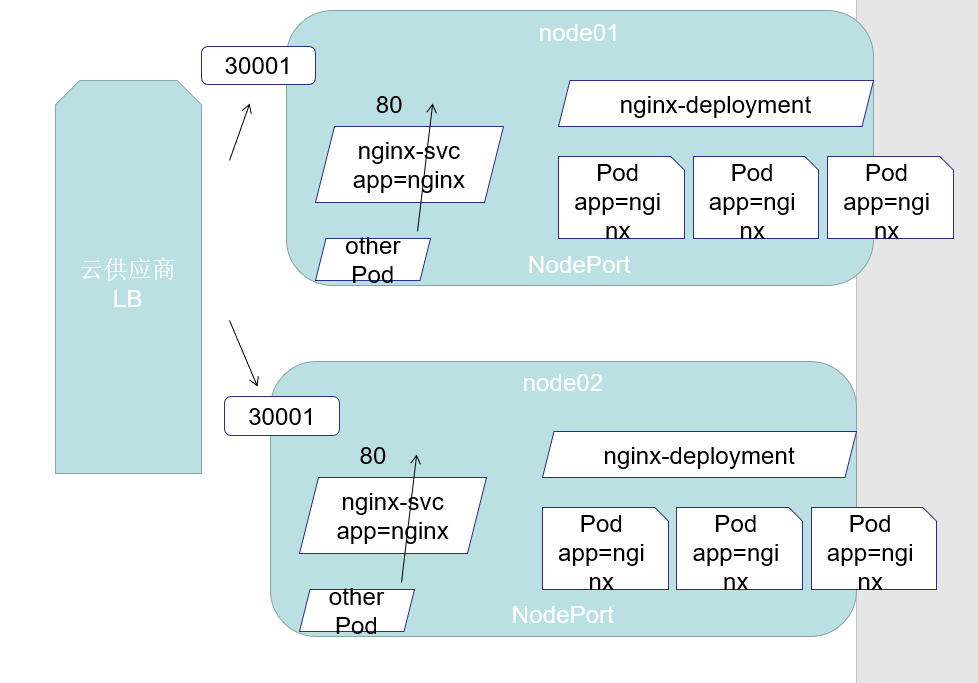
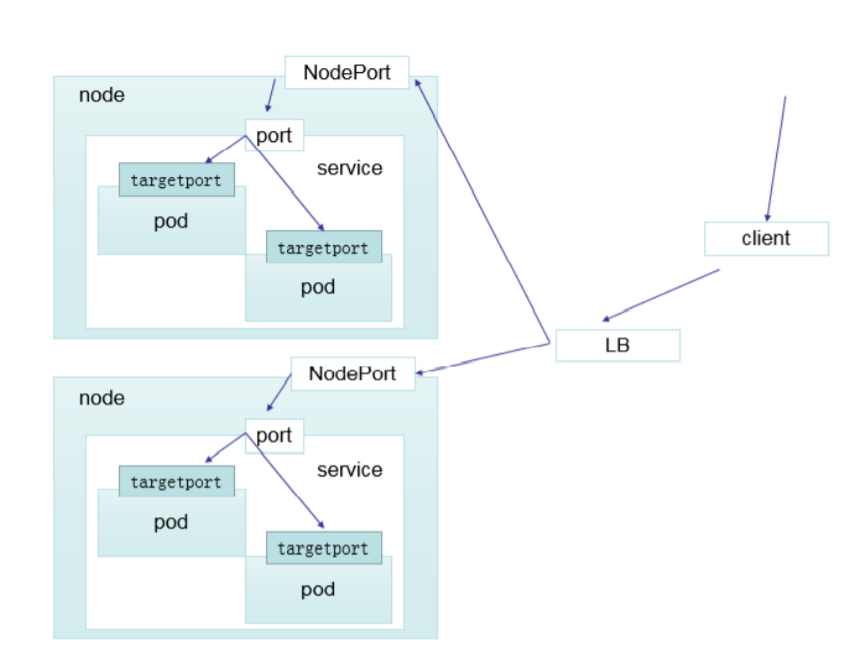
nodePort 的原理在于在 node 上开了一个端口,将向该端口的流量导入到 kube-proxy,然后由 kube-proxy 进一步到给对应的 pod
myapp-noode-service.yaml1
2
3
4
5
6
7
8
9
10
11
12
13
14apiVersion: v1
kind: Service
metadata:
name: myapp
namespace: default
spec:
type: NodePort
selector:
app: myapp
release: stabel
ports:
- name: http
port: 80
targetPort: 80
测试1
2
3
4
5
6
7
8
9
10
11[root@k8s01 ~]# kubectl apply -f myapp-noode-service.yaml
service/myapp configured
[root@k8s01 ~]# kubectl get svc
NAME TYPE CLUSTER-IP EXTERNAL-IP PORT(S) AGE
kubernetes ClusterIP 10.96.0.1 <none> 443/TCP 26d
myapp NodePort 10.96.221.214 <none> 80:30260/TCP 32m
myapp-headless ClusterIP None <none> 80/TCP 6m31s
[root@k8s01 ~]# curl 172.18.236.167:80 # 略 pod 的 ip + port
[root@k8s01 ~]# curl 10.96.221.214:80 # 略 service 的ip + port
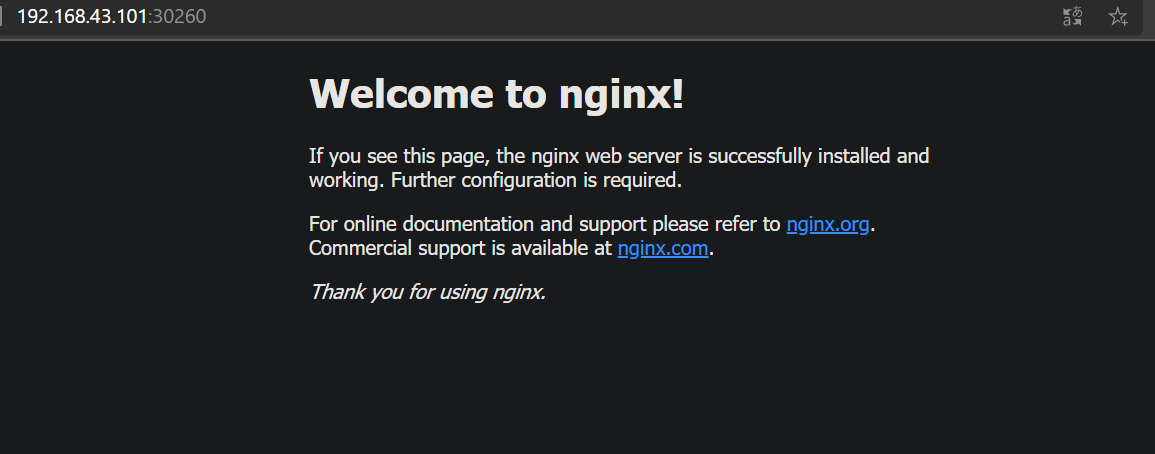
[root@k8s01 ~]# curl 192.168.43.101:30260 # 略 nodeport 的 ip + port
[root@k8s01 ~]# curl 192.168.43.102:30260 # 略
LoadBalancer
loadBalancer 和 nodePort 其实是同一种方式。区别在于 loadBalancer 比 nodePort 多了一步,就是可以调用 cloud provider 去创建 LB 来向节点导流
myapp-loadbalance.yaml 示例文件1
2
3
4
5
6
7
8
9
10
11
12
13apiVersion: v1
kind: Service
metadata:
name: myapp-loadbalance
namespace: default
spec:
selector:
app: myapp
release: stabel
ports:
- port: 8765
targetPort: 80
type: LoadBalancer
ExternalName
这种类型的 Service 通过返回 CNAME 和它的值,可以将服务映射到 externalName 字段的内容( 例如:www.baidu.com )。ExternalName Service 是 Service 的特例,它没有 selector,也没有定义任何的端口和Endpoint。相反的,对于运行在集群外部的服务,它通过返回该外部服务的别名这种方式来提供服务
externalname-example.yaml1
2
3
4
5
6
7
8kind: Service
apiVersion: v1
metadata:
name: my-service-1
namespace: default
spec:
type: ExternalName
externalName: www.baidu.com
当查询主机 my-service-1.defalut.svc.cluster.local ( SVC_NAME.NAMESPACE.svc.cluster.local )时,集群的 DNS 服务将返回一个值 www.baidu.com 的 CNAME 记录。
访问这个服务的工作方式和其他的相同,唯一不同的是重定向发生在 DNS 层,而且不会进行代理或转发
1 | [root@k8s01 ~]# kubectl apply -f externalname-example.yaml |
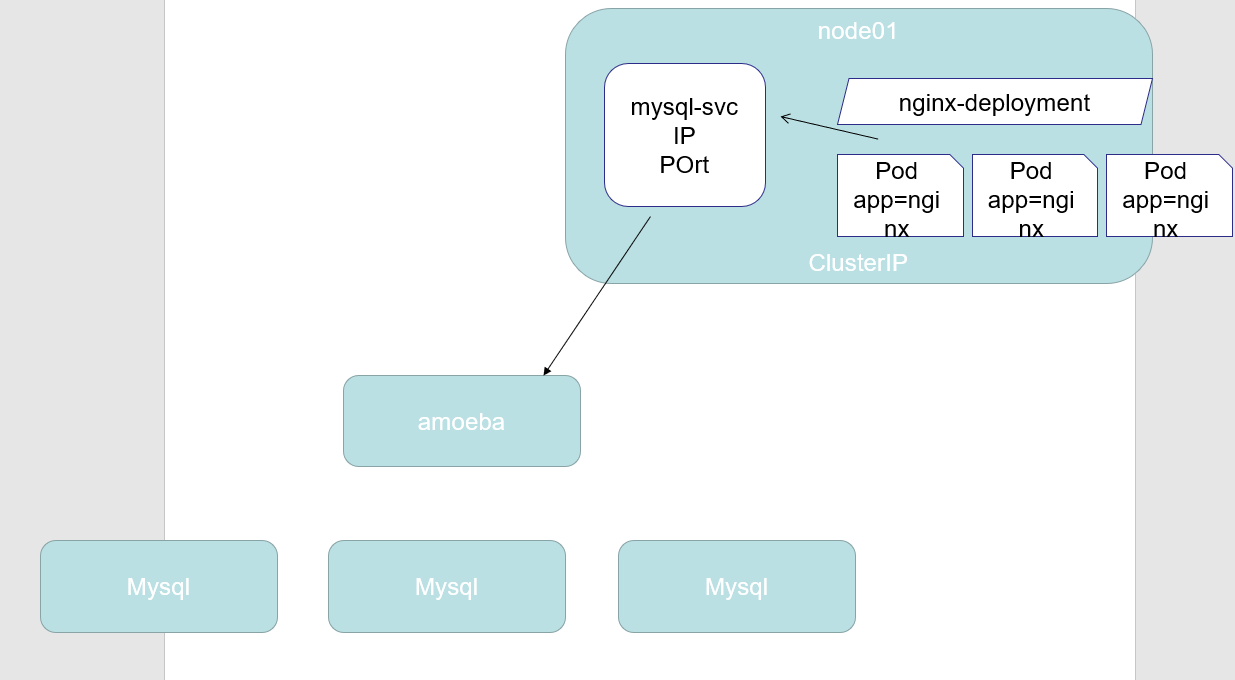
比如引用外部数据库到集群1
2
3
4
5
6
7
8
9# cat mysql_service.yaml
apiVersion: v1
kind: Service
metadata:
name: mysql
spec:
type: ClusterIP
ports:
- port: 3306
定义 endpoint1
2
3
4
5
6
7
8
9
10
11
12
13
14# cat mysql_endpoint.yaml
apiVersion: v1
kind: Endpoints
metadata:
name: mysql
subsets:
- addresses:
- ip: 192.168.43.101
ports:
- port: 3306
# kubectl apply -f mysql_service.yaml -f mysql_endpoint.yaml
# mysql -u root -h mysql.default.svc.cluster.local ## 也可以访问 MySQL 数据库
myapp
myapp-deploy.yaml1
2
3
4
5
6
7
8
9
10
11
12
13
14
15
16
17
18
19
20
21
22
23
24
25apiVersion: apps/v1
kind: Deployment
metadata:
name: myapp-deploy
namespace: default
spec:
replicas: 3
selector:
matchLabels:
app: myapp
release: stabel
template:
metadata:
labels:
app: myapp
release: stabel
env: test
spec:
containers:
- name: myapp
image: nginx:1.7.9
imagePullPolicy: IfNotPresent
ports:
- name: http
containerPort: 80
更多
https://blog.csdn.net/xixihahalelehehe/article/details/107993811