资源清单格式
1 | # 生成一个 实例文件,然后可以自行修改 --dry-run 不会具体执行 |
一般字段1
2
3
4
5
6
7
8
9apiVersion: group/apiversion # 如果没有给定 group 名称,那么默认为 core,可以使用 kubectl api-versions # 获取当前 k8s 版本上所有apiVersio版本信息( 每个版本可能不同 )
kind: # 资源类别
metadata: # 资源元数据
name # 名字
namespace # 命名空间
lables # 标签,主要用来表示一些有意义且和对象密切相关的信息
annotations # 注解,主要用来记录一些非识别的信息,方便用户阅读查找等
spec: # 期望的状态(disired state)
status: # 当前状态,本字段有 Kubernetes 自身维护,用户不能去定义
pod
一个pod 启动的第一个容器 pause, pod 中所有 容器都共享 pause 的网络存储卷等。即 Pod 中容器端口不能重复。
常见
pod-example.yaml1
2
3
4
5
6
7
8
9
10
11
12
13
14
15
16
17
18
19
20
21
22
23apiVersion: v1 # 指定当前描述文件遵循v1版本的Kubernetes API
kind: Pod # 我们在描述一个pod
metadata:
name: twocontainers # 指定pod的名称
namespace: default # 指定当前描述的pod所在的命名空间
labels: # 指定pod标签
app: twocontainers
annotations: # 指定pod注释
version: v1
releasedBy: weilai
purpose: demo
spec:
containers:
- name: myapp # 容器的名称
image: imwl/myapp:v1 # 创建容器所使用的镜像
ports:
- containerPort: 80 # 应用监听的端口
- name: shell # 容器的名称
image: centos:7 # 创建容器所使用的镜像
command: # 容器启动命令
- "bin/bash"
- "-c"
- "sleep 10000"
在生产环境中,推荐使用 Deployment、StatefulSet、Job 或者 CronJob 等控制器来创建 Pod,而不推荐直接创建 Pod。
- 当使用 name: nginx_pod_example 报错
1 | The Pod "nginx_pod_example" is invalid: metadata.name: Invalid value: "nginx_pod_example": a DNS-1123 subdomain must consist of lower case alphanumeric characters, '-' or '.', and must start and end with an alphanumeric character (e.g. 'example.com', regex used for validation is '[a-z0-9]([-a-z0-9]*[a-z0-9])?(\.[a-z0-9]([-a-z0-9]*[a-z0-9])?)*') |
- - containerPort:80 当格式错误时
1
error: error validating "pod_duplicate_port_example.yaml": error validating data: [ValidationError(Pod.spec.containers[0].ports[0]): invalid type for io.k8s.api.core.v1.ContainerPort: got "string", expected "map", ValidationError(Pod.spec.containers[1].ports[0]): invalid type for io.k8s.api.core.v1.ContainerPort: got "string", expected "map"]; if you choose to ignore these errors, turn validation off with --validate=false
测试 Pod 中容器端口重复
pod-duplicate-port-example.yaml1
2
3
4
5
6
7
8
9
10
11
12
13
14
15
16
17apiVersion: v1
kind: Pod
metadata:
name: nginx-pod-example
labels:
app: nginx
version: latest
spec:
containers:
- name: app
image: nginx:latest
ports:
- containerPort: 80
- name: app-double-port
image: nginx:latest
ports:
- containerPort: 80
定位过程如下1
2
3
4
5
6
7
8
9
10
11
12
13
14
15
16
17
18
19
20
21
22
23
24
25
26
27
28
29
30
31
32
33
34
35
36
37
38
39[root@k8s01 ~]# kubectl get pods # 查看 pods 状态
NAME READY STATUS RESTARTS AGE
my-pod 1/1 Running 0 15m
nginx-pod-example 1/2 Error 3 4m43s
[root@k8s01 ~]# kubectl logs nginx-pod-example
error: a container name must be specified for pod nginx-pod-example, choose one of: [app app-double-port]
[root@k8s01 ~]# kubectl logs nginx-pod-example -c app-double-port # 查看 pods 中容器 app-double-port 日志
/docker-entrypoint.sh: /docker-entrypoint.d/ is not empty, will attempt to perform configuration
/docker-entrypoint.sh: Looking for shell scripts in /docker-entrypoint.d/
/docker-entrypoint.sh: Launching /docker-entrypoint.d/10-listen-on-ipv6-by-default.sh
10-listen-on-ipv6-by-default.sh: Getting the checksum of /etc/nginx/conf.d/default.conf
10-listen-on-ipv6-by-default.sh: Enabled listen on IPv6 in /etc/nginx/conf.d/default.conf
/docker-entrypoint.sh: Launching /docker-entrypoint.d/20-envsubst-on-templates.sh
/docker-entrypoint.sh: Configuration complete; ready for start up
2020/08/09 15:19:30 [emerg] 1#1: bind() to 0.0.0.0:80 failed (98: Address already in use)
nginx: [emerg] bind() to 0.0.0.0:80 failed (98: Address already in use)
2020/08/09 15:19:30 [emerg] 1#1: bind() to [::]:80 failed (98: Address already in use)
nginx: [emerg] bind() to [::]:80 failed (98: Address already in use)
2020/08/09 15:19:30 [emerg] 1#1: bind() to 0.0.0.0:80 failed (98: Address already in use)
nginx: [emerg] bind() to 0.0.0.0:80 failed (98: Address already in use)
2020/08/09 15:19:30 [emerg] 1#1: bind() to [::]:80 failed (98: Address already in use)
nginx: [emerg] bind() to [::]:80 failed (98: Address already in use)
2020/08/09 15:19:30 [emerg] 1#1: bind() to 0.0.0.0:80 failed (98: Address already in use)
nginx: [emerg] bind() to 0.0.0.0:80 failed (98: Address already in use)
2020/08/09 15:19:30 [emerg] 1#1: bind() to [::]:80 failed (98: Address already in use)
nginx: [emerg] bind() to [::]:80 failed (98: Address already in use)
2020/08/09 15:19:30 [emerg] 1#1: bind() to 0.0.0.0:80 failed (98: Address already in use)
nginx: [emerg] bind() to 0.0.0.0:80 failed (98: Address already in use)
2020/08/09 15:19:30 [emerg] 1#1: bind() to [::]:80 failed (98: Address already in use)
nginx: [emerg] bind() to [::]:80 failed (98: Address already in use)
2020/08/09 15:19:30 [emerg] 1#1: bind() to 0.0.0.0:80 failed (98: Address already in use)
nginx: [emerg] bind() to 0.0.0.0:80 failed (98: Address already in use)
2020/08/09 15:19:30 [emerg] 1#1: bind() to [::]:80 failed (98: Address already in use)
nginx: [emerg] bind() to [::]:80 failed (98: Address already in use)
2020/08/09 15:19:30 [emerg] 1#1: still could not bind()
# 发现 端口 80 被占用
即一个pod 启动的第一个容器 pause,pod 中所有 容器都共享 pause 的网络存储卷等。即Pod 中容器端口不能重复。
删除1
2[root@k8s01 ~]# kubectl delete -f pod_duplicate_port_example.yaml
pod "nginx-pod-example" deleted
PodPreset
编写的 Pod 里追加的字段,都可以预先定义好
preset.yaml1
2
3
4
5
6
7
8
9
10
11
12
13
14
15
16
17apiVersion: settings.k8s.io/v1alpha1
kind: PodPreset
metadata:
name: allow-database
spec:
selector:
matchLabels:
role: frontend
env:
- name: DB_PORT
value: "6379"
volumeMounts:
- mountPath: /cache
name: cache-volume
volumes:
- name: cache-volume
emptyDir: {}
编写的 pod文件
PodPreset_test.yaml1
2
3
4
5
6
7
8
9
10
11
12
13apiVersion: v1
kind: Pod
metadata:
name: website
labels:
app: website
role: frontend # 匹配 PodPreset 标签
spec:
containers:
- name: website
image: nginx
ports:
- containerPort: 80
结果1
2
3
4
5
6
7
8
9
10
11
12
13
14
15
16
17
18
19
20
21
22
23
24
25
26
27
28$ kubectl create -f preset.yaml
$ kubectl create -f PodPreset_test.yaml
$ kubectl get pod website -o yaml
apiVersion: v1
kind: Pod
metadata:
name: website
labels:
app: website
role: frontend
annotations:
podpreset.admission.kubernetes.io/podpreset-allow-database: "resource version"
spec:
containers:
- name: website
image: nginx
volumeMounts:
- mountPath: /cache
name: cache-volume
ports:
- containerPort: 80
env:
- name: DB_PORT
value: "6379"
volumes:
- name: cache-volume
emptyDir: {}
PodPreset 里定义的内容,只会在 Pod API 对象被创建之前追加在这个对象本身上,而不会影响任何 Pod 的控制器的定义
RS示例
nginx-RS.yaml1
2
3
4
5
6
7
8
9
10
11
12
13
14
15
16
17
18
19
20
21
22apiVersion: apps/v1
kind: ReplicaSet
metadata:
name: frontend
spec:
replicas: 3
selector:
matchLabels:
tier: frontend
template:
metadata:
labels:
tier: frontend
spec:
containers:
- name: myapp
image: nginx:latest
env:
- name: GET-HOSTS-FROM
value: dns
ports:
- containerPort: 80
apiVersion: extensions/v1beta1 报错1
error: unable to recognize "nginx-RS.yaml": no matches for kind "ReplicaSet" in version "extensions/v1beta1"
当前的k8s版本是1.18.6, 而目前的extensions/v1beta1 中并没有支持 ReplicaSet, 将配置文件内的 api 接口修改为 apps/v1.
最好使用 Deployment 而不是 RS
1 | [root@k8s01 ~]# kubectl get rs |
Deployment示例
nginx-Deployment.yaml1
2
3
4
5
6
7
8
9
10
11
12
13
14
15
16
17
18
19
20
21
22
23
24
25
26apiVersion: apps/v1
kind: Deployment
metadata:
name: nginx-deployment
spec:
revisionHistoryLimit: 10 # revision保留个数
replicas: 3
selector:
matchLabels:
app: nginx
minReadySeconds: 5 # 新建 pod 视为准备好的 最小等待时间 5 秒
updateStrategy: # 这里指定了更新策略
type: RollingUpdate # 进行滚动更新 # OnDelete 删除时 # Recreate 一次性删除所有 pod 然后重建
rollingUpdate:
maxSurge: 2 # 升级过程中最多可以比原先设置多出的POD数量
maxUnavailable: 1 # 这是默认的值, 最多不可达 pod ## 这一块以上 控制器定义(包括期望状态)
template: ## 被控制对象的模板
metadata:
labels:
app: nginx
spec:
containers:
- name: nginx
image: nginx:1.7.9
ports:
- containerPort: 80
执行后1
2
3
4
5
6
7
8
9
10
11
12
13
14
15
16[root@k8s01 ~]# kubectl get pod
NAME READY STATUS RESTARTS AGE
frontend-2w8z4 1/1 Running 0 15m
frontend-hwh69 1/1 Running 0 15m
frontend-j2pwv 1/1 Running 0 15m
my-pod 1/1 Running 0 49m
nginx-deployment-5bf87f5f59-2m56p 1/1 Running 0 3m39s
nginx-deployment-5bf87f5f59-lctkl 1/1 Running 0 3m39s
nginx-deployment-5bf87f5f59-txqlp 1/1 Running 0 3m39s
[root@k8s01 ~]# kubectl get rs
NAME DESIRED CURRENT READY AGE
frontend 3 3 3 16m
nginx-deployment-5bf87f5f59 3 3 3 3m48s
[root@k8s01 ~]# kubectl get deployment
NAME READY UP-TO-DATE AVAILABLE AGE
nginx-deployment 3/3 3 3 3m59s
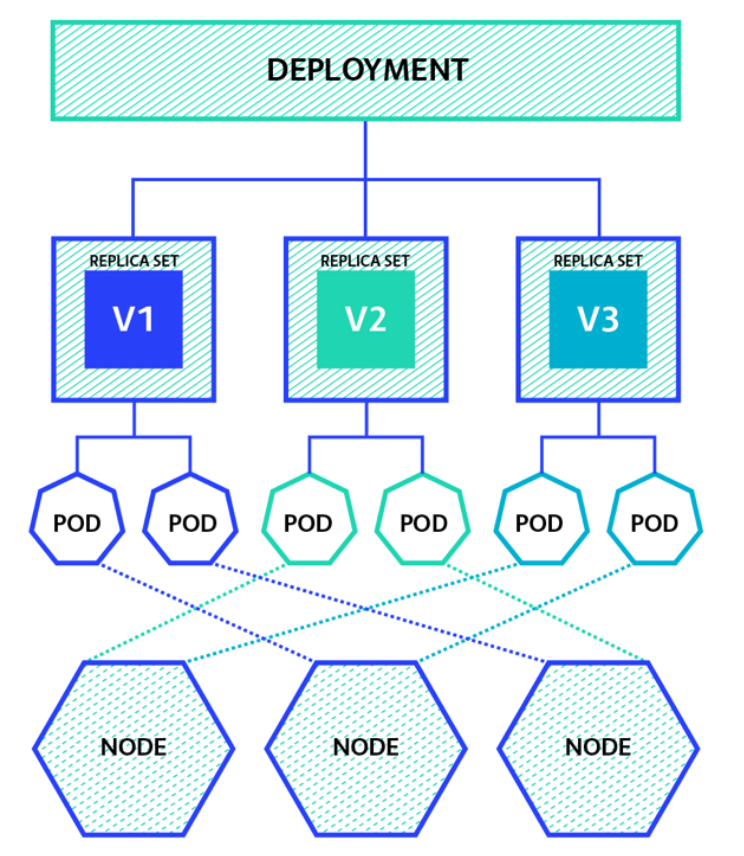
定义 Deployment , Deployment 是通过 RelicaSet 管理 Pod
多次修改 deployment 后 apply1
2
3
4
5
6
7
8
9
10
11
12
13
14
15
16
17
18kubectl rollout status deployment nginx-deploy # 查看当前升级状态
kubectl rollout pause deployment nginx-deploy # 暂停升级
kubectl rollout resume deployment nginx-deploy # 恢复升级
kubectl rollout history deployment nginx-deploy # 查看升级历史
kubectl rollout undo deployment nginx-deploy # 回滚到上一版本
# 所有通过kubectl xxxx --record都会被kubernetes记录到etcd进行持久化
# .spec.revisionHistoryLimit 来限制最大保留的revision number
kubectl rollout history deployment nginx-deploy --revision=2 # 查看 revision=2 的信息
kubectl rollout undo deployment nginx-deploy --to-revision=2 # 恢复到 revision=2
kubectl rollout restart deployment nginx-deploy # 重启(触发滚动更新)
扩容缩容1
2
3kubectl scale deployment nginx-deployment --replicas=5
kubectl scale deployment nginx-deployment --replicas=2
自动扩缩容1
kubectl autoscale deployment nginx-deployment --min=1 --max=10 --cpu-percent=80
DaemonSet示例
nginx-DaemonSet.yaml1
2
3
4
5
6
7
8
9
10
11
12
13
14
15
16apiVersion: apps/v1
kind: DaemonSet
metadata:
name: daemonset-example
spec:
selector:
matchLabels:
name: daemonset-example
template:
metadata:
labels:
name: daemonset-example
spec:
containers:
- name: daemonset-example
image: nginx:1.7.8
1 | [root@k8s01 ~]# kubectl get pods -o wide |
Job示例
pi-job.yaml1
2
3
4
5
6
7
8
9
10
11
12
13
14
15
16
17apiVersion: batch/v1
kind: Job
metadata:
name: pi
spec:
parallelism: 2 # 最大并行数 默认为 1
# completions: 4 # 最小完成数 # 不定义 completions 时,需自行决定什么时候 pod 算完成
# ttlSecondsAfterFinished: 100 # 该 Job 在运行结束 100 秒之后就被自动清理删除,实验功能
template:
spec:
containers:
- name: pi
image: resouer/ubuntu-bc
command: ["sh", "-c", "echo 'scale=5000; 4*a(1)' | bc -l"]
restartPolicy: Never # OnFailure 仅支持这两种
backoffLimit: 4 # 重试次数 默认为6
activeDeadlineSeconds: 100 # 最长运行时间 超过 100秒此job 就会终止
运行1
2
3
4
5
6
7
8
9
10
11
12
13
14
15
16
17
18
19
20
21
22
23
24
25
26
27
28
29
30
31
32
33
34
35[root@k8s01 stroage]# kubectl apply -f job.yaml
job.batch/pi created
[root@k8s01 stroage]# kubectl describe jobs/pi
Name: pi
Namespace: default
Selector: controller-uid=e896b336-dfde-49c3-9451-aef9204b261d
Labels: controller-uid=e896b336-dfde-49c3-9451-aef9204b261d
job-name=pi
Annotations: <none>
Parallelism: 2
Completions: <unset>
Start Time: Sat, 30 Jan 2021 23:21:43 +0800
Active Deadline Seconds: 100s
Pods Statuses: 2 Running / 0 Succeeded / 0 Failed
Pod Template:
Labels: controller-uid=e896b336-dfde-49c3-9451-aef9204b261d
job-name=pi
Containers:
pi:
Image: resouer/ubuntu-bc
Port: <none>
Host Port: <none>
Command:
sh
-c
echo 'scale=5000; 4*a(1)' | bc -l
Environment: <none>
Mounts: <none>
Volumes: <none>
Events:
Type Reason Age From Message
---- ------ ---- ---- -------
Normal SuccessfulCreate 38s job-controller Created pod: pi-pz6wv
Normal SuccessfulCreate 38s job-controller Created pod: pi-ss82f
- 系统自动给
Job添加了Selector:controller-uid=e896b336-dfde-49c3-9451-aef9204b261d Job上会自动被加上了Label:controller-uid=e896b336-dfde-49c3-9451-aef9204b261d和job-name=piJob spec.podTemplate中也被加上了Label,即controller-uid=e896b336-dfde-49c3-9451-aef9204b261d和job-name=pi。这样Job就可以通过这些Label和Pod关联起来,从而控制Pod的创建、删除等操作.
1 | [root@k8s01 stroage]# kubectl get pod --selector=controller-uid=896b336-dfde-49c3-9451-aef9204b261d |
CronJob
CronJob_test.yaml1
2
3
4
5
6
7
8
9
10
11
12
13
14
15
16
17
18
19
20
21
22[root@k8s01 stroage]# cat CronJob_test.yaml
apiVersion: batch/v1beta1
kind: CronJob
metadata:
name: hello # cronjob 名字
spec:
schedule: "*/1 * * * *" # 每 1 分钟执行一次
concurrencyPolicy: Replace # 并发策略,Replace:取消当前正在运行的 Job,用一个新的来替换
failedJobsHistoryLimit: 1 # 失败任务历史显示个数
startingDeadlineSeconds: 200 # 在过去的 200秒,如果 miss 的数目达到了 100 次,那么这个 Job 就不会被创建执行了。
jobTemplate:
spec:
template:
spec:
containers:
- name: hello
image: busybox
args:
- /bin/sh
- -c
- date;echo hello from the Kubernetes cluster
restartPolicy: OnFailure
concurrencyPolicy
Allow : 默认值,允许并发任务的执行
Forbid : 不允许并发任务执行
Replace : 用新的 Job 来替换当前正在运行的老的 Job
查看
1 | [root@k8s01 stroage]# kubectl get cronjobs |
补
1 | [root@k8s01 ~]# kubectl get pod my-pod --o yaml # 将资源的配置以 yaml格式输出 |