k6安装测试

k6 的主要用途

  1. 负载测试
    模拟高并发用户访问,检测服务在高流量下的性能表现。
  2. 基准测试
    测试系统在不同负载下的响应时间、吞吐量和资源使用情况。
  3. 回归测试
    确保代码更新不会引入性能回退。
  4. 容量测试
    测试系统的最大承载能力,发现性能瓶颈。

搭建

  1. 使用 Docker, xk6-dashboard 扩展,将 k6 性能测试结果发送到 Grafana
1
mkdir xk6-dashboard-docker && cd xk6-dashboard-docker
  1. docker-compose.yml 文件, 运行 grafana 和 influxdb # 也可以使用 prometheus 等别的输出
1
2
3
4
5
6
7
8
9
10
11
12
13
14
15
16
17
18
19
20
21
22
23
24
25
26
version: '3.7'
services:
grafana:
image: grafana/grafana-oss:latest
container_name: grafana
ports:
- "3000:3000"
environment:
- GF_SECURITY_ADMIN_USER=admin
- GF_SECURITY_ADMIN_PASSWORD=admin
volumes:
- ./grafana-data:/var/lib/grafana

influxdb:
image: influxdb:1.8 # 以上版本为 v2,可能不兼容,需要更改认证方式
container_name: influxdb
ports:
- "8086:8086"
environment:
- INFLUXDB_DB=k6
- INFLUXDB_ADMIN_USER=admin
- INFLUXDB_ADMIN_PASSWORD=admin
- INFLUXDB_USER=k6
- INFLUXDB_USER_PASSWORD=k6pass
volumes:
- ./influxdb-data:/var/lib/influxdb

docker-compose up -d

  1. k6 测试脚本
1
2
3
4
5
6
7
8
9
10
11
12
import http from 'k6/http';
import { sleep } from 'k6';

export let options = {
vus: 10, // 虚拟用户数量
duration: '30s', // 测试持续时间
};

export default function () {
http.get('https://test-api.com'); // 替换为你的测试 API
sleep(5);
}
  1. 构建带 xk6-dashboard 的 k6 Docker 镜像

Dockerfile

1
2
3
4
5
6
7
8
9
10
11
12
13
14
15
16
17
18
19
FROM golang:1.20 AS builder

# 安装 xk6
RUN go install go.k6.io/xk6/cmd/xk6@latest

# 确保依赖环境
RUN mkdir /app
WORKDIR /app
RUN go mod init k6build
RUN GO111MODULE=on go get github.com/grafana/xk6-dashboard@latest

# 构建定制版 k6
RUN xk6 build --with github.com/grafana/xk6-dashboard@latest


FROM alpine:3.15

COPY --from=builder /app/k6 /usr/bin/k6
ENTRYPOINT ["k6"]

docker build -t imwl/custom-k6 .

  1. 运行性能测试
1
2
3
4
5
6
7
8
9
10
11
12
13
14
15
16
17
18
19
20
21
22
23
24
25
26
27
28
29
30
31
32
33
34
35
36
37
38
39
40
41
42
43
44
45
46
47
48
49
50
51
52
53
54
55
56
57
58
59
60
61
62
63
64
65
66
67
68
69
70
71
72
73
74
75
76
77
78
79
80
81
82
83
84
85
86
87
88
89
90
91
92
93
94
95
96
97
98
99
100
101
102
103
104
105
106
107
108
109
110
111
112
113
114
115
116
117
118
119
120
121
122
123
124
125
# docker run --rm --network="host" -v $(pwd)/script.js:/script.js imwl/custom-k6 run --out influxdb=http://localhost:8086/k6 /script.js

/\ |‾‾| /‾‾/ /‾‾/
/\ / \ | |/ / / /
/ \/ \ | ( / ‾‾\
/ \ | |\ \ | (‾) |
/ __________ \ |__| \__\ \_____/ .io

execution: local
script: /script.js
output: InfluxDBv1 (http://localhost:8086)

scenarios: (100.00%) 1 scenario, 10 max VUs, 1m0s max duration (incl. graceful stop):
* default: 10 looping VUs for 30s (gracefulStop: 30s)


running (0m01.0s), 10/10 VUs, 0 complete and 0 interrupted iterations
default [ 3% ] 10 VUs 01.0s/30s

running (0m02.0s), 10/10 VUs, 0 complete and 0 interrupted iterations
default [ 7% ] 10 VUs 02.0s/30s

running (0m03.0s), 10/10 VUs, 0 complete and 0 interrupted iterations
default [ 10% ] 10 VUs 03.0s/30s

running (0m04.0s), 10/10 VUs, 0 complete and 0 interrupted iterations
default [ 13% ] 10 VUs 04.0s/30s

running (0m05.0s), 10/10 VUs, 0 complete and 0 interrupted iterations
default [ 17% ] 10 VUs 05.0s/30s

running (0m06.0s), 10/10 VUs, 10 complete and 0 interrupted iterations
default [ 20% ] 10 VUs 06.0s/30s

running (0m07.0s), 10/10 VUs, 10 complete and 0 interrupted iterations
default [ 23% ] 10 VUs 07.0s/30s

running (0m08.0s), 10/10 VUs, 10 complete and 0 interrupted iterations
default [ 27% ] 10 VUs 08.0s/30s

running (0m09.0s), 10/10 VUs, 10 complete and 0 interrupted iterations
default [ 30% ] 10 VUs 09.0s/30s

running (0m10.0s), 10/10 VUs, 10 complete and 0 interrupted iterations
default [ 33% ] 10 VUs 10.0s/30s

running (0m11.0s), 10/10 VUs, 20 complete and 0 interrupted iterations
default [ 37% ] 10 VUs 11.0s/30s

running (0m12.0s), 10/10 VUs, 20 complete and 0 interrupted iterations
default [ 40% ] 10 VUs 12.0s/30s

running (0m13.0s), 10/10 VUs, 20 complete and 0 interrupted iterations
default [ 43% ] 10 VUs 13.0s/30s

running (0m14.0s), 10/10 VUs, 20 complete and 0 interrupted iterations
default [ 47% ] 10 VUs 14.0s/30s

running (0m15.0s), 10/10 VUs, 20 complete and 0 interrupted iterations
default [ 50% ] 10 VUs 15.0s/30s

running (0m16.0s), 10/10 VUs, 30 complete and 0 interrupted iterations
default [ 53% ] 10 VUs 16.0s/30s

running (0m17.0s), 10/10 VUs, 30 complete and 0 interrupted iterations
default [ 57% ] 10 VUs 17.0s/30s

running (0m18.0s), 10/10 VUs, 30 complete and 0 interrupted iterations
default [ 60% ] 10 VUs 18.0s/30s

running (0m19.0s), 10/10 VUs, 30 complete and 0 interrupted iterations
default [ 63% ] 10 VUs 19.0s/30s

running (0m20.0s), 10/10 VUs, 30 complete and 0 interrupted iterations
default [ 67% ] 10 VUs 20.0s/30s

running (0m21.0s), 10/10 VUs, 40 complete and 0 interrupted iterations
default [ 70% ] 10 VUs 21.0s/30s

running (0m22.0s), 10/10 VUs, 40 complete and 0 interrupted iterations
default [ 73% ] 10 VUs 22.0s/30s

running (0m23.0s), 10/10 VUs, 40 complete and 0 interrupted iterations
default [ 77% ] 10 VUs 23.0s/30s

running (0m24.0s), 10/10 VUs, 40 complete and 0 interrupted iterations
default [ 80% ] 10 VUs 24.0s/30s

running (0m25.0s), 10/10 VUs, 40 complete and 0 interrupted iterations
default [ 83% ] 10 VUs 25.0s/30s

running (0m26.0s), 10/10 VUs, 50 complete and 0 interrupted iterations
default [ 87% ] 10 VUs 26.0s/30s

running (0m27.0s), 10/10 VUs, 50 complete and 0 interrupted iterations
default [ 90% ] 10 VUs 27.0s/30s

running (0m28.0s), 10/10 VUs, 50 complete and 0 interrupted iterations
default [ 93% ] 10 VUs 28.0s/30s

running (0m29.0s), 10/10 VUs, 50 complete and 0 interrupted iterations
default [ 97% ] 10 VUs 29.0s/30s

running (0m30.0s), 10/10 VUs, 50 complete and 0 interrupted iterations
default [ 100% ] 10 VUs 30.0s/30s

running (0m31.0s), 04/10 VUs, 56 complete and 0 interrupted iterations
default ↓ [ 100% ] 10 VUs 30s

data_received..................: 28 MB 894 kB/s
data_sent......................: 11 kB 334 B/s
http_req_blocked...............: avg=3.83ms min=1.65µs med=2.37µs max=27.7ms p(90)=21.94ms p(95)=24.99ms
http_req_connecting............: avg=234.35µs min=0s med=0s max=1.86ms p(90)=1.26ms p(95)=1.57ms
http_req_duration..............: avg=155.47ms min=31.25ms med=46.68ms max=1.33s p(90)=594.22ms p(95)=746.33ms
{ expected_response:true }...: avg=155.47ms min=31.25ms med=46.68ms max=1.33s p(90)=594.22ms p(95)=746.33ms
http_req_failed................: 0.00% ✓ 0 ✗ 60
http_req_receiving.............: avg=28.16ms min=16.59ms med=25.47ms max=63.4ms p(90)=37.55ms p(95)=38.67ms
http_req_sending...............: avg=151.69µs min=6.06µs med=8.65µs max=2.82ms p(90)=25.59µs p(95)=170.88µs
http_req_tls_handshaking.......: avg=3.42ms min=0s med=0s max=25.66ms p(90)=19.16ms p(95)=22.92ms
http_req_waiting...............: avg=127.16ms min=13.43ms med=18.23ms max=1.31s p(90)=553.72ms p(95)=695.29ms
http_reqs......................: 60 1.900488/s
iteration_duration.............: avg=5.15s min=5.03s med=5.05s max=6.33s p(90)=5.59s p(95)=5.74s
iterations.....................: 60 1.900488/s
vus............................: 4 min=4 max=10
vus_max........................: 10 min=10 max=10

验证

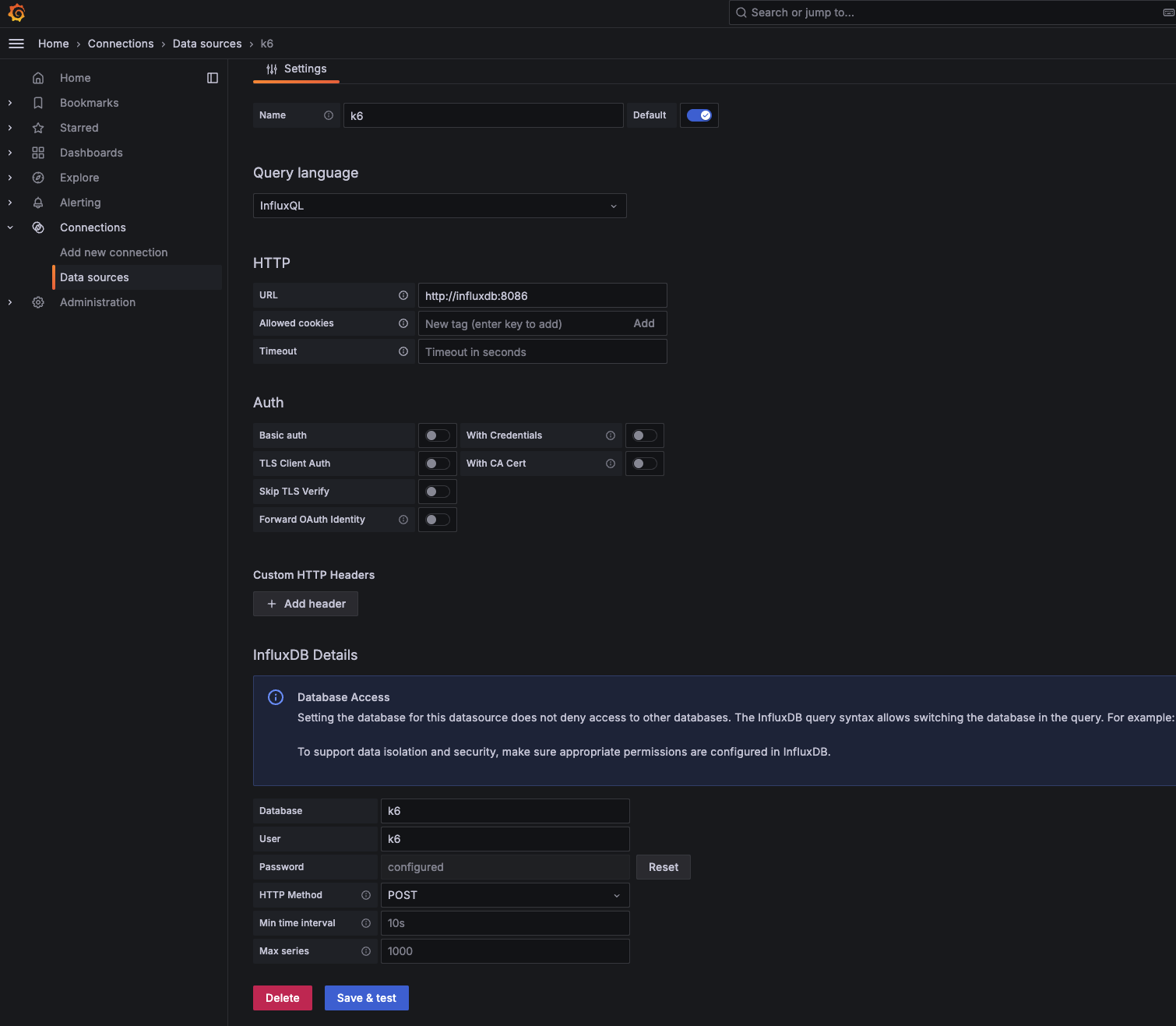
配置数据源
k6-influxdb源

导入 K6 官方仪表板

  1. 在 Grafana 中点击左侧菜单 “Dashboards” > “Import”

  2. 输入 K6 官方仪表板的 ID:2587

  3. 点击 Load,选择数据源为刚添加的 InfluxDB

  4. 点击 Import,导入完成

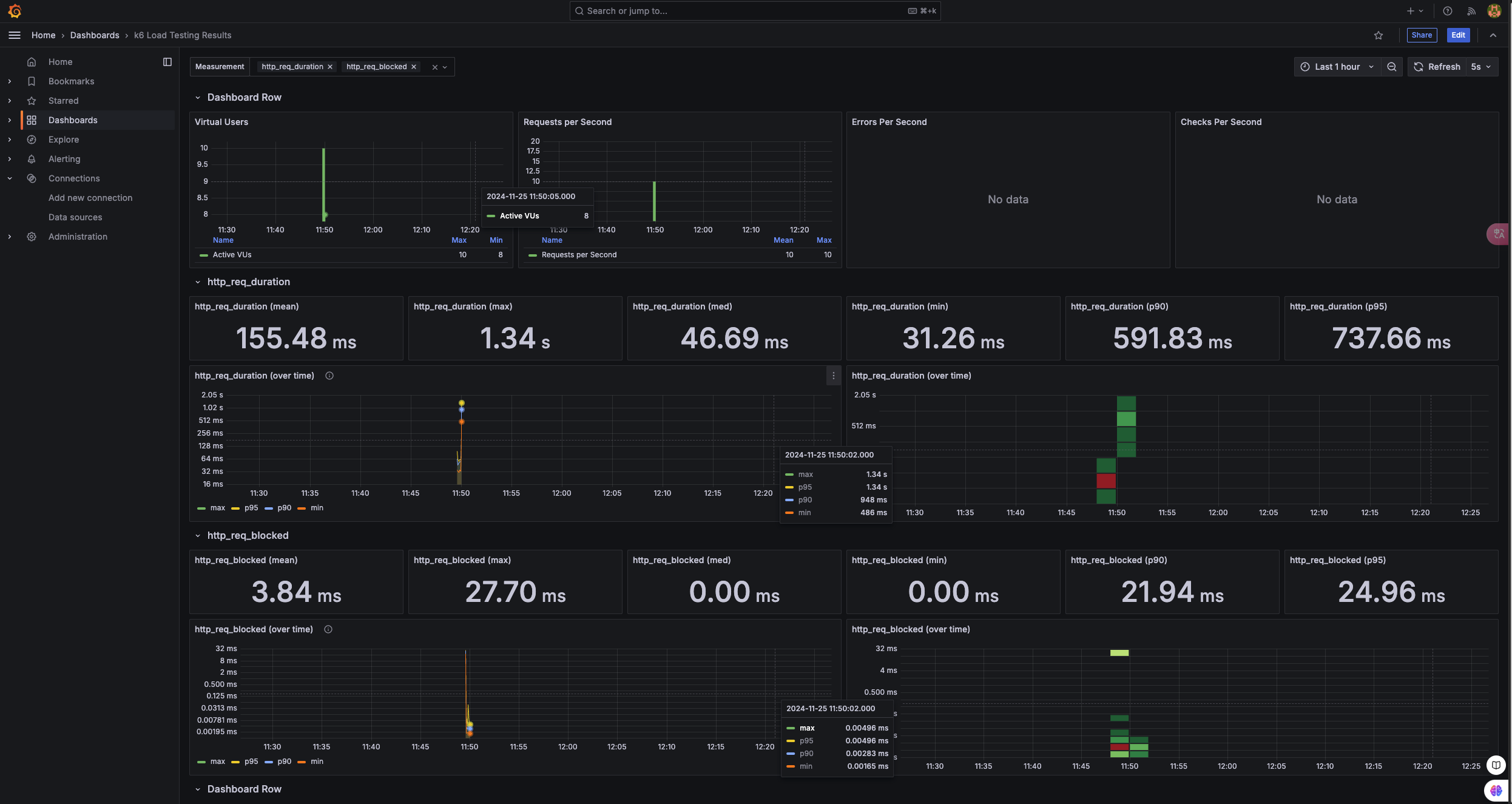
界面验证
k6监控页面