📌 学习笔记 :本文为学习与实践过程中整理的技术笔记,内容梳理自官方文档与网络公开资料,主要用于知识沉淀与命令速查。
简介 Scheduler 是 kubernetes 的调度器,是为一个新创建出来的 Pod,寻找一个最合适的节点(Node)。调度器对一个 Pod 调度成功,实际上就是将它的 spec.nodeName 字段填上调度结果的节点名字
听起来非常简单,但有很多要考虑的问题:(这一块可以很复杂,也可以不关注使用默认)
公平:如何保证每个节点都能被分配资源资源
高效利用:集群所有资源最大化被使用
效率:调度的性能要好,能够尽快地对大批量的 pod 完成调度工作
灵活:允许用户根据自己的需求控制调度的逻辑
Sheduler 是作为单独的程序运行的,启动之后会一直坚挺 API Server,获取 PodSpec.NodeName 为空的 pod,对每个 pod 都会创建一个 binding,表明该 pod 应该放到哪个节点上
调度过程调度分为几个部分:
首先是过滤掉不满足条件的节点,这个过程称为 predicate (预选)
然后对通过的节点按照优先级排序,这个是 priority (优选)
最后从中选择优先级最高的节点。
如果中间任何一步骤有错误,就直接返回错误
Predicate 有一系列的算法可以使用:
PodFitsResources:节点上剩余的资源是否大于 pod 请求的资源PodFitsHost:如果 pod 指定了 NodeName,检查节点名称是否和 NodeName 匹配PodFitsHostPorts:节点上已经使用的 port 是否和 pod 申请的 port 冲突 PodSelectorMatches:过滤掉和 pod 指定的 label 不匹配的节点NoDiskConflict:已经 mount 的 volume 和 pod 指定的 volume 不冲突,除非它们都是只读
如果在 predicate 过程中没有合适的节点,pod会一直在 pending 状态,不断重试调度,直到有节点满足条件。经过这个步骤,如果有多个节点满足条件,就继续 priorities 过程:按照优先级大小对节点排序
优先级由一系列键值对组成,键是该优先级项的名称,值是它的权重(该项的重要性)。这些优先级选项包括:
LeastRequestedPriority:通过计算 CPU 和 Memory 的使用率来决定权重,使用率越低权重越高。换句话说,这个优先级指标倾向于资源使用比例更低的节点 BalancedResourceAllocation:节点上 CPU 和 Memory 使用率越接近,权重越高。这个应该和上面的一起使用,不应该单独使用ImageLocalityPriority:倾向于已经有要使用镜像的节点,镜像总大小值越大,权重越高通过算法对所有的优先级项目和权重进行计算,得出最终的结果自定义调度器
除了 kubernetes 自带的调度器,也可以编写自己的调度器。通过 spec.schedulerName 参数指定调度器的名字(注意是驼峰,写成全小写属于未知字段,旧版 API Server 静默丢弃、新版给 warning,两种情况下 Pod 都还是被 default-scheduler 调走),可以为 pod 选择某个调度器进行调度。比如下面的 pod 选择 my-scheduler 进行调度,而不是默认的 default-scheduler:
1
2
3
4
5
6
7
8
9
10
11
apiVersion: v1 kind: Pod metadata: name: annotation-second-scheduler labels: name: multischeduler-example spec: schedulerName: my-scheduler containers: - name: pod-with-second-annotation-container image: gcr.io/google_containers/pause:2.0
default-scheduler原理
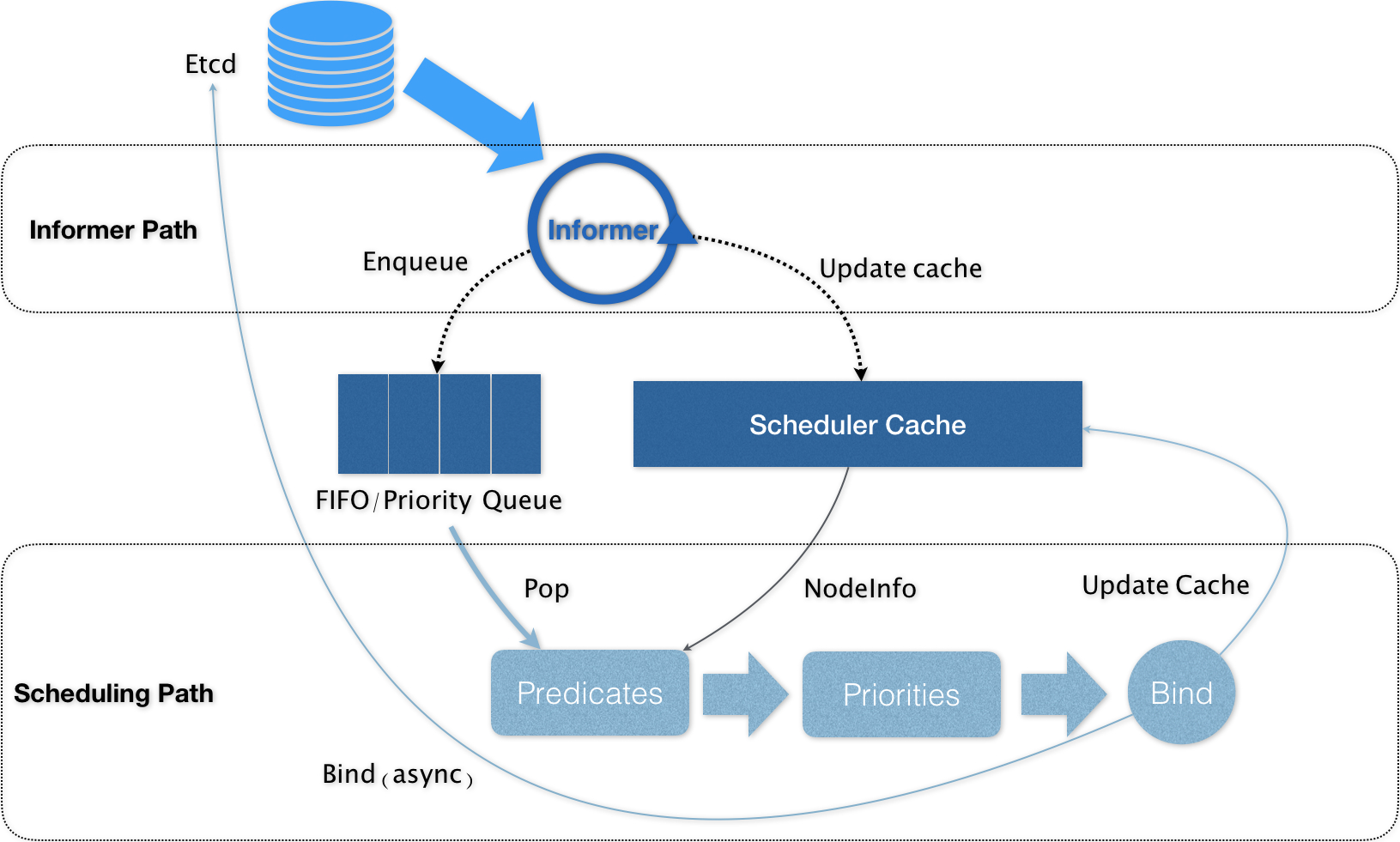
Kubernetes 的调度器的核心,实际上就是两个相互独立的控制循环
Informer Path : 是启动一系列 Informer,用来监听(Watch)API Server 中 Pod、Node、Service 等与调度相关的 API 对象的变化(调度器并没有 etcd 的证书,也不直连 etcd)。(eg: 当一个待调度 Pod(即:它的 nodeName 字段是空的)被创建出来之后,调度器就会通过 Pod Informer 的 Handler,将这个待调度 Pod 添加进调度队列)Scheduling Path : 是调度器负责 Pod 调度的主循环, 不断地从调度队列里出队一个 Pod , 然后按照指定的算法,预选,优选,打分等操作(基于 Cache 然后 Assume ),最后 Bind Node 。
将默认调度器进一步做轻做薄,并且插件化,才是 kube-scheduler 正确的演进方向。
默认调度器重要的设计 : “Cache 化”和“乐观绑定”,“无锁化”
Kubernetes 调度部分进行性能优化的一个最根本原则,就是尽最大可能将集群信息 Cache 化,以便从根本上提高 Predicate 和 Priority 调度算法的执行效率。
Kubernetes 的默认调度器在 Bind 阶段,只会更新 Scheduler Cache 里的 Pod 和 Node 的信息。这种基于“乐观”假设的 API 对象更新方式,在 Kubernetes 里被称作 Assume。
Kubernetes 调度器只有对调度队列和 Scheduler Cache 进行操作时,才需要加锁。而这两部分操作,都不在 Scheduling Path 的算法执行路径上。
示例 节点亲和性(pod与node的亲和性) pod.spec.nodeAffinity 关键字
preferredDuringSchedulingIgnoredDuringExecution(优先执行计划):软策略
requiredDuringSchedulingIgnoredDuringExecution(要求执行计划):硬策略
键值运算关系:
In:label 的值在某个列表中NotIn:label 的值不在某个列表中Gt:label 的值大于某个值Lt:label 的值小于某个值Exists:某个 label 存在DoesNotExist:某个 label 不存在
1
2
3
4
5
[root@k8s01 ~]# kubectl get node --show-labels # 查看标签 -L env,beta.kubernetes.io/arch NAME STATUS ROLES AGE VERSION LABELS k8s01 Ready master 29d v1.18.6 beta.kubernetes.io/arch=amd64,beta.kubernetes.io/os=linux,kubernetes.io/arch=amd64,kubernetes.io/hostname=k8s01,kubernetes.io/os=linux,node-role.kubernetes.io/master= k8s02 Ready <none> 29d v1.18.6 beta.kubernetes.io/arch=amd64,beta.kubernetes.io/os=linux,kubernetes.io/arch=amd64,kubernetes.io/hostname=k8s02,kubernetes.io/os=linux k8s03 Ready <none> 29d v1.18.6 beta.kubernetes.io/arch=amd64,beta.kubernetes.io/os=linux,kubernetes.io/arch=amd64,kubernetes.io/hostname=k8s03,kubernetes.io/os=linux
requiredDuringSchedulingIgnoredDuringExecution 节点硬策略。排除 k8s02,只能在 k8s03 上运行
1
2
3
4
5
6
7
8
9
10
11
12
13
14
15
16
17
18
19
apiVersion: v1 kind: Pod metadata: name: required labels: app: node-affinity-pod spec: containers: - name: with-node-affinity image: nginx:1.7.9 affinity: #亲和性 nodeAffinity: #node亲和性 requiredDuringSchedulingIgnoredDuringExecution: nodeSelectorTerms: - matchExpressions: - key: kubernetes.io/hostname operator: NotIn #键值运算关系 ,NotIn:label的值不在某个列表中 values: - k8s02
1
2
3
4
5
[root@k8s01 Scheduler]# kubectl apply -f required_pod_example.yaml pod/affinity created [root@k8s01 Scheduler]# kubectl get pod -o wide # 多次运行都只会在 k8s03 ,因为 k8s01 master 默认打上了污点 # kubectl taint nodes --all node-role.kubernetes.io/master- 让k8s01 节点也能调度 NAME READY STATUS RESTARTS AGE IP NODE NOMINATED NODE READINESS GATES affinity 1/1 Running 0 11s 172.18.235.181 k8s03 <none> <none>
preferredDuringSchedulingIgnoredDuringExecution 节点软策略。优先选择 k8s03 节点
1
2
3
4
5
6
7
8
9
10
11
12
13
14
15
16
17
18
19
20
21
22
apiVersion: v1 kind: Pod metadata: name: prefer labels: app: node-affinity-pod spec: containers: - name: with-node-affinity image: nginx:1.7.9 affinity: #亲和性 nodeAffinity: #node亲和性 preferredDuringSchedulingIgnoredDuringExecution: - weight: 1 #权重,权重越大越亲和(多个软策略的情况) preference: matchExpressions: - key: kubernetes.io/hostname operator: In values: - k8s03
合体 1 2 3 4 5 6 7 8 9 10 11 12 13 14 15 16 17 18 19 20 21 22 23 24 25 26 27 28 29 apiVersion: v1 kind: Pod metadata: name: prefer-require # 对象名必须符合 DNS-1123,带下划线会被 API Server 直接拒绝 labels: app: node-affinity-pod spec: containers: - name: with-node-affinity image: nginx:1.7.9 affinity: #亲和性 nodeAffinity: #node亲和性 requiredDuringSchedulingIgnoredDuringExecution: nodeSelectorTerms: - matchExpressions: - key: kubernetes.io/hostname operator: NotIn #键值运算关系 ,NotIn:label的值不在某个列表中 values: - k8s02 preferredDuringSchedulingIgnoredDuringExecution: - weight: 1 #权重,权重越大越亲和(多个软策略的情况) preference: matchExpressions: - key: kubernetes.io/hostname operator: In values: - k8s03
Pod 亲和性(pod与pod之间的亲和性) pod.spec.affinity.podAffinity/podAntiAffinity
pod-Affinity.yaml
1 2 3 4 5 6 7 8 9 10 11 12 13 14 15 16 17 18 19 20 21 22 23 24 25 26 27 28 29 30 31 apiVersion: v1 kind: Pod metadata: name: pod-3 labels: app: pod-3 spec: containers: - name: pod-3 image: nginx:1.7.9 affinity: podAffinity: requiredDuringSchedulingIgnoredDuringExecution: # 硬策略 app=nginx - labelSelector: matchExpressions: - key: app operator: In values: - nginx topologyKey: kubernetes.io/hostname podAntiAffinity: preferredDuringSchedulingIgnoredDuringExecution: - weight: 1 podAffinityTerm: labelSelector: matchExpressions: - key: app operator: In values: - pod-2 topologyKey: kubernetes.io/hostname
1 2 3 4 5 6 7 8 9 10 11 12 13 14 15 16 17 18 19 20 [root@k8s01 ~]# kubectl apply -f podAffinity.yaml pod/pod-3 created [root@k8s01 ~]# kubectl get pod -o wide # 硬策略没有匹配到, Pending 状态 NAME READY STATUS RESTARTS AGE IP NODE NOMINATED NODE READINESS GATES nginx 1/1 Running 1 24h 172.18.235.138 k8s03 <none> <none> pod-3 0/1 Pending 0 4s <none> <none> <none> <none> [root@k8s01 ~]# kubectl get pod --show-labels # 查看标签 NAME READY STATUS RESTARTS AGE LABELS nginx 1/1 Running 1 24h run=nginx pod-3 0/1 Pending 0 57s app=pod-3 [root@k8s01 ~]# kubectl label pod nginx app=nginx --overwrite=true # 打上标签,强制覆盖 kubectl label pod nginx app=nginx - 删除标签 pod/nginx labeled [root@k8s01 ~]# kubectl get pod --show-labels NAME READY STATUS RESTARTS AGE LABELS nginx 1/1 Running 1 24h app=nginx,run=nginx pod-3 1/1 Running 0 2m56s app=pod-3 [root@k8s01 ~]# kubectl get pod -o wide # 已经Running 并且和 app=nginx 在同一 node 上 NAME READY STATUS RESTARTS AGE IP NODE NOMINATED NODE READINESS GATES nginx 1/1 Running 1 24h 172.18.235.138 k8s03 <none> <none> pod-3 1/1 Running 0 3m1s 172.18.235.136 k8s03 <none> <none>
topologyKey 拓补域 要实现更细粒度的控制,你可以设置拓扑分布约束来将 Pod 分布到不同的拓扑域下, 从而实现高可用性或节省成本
topologyKey: kubernetes.io/hostname : 以 kubernetes.io/hostname 为 key 的拓补域
节点信息
1 2 3 4 5 6 NAME STATUS ROLES AGE VERSION LABELS node1 Ready <none> 4m26s v1.20.0 node=node1,zone=zoneA node2 Ready <none> 3m58s v1.20.0 node=node2,zone=zoneA node3 Ready <none> 3m17s v1.20.0 node=node3,zone=zoneB node4 Ready <none> 2m43s v1.20.0 node=node4,zone=zoneB node4 Ready <none> 1m56s v1.20.0 node=node5,zone=zoneC
使用拓补域
1 2 3 4 5 6 7 8 9 10 11 12 13 14 15 16 17 18 19 20 21 22 23 24 25 26 kind: Pod apiVersion: v1 metadata: name: mypod labels: foo: bar spec: topologySpreadConstraints: - maxSkew: 1 # Pod 分布不均的程度,默认为 1 topologyKey: zone # 使用 zone 为 key 划分 whenUnsatisfiable: DoNotSchedule # 默认 DoNotSchedule(不调度), ScheduleAnyway (仍然调度,偏差最小化) labelSelector: matchLabels: foo: bar affinity: nodeAffinity: requiredDuringSchedulingIgnoredDuringExecution: nodeSelectorTerms: - matchExpressions: - key: zone operator: NotIn values: - zoneC # 不要 调度到 zoneC containers: - name: pause image: k8s.gcr.io/pause:3.2
指定调度节点 1. Pod.spec.nodeName 将 Pod 直接调度到指定的 Node 节点上,会跳过 Scheduler 的调度策略,该匹配规则是强制匹配.
pod_k8s03.yaml
1 2 3 4 5 6 7 8 9 10 11 12 13 14 15 16 17 18 19 20 apiVersion: apps/v1 kind: Deployment metadata: name: myweb spec: replicas: 7 selector: matchLabels: app: myweb template: metadata: labels: app: myweb spec: nodeName: k8s03 # 指定 Node 节点 containers: - name: myweb image: nginx:1.7.9 ports: - containerPort: 80
1 2 3 4 5 6 7 8 9 10 11 [root@k8s01 Scheduler]# kubectl apply -f pod_k8s03.yaml deployment.apps/myweb created [root@k8s01 Scheduler]# kubectl get pod -o wide # 全在 k8s03 节点 NAME READY STATUS RESTARTS AGE IP NODE NOMINATED NODE READINESS GATES myweb-8678fd58f8-8l2fc 1/1 Running 0 59s 172.18.235.187 k8s03 <none> <none> myweb-8678fd58f8-h46zk 1/1 Running 0 59s 172.18.235.183 k8s03 <none> <none> myweb-8678fd58f8-p9jtj 1/1 Running 0 59s 172.18.235.186 k8s03 <none> <none> myweb-8678fd58f8-rrjhn 1/1 Running 0 59s 172.18.235.188 k8s03 <none> <none> myweb-8678fd58f8-rxtfh 1/1 Running 0 59s 172.18.235.189 k8s03 <none> <none> myweb-8678fd58f8-t6snp 1/1 Running 0 59s 172.18.235.185 k8s03 <none> <none> myweb-8678fd58f8-w8xsm 1/1 Running 0 59s 172.18.235.184 k8s03 <none> <none>
2. Pod.spec.nodeSelector 通过 kubernetes 的 label-selector 机制选择节点,由调度器调度策略匹配 label,而后调度 Pod 到目标节点,该匹配规则属于强制约束
pod_select_k8s03.yaml
1 2 3 4 5 6 7 8 9 10 11 12 13 14 15 16 17 18 19 20 21 apiVersion: apps/v1 kind: Deployment metadata: name: myweb02 spec: replicas: 5 selector: matchLabels: app: myweb template: metadata: labels: app: myweb spec: nodeSelector: disk: ssd # 标签 containers: - name: myweb image: nginx:1.7.9 ports: - containerPort: 80
1 2 3 4 5 6 7 8 9 10 11 12 13 14 15 16 [root@k8s01 Scheduler]# kubectl apply -f pod_select_k8s02.yaml deployment.apps/myweb02 created [root@k8s01 Scheduler]# kubectl get pod -o wide # 还是pending 状态,因为 disk=ssd 的标签还没打上 NAME READY STATUS RESTARTS AGE IP NODE NOMINATED NODE READINESS GATES myweb-8678fd58f8-8l2fc 1/1 Running 0 8m50s 172.18.235.187 k8s03 <none> <none> myweb-8678fd58f8-h46zk 1/1 Running 0 8m50s 172.18.235.183 k8s03 <none> <none> myweb-8678fd58f8-p9jtj 1/1 Running 0 8m50s 172.18.235.186 k8s03 <none> <none> myweb-8678fd58f8-rrjhn 1/1 Running 0 8m50s 172.18.235.188 k8s03 <none> <none> myweb-8678fd58f8-rxtfh 1/1 Running 0 8m50s 172.18.235.189 k8s03 <none> <none> myweb-8678fd58f8-t6snp 1/1 Running 0 8m50s 172.18.235.185 k8s03 <none> <none> myweb-8678fd58f8-w8xsm 1/1 Running 0 8m50s 172.18.235.184 k8s03 <none> <none> myweb02-77589bcf45-85r2l 0/1 Pending 0 26s <none> <none> <none> <none> myweb02-77589bcf45-cllsk 0/1 Pending 0 26s <none> <none> <none> <none> myweb02-77589bcf45-clmhd 0/1 Pending 0 26s <none> <none> <none> <none> myweb02-77589bcf45-j8cwt 0/1 Pending 0 26s <none> <none> <none> <none> myweb02-77589bcf45-nm4jc 0/1 Pending 0 26s <none> <none> <none> <none>
1 2 3 4 5 6 7 8 9 10 11 12 13 14 15 16 17 [root@k8s01 Scheduler]# kubectl label node k8s02 disk=ssd # node k8s02 打上标签 disk=ssd node/k8s02 labeled [root@k8s01 Scheduler]# kubectl get pod -o wide # 已在 k8s02 上 Running NAME READY STATUS RESTARTS AGE IP NODE NOMINATED NODE READINESS GATES myweb-8678fd58f8-8l2fc 1/1 Running 0 13m 172.18.235.187 k8s03 <none> <none> myweb-8678fd58f8-h46zk 1/1 Running 0 13m 172.18.235.183 k8s03 <none> <none> myweb-8678fd58f8-p9jtj 1/1 Running 0 13m 172.18.235.186 k8s03 <none> <none> myweb-8678fd58f8-rrjhn 1/1 Running 0 13m 172.18.235.188 k8s03 <none> <none> myweb-8678fd58f8-rxtfh 1/1 Running 0 13m 172.18.235.189 k8s03 <none> <none> myweb-8678fd58f8-t6snp 1/1 Running 0 13m 172.18.235.185 k8s03 <none> <none> myweb-8678fd58f8-w8xsm 1/1 Running 0 13m 172.18.235.184 k8s03 <none> <none> myweb02-77589bcf45-85r2l 1/1 Running 0 5m12s 172.18.236.176 k8s02 <none> <none> myweb02-77589bcf45-cllsk 1/1 Running 0 5m12s 172.18.236.180 k8s02 <none> <none> myweb02-77589bcf45-clmhd 1/1 Running 0 5m12s 172.18.236.179 k8s02 <none> <none> myweb02-77589bcf45-j8cwt 1/1 Running 0 5m12s 172.18.236.177 k8s02 <none> <none> myweb02-77589bcf45-nm4jc 1/1 Running 0 5m12s 172.18.236.178 k8s02 <none> <none>
Taint 和 Toleration (污点与容忍度) 节点亲和性,是 pod 的一种属性(偏好或硬性要求),它使 pod被吸引到一类特定的节点。
Taint 则相反,它使节点能够排斥一类特定的 pod.
Taint 和 toleration 相互配合,可以用来避免 pod 被分配到不合适的节点上。每个节点上都可以应用一个或多个 taint ,这表示对于那些不能容忍这些 taint 的 pod,是不会被该节点接受的。如果将 toleration 应用于 pod 上,则表示这些 pod 可以(但不要求)被调度到具有匹配 taint 的节点上。
Taint 使用 kubectl taint 命令可以给某个 Node 节点设置污点,Node 被设置上污点之后就和 Pod 之间存在了一种相斥的关系,可以让 Node 拒绝 Pod 的调度执行,甚至将 Node 已经存在的 Pod 驱逐出去
每个污点的组成如下 key=value:effect
每个污点有一个 key 和 value 作为污点的标签,其中 value 可以为空,effect 描述污点的作用。当前 taint effect 支持如下三个选项:
NoSchedule: 新的不能容忍的 pod 不能再调度过来,但是老的运行在 node 上不受影响NoExecute:新的不能容忍的 pod 不能调度过来,老的 pod 也会被驱逐PreferNoSchedule:尽量避免将 pod 分配到该节点
污点的设置、查看和去除 查看污点 : kubectl describe node k8s01
1 2 3 4 5 6 7 8 [root@k8s01 Scheduler]# kubectl describe node k8s01 ## 节选 Taints: node-role.kubernetes.io/master:NoSchedule # master 默认打上 NoSchedule Unschedulable: false Lease: HolderIdentity: k8s01 AcquireTime: <unset> RenewTime: Wed, 26 Aug 2020 12:25:00 -0400
设置污点 : kubectl taint nodes k8s02 key1=value1:NoExecute
去除污点 : kubectl taint nodes node1 key1=value1:NoSchedule-
当有多 master 时,为了防止资源浪费,可以如下设置
1 2 kubectl taint nodes k8s01 node-role.kubernetes.io/master=:NoSchedule- # 去除 NoSchedule 污点 kubectl taint nodes k8s01 node-role.kubernetes.io/master=:PreferNoSchedule # 打上 PreferNoSchedule 污点
1 2 3 4 5 6 7 8 9 10 11 12 13 14 15 16 17 18 19 20 21 22 23 24 25 26 27 28 29 30 31 32 33 34 35 36 37 38 39 40 41 42 43 44 45 46 47 48 49 50 51 [root@k8s01 Scheduler]# kubectl taint nodes k8s02 key1=value1:NoExecute # 设置污点 k8s02 上的 pod 将驱逐 node/k8s02 tainted [root@k8s01 Scheduler]# kubectl get pod -o wide NAME READY STATUS RESTARTS AGE IP NODE NOMINATED NODE READINESS GATES myweb-8678fd58f8-8l2fc 1/1 Running 0 27m 172.18.235.187 k8s03 <none> <none> myweb-8678fd58f8-h46zk 1/1 Running 0 27m 172.18.235.183 k8s03 <none> <none> myweb-8678fd58f8-p9jtj 1/1 Running 0 27m 172.18.235.186 k8s03 <none> <none> myweb-8678fd58f8-rrjhn 1/1 Running 0 27m 172.18.235.188 k8s03 <none> <none> myweb-8678fd58f8-rxtfh 1/1 Running 0 27m 172.18.235.189 k8s03 <none> <none> myweb-8678fd58f8-t6snp 1/1 Running 0 27m 172.18.235.185 k8s03 <none> <none> myweb-8678fd58f8-w8xsm 1/1 Running 0 27m 172.18.235.184 k8s03 <none> <none> myweb02-77589bcf45-28kk2 0/1 Pending 0 4s <none> <none> <none> <none> myweb02-77589bcf45-85r2l 0/1 Terminating 0 18m 172.18.236.176 k8s02 <none> <none> myweb02-77589bcf45-cllsk 0/1 Terminating 0 18m 172.18.236.180 k8s02 <none> <none> myweb02-77589bcf45-clmhd 0/1 Terminating 0 18m <none> k8s02 <none> <none> myweb02-77589bcf45-ggq22 0/1 Pending 0 4s <none> <none> <none> <none> myweb02-77589bcf45-j8cwt 0/1 Terminating 0 18m 172.18.236.177 k8s02 <none> <none> myweb02-77589bcf45-mw98x 0/1 Pending 0 4s <none> <none> <none> <none> myweb02-77589bcf45-nm4jc 0/1 Terminating 0 18m 172.18.236.178 k8s02 <none> <none> myweb02-77589bcf45-rwqzk 0/1 Pending 0 4s <none> <none> <none> <none> myweb02-77589bcf45-sxrtx 0/1 Pending 0 4s <none> <none> <none> <none> [root@k8s01 Scheduler]# kubectl get pod -o wide # 但是这个pod 固定了 k8s02 NAME READY STATUS RESTARTS AGE IP NODE NOMINATED NODE READINESS GATES myweb-8678fd58f8-8l2fc 1/1 Running 0 27m 172.18.235.187 k8s03 <none> <none> myweb-8678fd58f8-h46zk 1/1 Running 0 27m 172.18.235.183 k8s03 <none> <none> myweb-8678fd58f8-p9jtj 1/1 Running 0 27m 172.18.235.186 k8s03 <none> <none> myweb-8678fd58f8-rrjhn 1/1 Running 0 27m 172.18.235.188 k8s03 <none> <none> myweb-8678fd58f8-rxtfh 1/1 Running 0 27m 172.18.235.189 k8s03 <none> <none> myweb-8678fd58f8-t6snp 1/1 Running 0 27m 172.18.235.185 k8s03 <none> <none> myweb-8678fd58f8-w8xsm 1/1 Running 0 27m 172.18.235.184 k8s03 <none> <none> myweb02-77589bcf45-28kk2 0/1 Pending 0 39s <none> <none> <none> <none> myweb02-77589bcf45-ggq22 0/1 Pending 0 39s <none> <none> <none> <none> myweb02-77589bcf45-mw98x 0/1 Pending 0 39s <none> <none> <none> <none> myweb02-77589bcf45-rwqzk 0/1 Pending 0 39s <none> <none> <none> <none> myweb02-77589bcf45-sxrtx 0/1 Pending 0 39s <none> <none> <none> <none> [root@k8s01 Scheduler]# kubectl taint nodes k8s02 key1=value1:NoExecute- # 去除污点 node/k8s02 untainted [root@k8s01 Scheduler]# kubectl get pod -o wide NAME READY STATUS RESTARTS AGE IP NODE NOMINATED NODE READINESS GATES myweb-8678fd58f8-8l2fc 1/1 Running 0 28m 172.18.235.187 k8s03 <none> <none> myweb-8678fd58f8-h46zk 1/1 Running 0 28m 172.18.235.183 k8s03 <none> <none> myweb-8678fd58f8-p9jtj 1/1 Running 0 28m 172.18.235.186 k8s03 <none> <none> myweb-8678fd58f8-rrjhn 1/1 Running 0 28m 172.18.235.188 k8s03 <none> <none> myweb-8678fd58f8-rxtfh 1/1 Running 0 28m 172.18.235.189 k8s03 <none> <none> myweb-8678fd58f8-t6snp 1/1 Running 0 28m 172.18.235.185 k8s03 <none> <none> myweb-8678fd58f8-w8xsm 1/1 Running 0 28m 172.18.235.184 k8s03 <none> <none> myweb02-77589bcf45-28kk2 1/1 Running 0 68s 172.18.236.182 k8s02 <none> <none> myweb02-77589bcf45-ggq22 1/1 Running 0 68s 172.18.236.185 k8s02 <none> <none> myweb02-77589bcf45-mw98x 1/1 Running 0 68s 172.18.236.181 k8s02 <none> <none> myweb02-77589bcf45-rwqzk 1/1 Running 0 68s 172.18.236.183 k8s02 <none> <none> myweb02-77589bcf45-sxrtx 1/1 Running 0 68s 172.18.236.184 k8s02 <none> <none>
Toleration 设置了污点的 Node 将根据 taint 的 effect:NoSchedule、PreferNoSchedule、NoExecute 和 Pod 之间产生互斥的关系,Pod 将在一定程度上不会被调度到 Node 上。Pod 上设置容忍 ( Toleration ) ,意思是设置了容忍的 Pod 将可以容忍污点的存在,可以被调度到存在污点的 Node 上。
pod-Toleration.yaml
1 2 3 4 5 6 7 8 9 10 11 12 13 14 15 16 17 18 19 20 21 22 23 24 25 apiVersion: apps/v1 kind: Deployment metadata: name: nginx-deploy spec: replicas: 10 selector: matchLabels: app: nginx template: metadata: labels: app: nginx spec: containers: - name: nginx image: nginx:1.7.9 ports: - containerPort: 80 tolerations: #containers同级 - key: "key1" #能容忍的污点key operator: "Equal" #Equal:key 和 value 都相等才容忍。Exists:只要该 key 的污点存在就容忍,完全忽略 value(用 Exists 时 value 必须留空,写了会被校验拒绝);只写 operator: Exists 连 key 都不写,就是容忍该节点上的所有污点 value: "value1" #值 effect: "NoExecute" #effect策略,见上面 tolerationSeconds: 3600 #原始的pod多久驱逐,注意只有effect: "NoExecute"才能设置,不然报错
1 2 3 4 5 6 7 8 9 10 11 12 13 14 15 16 17 18 [root@k8s01 ~]# kubectl taint nodes k8s02 key1=value1:NoExecute # k8s02打上污点 node/k8s02 tainted [root@k8s01 ~]# kubectl apply -f pod-Toleration.yaml # 能容忍 key1=value1:NoExecute 这个污点 deployment.apps/nginx-deploy created [root@k8s01 ~]# kubectl get pod -o wide # 所以 k8s02 节点也有 pod NAME READY STATUS RESTARTS AGE IP NODE NOMINATED NODE READINESS GATES nginx 1/1 Running 1 24h 172.18.235.138 k8s03 <none> <none> nginx-deploy-785cc8f568-78svq 1/1 Running 0 20s 172.18.235.145 k8s03 <none> <none> nginx-deploy-785cc8f568-8kzgb 1/1 Running 0 20s 172.18.236.142 k8s02 <none> <none> nginx-deploy-785cc8f568-8l5wc 1/1 Running 0 20s 172.18.235.144 k8s03 <none> <none> nginx-deploy-785cc8f568-977fg 1/1 Running 0 20s 172.18.235.146 k8s03 <none> <none> nginx-deploy-785cc8f568-c7xv5 1/1 Running 0 20s 172.18.235.143 k8s03 <none> <none> nginx-deploy-785cc8f568-dtlbn 1/1 Running 0 20s 172.18.235.147 k8s03 <none> <none> nginx-deploy-785cc8f568-hfvl6 1/1 Running 0 20s 172.18.235.141 k8s03 <none> <none> nginx-deploy-785cc8f568-hw5m2 1/1 Running 0 20s 172.18.235.142 k8s03 <none> <none> nginx-deploy-785cc8f568-rpqqq 1/1 Running 0 20s 172.18.235.148 k8s03 <none> <none> nginx-deploy-785cc8f568-vtpwl 1/1 Running 0 20s 172.18.236.140 k8s02 <none> <none> pod-3 1/1 Running 0 18m 172.18.235.136 k8s03 <none> <none>